iOS 15: How to Blur Your Background on a FaceTime Call - MacRumors
Skip to Content

iOS 15: How to Blur Your Background on a FaceTime Call

by

In iOS 15, Apple brings several enhancements to FaceTime, including new visual and audio effects to improve the video call experience.
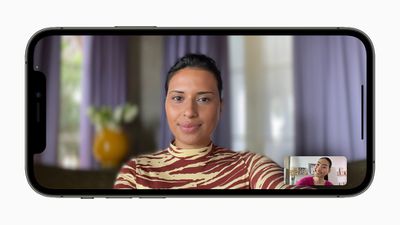
Apple iPhone12Pro iOS15 FaceTime portraitmode 060721 big
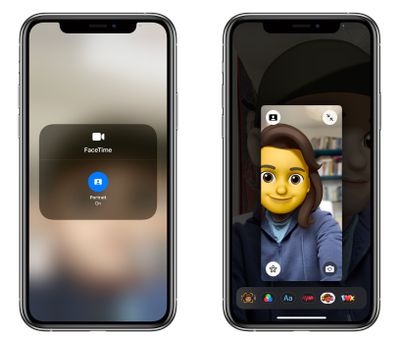
One of the new visual features is Portrait mode in calls. With this mode enabled, you can blur your background so that the focus is on you rather than what's behind you.

The feature is commonly used by other video conferencing apps like Zoom and Teams to obscure untidy domestic scenes and other sources of distraction or embarrassment. Here's how it works in ‌FaceTime‌ on iPhones and iPads running iOS 15.

  1. Launch the FaceTime app and initiate a video call.
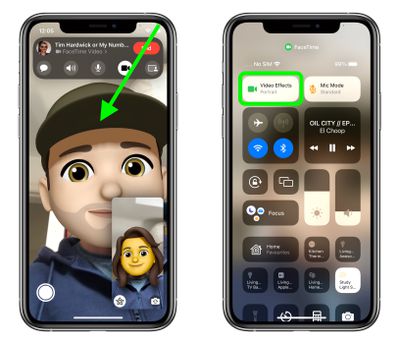
  2. Open Control Center with a diagonal swipe down from the top-right corner of your screen.
  3. Tap the Video Effects button.
    FaceTime

  4. Tap the Portrait button to enable it.
  5. Swipe up from the bottom of the screen to dismiss Control Center and return to the call.
    ios 15 facetime portrait 2

Unless you expand your view of yourself, you won't see too much difference in your appearance when Portrait mode is enabled, but the person on the other end of the call will see your environment faintly blurred, just like in a Portrait mode photo.


Related Forum: iOS 15

Popular Stories

iOS 26

iOS 26.4 Adds Two New Features to CarPlay

Tuesday March 24, 2026 1:55 pm PDT by
iOS 26.4 was released today, and it includes a couple of new features for CarPlay: an Ambient Music widget and support for voice-based chatbot apps. To update your iPhone 11 or newer to iOS 26.4, open the Settings app and tap on General → Software Update. CarPlay will automatically offer the new features so long as the iPhone connected to your vehicle is running iOS 26.4 or later....
Apple Business hero

Apple Unveils 'Apple Business' All-in-One Platform

Tuesday March 24, 2026 8:53 am PDT by
Apple today announced Apple Business, a new all-in-one platform that unifies device management, productivity tools, and customer outreach features. The service is designed to be a consolidated replacement for several of Apple's existing business-focused offerings, including Apple Business Essentials, Apple Business Manager, and Apple Business Connect. It provides organizations with a single...
AirPods Pro Firmware Feature

Apple Releases New Firmware for AirPods Pro 3, AirPods Pro 2 and AirPods 4

Tuesday March 24, 2026 12:31 pm PDT by
Apple today released new firmware for the AirPods Pro 2, AirPods Pro 3, and the AirPods 4. The firmware has a version number of 8B39, up from 8B34 on the AirPods Pro 3, 8B28 on the AirPods Pro 2, and 8B21 on the AirPods 4. There is no word on what's included in the firmware, but Apple has a support document with limited notes. Most updates are limited to bug fixes and performance...