

Apple's iPhone 12 and 12 Pro are the first iPhones to be released with 5G connectivity, and there are several new settings related to 5G that you should be aware of.
By default, when you set up a new iPhone 12 or 12 Pro, it activates an Auto 5G mode that only turns on 5G data when it won't significantly reduce battery life. You can turn this off so that your iPhone uses 5G all the time, and there are also data modes to choose from. This how to shows you where the new settings are and explains what they mean.
Turn on 5G All the Time or Activate 4G
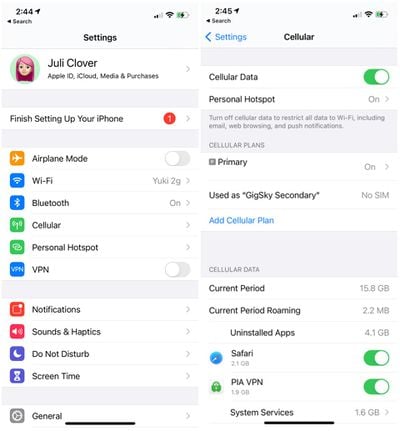
Getting to your specific cellular settings might look a bit different depending on your carrier, but these general steps should work for accessing your Voice and Data settings.
- Open up Settings.
- Tap on "Cellular."

- Tap on your cellular plan or Cellular Data Options.
- Tap on Voice & Data.
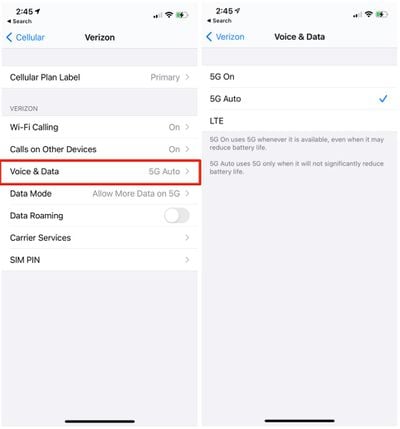
From the Voice & Data menu, you'll see three options: 5G On, 5G Auto, and LTE. 5G Auto, the default setting, uses 5G only when 5G won't significantly reduce battery life.
This appears to be Apple's Data Saver Mode that's meant to swap the iPhone's connection to LTE when 5G speeds aren't necessary. For example, when the iPhone is updating in the background, it uses LTE because super fast speeds aren't necessary, but in instances where speed does matter, such as downloading a show, the iPhone 12 models will swap over to 5G.
5G On ensures that 5G is activated all the time when a 5G network is available, and LTE disables 5G all together and lets you use an LTE connection instead of a 5G connection.
Data Mode
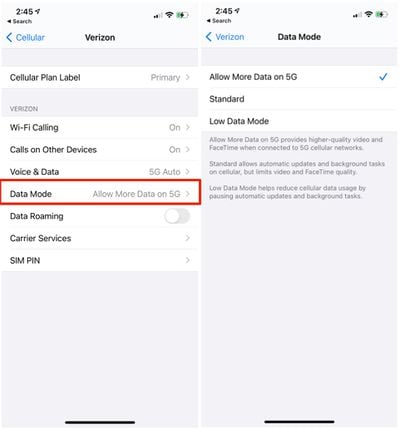
There are several data modes that you can adjust. By default, iPhone 12 models are set on "Allow More Data on 5G," which offers up higher-quality video and FaceTime when connected to 5G cellular networks.
Most people with unlimited data will want to leave this enabled, but if you're aiming to preserve data, you can change the settings to "Standard," which allows automatic updates and background tasks on cellular but limits video and FaceTime quality.
There's also a Low Data Mode that helps reduce cellular data usage by pausing automatic updates and background tasks when connected to a cellular network. Here's how to get to your data settings:
- Open up Settings.
- Tap on "Cellular."
- Tap on your cellular plan or Cellular Data Options.
- Tap on Data Mode.
5G is still a new technology that carriers in the United States and other countries are rolling out, so many people may not have 5G connections available to them. Most U.S. carriers have widespread Sub-6GHz 5G networks that should give 5G connectivity that's a bit faster than LTE in most areas, but the fastest mmWave 5G is extremely limited. Make sure to check out our mmWave vs. Sub-6GHz guide for more info.
5G Connectivity Symbols
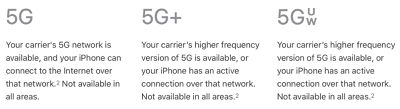
When you're connected to a 5G network, you'll see a few different symbols, all of which confirm that you're on a 5G network. 5G+ is AT&T's symbol when connected to a faster mmWave 5G network, and the 5G UW symbol shows up when you have a higher-speed mmWave connection on a Verizon device.
Feedback
Have 5G questions or know of something we left out in this how to? Send us an email here.





















Top Rated Comments
Hate all those AT&T gimmicky names, calling HSPA+ as 4G and better LTE as 5GE, and now mmWave is 5G+. Just call it what it is.
shows 4G and LTE.
Glad TMO does not upcharge for 5G and has more 5G service (Sub 6 & mm Wave) compared to the other 2!
* Your plan does not "support" or allow for 5G access. The only consumer plans that include 5G network access are:
* The highest end unlimited prepaid (I believe it is the "Unlimited Plus" plan)
* On postpaid
* Unlimited Starter
* Unlimited Extra
* Unlimited Elite
* If you are on one of these plans and still not able to choose 5G Auto or 5G On, you may need to contact AT&T to have the correct account codes reprovisioned to your account for 5G
* You need a new SIM
* Older SIMs may not support 5G NR. The iPhone 12 SKUs that include carrier activation (the $30 discounted models for iPhone 12 non-Pro) include a SIM in the box that will support 5G. If you bought the SIM-free model, you may need to contact AT&T to have a replacement SIM sent to you or pick up a replacement at an AT&T store
* You are using dual-SIM mode with an eSIM
* iPhone 12 (all models) do not currently support 5G when dual-SIM is active, except in China where you can install two physical SIMs into the device
* eSIM alone should still support 5G, as long as a physical SIM is not also in use. However, some people are finding that they have had to contact AT&T to have the correct account codes for 5G reprovisioned onto their account before the 5G options would appear