Last year in iOS 13, Apple introduced new hearing features in the Health app that are designed to help users avoid being exposed to high levels of sound when wearing headphones for an extended period of time. In iOS 14, Apple is advancing its hearing features by adding the ability to measure the volume level of what you're listening to in real time.
airpodsapplemusic
With the new feature, Apple is putting more emphasis on the health dangers of being exposed to high volume audio. Listening to something at 80 decibels (dB) for more than 40 hours in a one-week period increases your risk of hearing loss. Raise it 10 dB to 90, and damage can begin after only four hours a week. Turn it up over 100 dB, and listening for just a few minutes a week can cause damage.

With the new headphone measuring feature, you can check that what you're listening to is being played at an acceptable level for your ears. It's easy to set up and use once you know where it is. The following steps show you how it's done on an ‌iPhone‌ or ‌iPad‌ running iOS 14.

How to Set Up the Headphone Level Checker in iOS 14

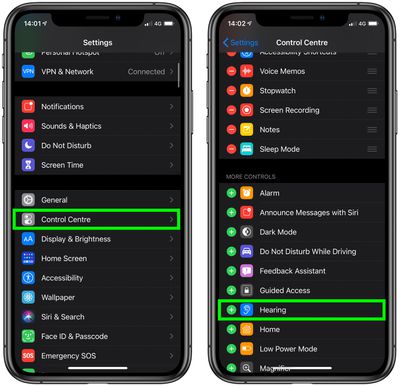
  1. Launch the Settings app on your ‌‌iPhone‌‌ or ‌‌iPad‌‌.

  2. Tap Control Center.
  3. Scroll down and tap the green plus (+) button next to Hearing.
    settings

How to Use the Headphone Level Checker in iOS 14

The next time you're listening to something on your iOS device over connected headphones, follow these steps.

  1. Launch Control Center: On an ‌‌iPad‌‌ with a Home button, double-tap the Home button; on ‌‌iPhone‌‌ 8 or earlier, swipe up from the bottom of the screen; and on a 2018 iPad Pro or ‌‌iPhone‌‌ X and later, swipe down from the upper right of the screen.
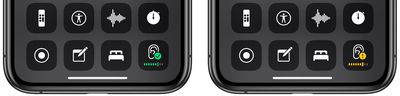
  2. Look at the Hearing button in Control Center. If it has a green tick, you're listening at a healthy volume level. If what you're listening to exceeds the 80-decibel level, the measurement icon will display a yellow exclamation mark, warning you that the volume is too high.
    control center

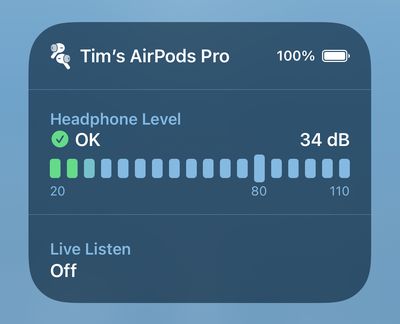
  3. For a more detailed picture of the current decibel level, tap the Hearing button.
    headphone level

The real-time headphone level feature works well with most headphones, but bear in mind that Apple says the measurement is more accurate with AirPods and other Apple-certified headsets.


Tag: Hearing
Related Forum: iOS 14

Top Rated Comments

einsteinbqat Avatar
73 months ago

"Control centre" lol iOS 14 already has typos
I don't think that you realise that Brits, Canucks, Aussies, Kiwis, etc., write centre with the R before the E. The R at the end, that's the American way. And we write, neighboUr, flavoUr, coloUr, odoUr, doughnut, etc. USA aren't the centre of everything. ?
Score: 33 Votes (Like | Disagree)
Apple_Robert Avatar
73 months ago

!!!! In general, slide the slider to the left or turn the knob counter clockwise to turn the volume down. As a civilization we are now so stupid we can't tell when we have something turned up too loud?
A song sound level may sound reasonable to a listener. That doesn’t necessarily mean the sound is medically safe at that moment, much less long term. Many people get used to loud noises. That doesn’t mean they should continue listening to loud noises

I think you are trivializing an important feature and topic.
Score: 14 Votes (Like | Disagree)
Apple_Robert Avatar
73 months ago
Another good article, MacRumors. A handy feature indeed.

In my opinion, Apple should set it up where the user is notified with an across the screen display if the decibels are too loud. Too easy to forget to swipe up and check control center for a lot of people.
Score: 8 Votes (Like | Disagree)
CarpalMac Avatar
73 months ago

But the USA population is bigger than all those countries COMBINED!!
Reminds me of the phrase "quality over quantity". :p

(Joking, BTW).
Score: 7 Votes (Like | Disagree)
Pakaku Avatar
73 months ago
Semi-related, but the fact that the lowest two volume notches still sound way too loud whenever I use headphones has always astounded me, and I really wish Apple would give us better management over that in iOS and OSX. I always find myself resorting to apps like Audio Hijack in order to limit it.
Score: 6 Votes (Like | Disagree)
NickName99 Avatar
73 months ago

!!!! In general, slide the slider to the left or turn the knob counter clockwise to turn the volume down. As a civilization we are now so stupid we can't tell when we have something turned up too loud?
Most guys over 50 I know have significant loss of hearing, from failing to protect their hearing over the years. I try to take better care of my ears, I don’t want to end up another old guy always shouting for people to speak up or repeat themselves. It’s funny how so many of these little macho ideas end up making us weaker in the long run.
Score: 6 Votes (Like | Disagree)

Popular Stories

Apple Logo Zoomed

Tim Cook Teases Plans for Apple's Upcoming 50th Anniversary

Thursday February 5, 2026 12:54 pm PST by
Apple turns 50 this year, and its CEO Tim Cook has promised to celebrate the milestone. The big day falls on April 1, 2026. "I've been unusually reflective lately about Apple because we have been working on what do we do to mark this moment," Cook told employees today, according to Bloomberg's Mark Gurman. "When you really stop and pause and think about the last 50 years, it makes your heart ...
wwdc sans text feature

Apple Rumored to Announce New Product on February 19

Thursday February 5, 2026 12:22 pm PST by
Apple plans to announce the iPhone 17e on Thursday, February 19, according to Macwelt, the German equivalent of Macworld. The report, citing industry sources, is available in English on Macworld. Apple announced the iPhone 16e on Wednesday, February 19 last year, so the iPhone 17e would be unveiled exactly one year later if this rumor is accurate. It is quite uncommon for Apple to unveil...
Finder Siri Feature

Why Apple's iOS 26.4 Siri Upgrade Will Be Bigger Than Originally Promised

Friday February 6, 2026 3:06 pm PST by
In the iOS 26.4 update that's coming this spring, Apple will introduce a new version of Siri that's going to overhaul how we interact with the personal assistant and what it's able to do. The iOS 26.4 version of Siri won't work like ChatGPT or Claude, but it will rely on large language models (LLMs) and has been updated from the ground up. Upgraded Architecture The next-generation...
iOS 26

iOS 26.3 and iOS 26.4 Will Add These New Features to Your iPhone

Tuesday February 3, 2026 7:47 am PST by
While the iOS 26.3 Release Candidate is now available ahead of a public release, the first iOS 26.4 beta is likely still at least a week away. Following beta testing, iOS 26.4 will likely be released to the general public in March or April. Below, we have recapped known or rumored iOS 26.3 and iOS 26.4 features so far. iOS 26.3 iPhone to Android Transfer Tool iOS 26.3 makes it easier...
iphone 17 pro dark blue 1

iPhone 18 Pro Max Rumored to Deliver Next-Level Battery Life

Friday February 6, 2026 5:14 am PST by
The iPhone 18 Pro Max will feature a bigger battery for continued best-in-class battery life, according to a known Weibo leaker. Citing supply chain information, the Weibo user known as "Digital Chat Station" said that the iPhone 18 Pro Max will have a battery capacity of 5,100 to 5,200 mAh. Combined with the efficiency improvements of the A20 Pro chip, made with TSMC's 2nm process, the...