
How to Control Your Apple Watch With Your iPhone - GeekWebGuides
Skip to Content

How to Control Your Apple Watch With Your iPhone

by

In iOS 16, Apple introduced a new Apple Watch Mirroring feature that lets you see and control your Apple Watch screen from your paired iPhone. Apple Watch Mirroring is designed to make the watch experience more accessible for people with physical and motor disabilities, but it can be useful to anyone. Keep reading to learn how to use it.
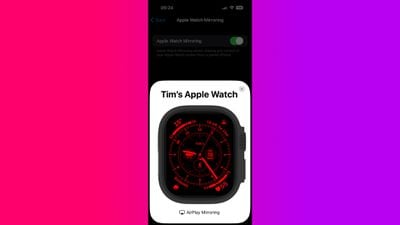
apple watch mirroring
With Apple Watch Mirroring in iOS 16, Apple utilizes its AirPlay wireless protocol to make Apple Watch more accessible. The addition of the new feature means you can use touch or assistive features like Voice Control, Switch Control, and more on your iPhone to interact with your Apple Watch.

To start using Apple Watch Mirroring, you'll need an Apple Watch Series 6 or later running watchOS 9, along with a paired iPhone running iOS 16. You can check if your iPhone needs updating by going to Settings -> General -> Software Update.

How to Control Apple Watch Mirroring

  1. On your iPhone, launch the Settings app.
  2. Scroll down and tap Accessibility.
  3. Under "Physical and Motor," tap Apple Watch Mirroring.
  4. Toggle on the switch next to Apple Watch Mirroring.
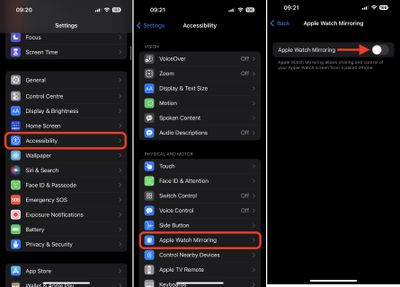
settings

After you've performed the last step, a graphical representation of your Apple Watch will appear on your iPhone's screen, while a blue outline will appear around the face of your Apple Watch to indicate that mirroring is enabled.

You'll now be able to control your Apple Watch by tapping and swiping on the watch image that appears on your iPhone. You can even tap the Side button and swipe the Digital Crown to mimic the same physical actions that you would perform on your watch. When you're done using Apple Watch Mirroring, simply tap the X in the top-right corner of the Apple Watch card on your iPhone.

If you want to make Apple Watch Mirroring quicker to access, you can add it to Apple's Accessibility Shortcut menu, which, once set up, can be invoked using a triple click of the Home button or Side button.

Related Forum: Apple Watch

Top Rated Comments

tubular Avatar
53 months ago
Next week, how to control your refrigerator with your dishwasher.
Score: 18 Votes (Like | Disagree)
Arsenikdote Avatar
53 months ago

Can someone tell me why this could be useful? What are some possible use cases?

How is this useful?

Can someone tell me why one would want to use this?
As someone else pointed out, someone with arm disabilities (e.g. missing arm or just arm mobility) is an easy example. There have been time I have been carrying something and can't reach my watch to perform a task and I have used my nose :p but imagine that is your daily use case? This feature is very helpful for that.

Personally, I know of someone who has really bad eyesight but needs to use the Apple Watch (or similar device) for health tracking. This would allow them to adjust things on the watch or possibly even get more functionality out of it since they are wearing it anyway.

I think there is a reason this setting is under Accessibility....just putting yourself in those other people's shoes would probably result in a better understanding on how this feature can help a lot of people who don't have the same world experience as the rest of us.
Score: 13 Votes (Like | Disagree)
53 months ago
This is pretty cool. iOS16 is the most enjoyable iOS to date imo.
Score: 13 Votes (Like | Disagree)
apyrenum Avatar
53 months ago
Can someone tell me why this could be useful? What are some possible use cases?
Score: 10 Votes (Like | Disagree)
CiP12 Avatar
53 months ago

Can someone tell me why one would want to use this?
I can. Configuring stuff on the Apple Watch a bit easier, screen recording it if necessary, and it’s a plainly nice accessibility feature for people with mobility issues.


I personally used this feature with my Series 6 during the beta for mainly configuring apps and screen recording
Score: 7 Votes (Like | Disagree)
53 months ago
Not interested until I can watch tv on my watch while surfing on my phone.
Score: 7 Votes (Like | Disagree)

Popular Stories

apple watch s12 ultra 4

Apple Watch Series 12, Ultra 4 Owners Report Skin Irritation

Wednesday October 7, 2026 12:02 pm PDT by
Some Apple Watch Series 12 and Ultra 4 owners have experienced unexpected skin irritation with the new models, according to reports on the GeekWebGuides forums and Reddit. Affected users complain of a burning sensation and redness under the sensor area. The Apple Watch Series 12 and Ultra 4 measure heart rate every five seconds, and some people have wondered if that's the cause of the skin...
lululook apple watch titanium

GeekWebGuides Giveaway: Win an Apple Watch Ultra 4 From Lululook

Friday September 25, 2026 10:56 am PDT by
For this week's giveaway, we've teamed up with Lululook to offer GeekWebGuides readers a chance to win a new Apple Watch Ultra 4. Lululook makes all kinds of accessories for Apple devices, including the Apple Watch. The company has a selection of Apple Watch bands that work well with the new Series 12 and the Ultra 4 models. Lululook's $129.99 Strata Milanese Band matches the Apple Watch Ultra...
southern straps 3 1

GeekWebGuides Giveaway: Win an Apple Watch Series 12 and a Nylon Band From Southern Straps

Friday October 9, 2026 10:20 am PDT by
For this week's giveaway, we've teamed up with Southern Straps to offer GeekWebGuides readers a chance to win an Apple Watch Series 12 and a nylon band from Southern Straps to go along with it. Southern Straps is a California-based company that has been making high-quality bands for the Apple Watch since the device first launched in 2015, and the company's selection of bands offer a an...
Latest Stories
Apple Will Label Apps 'Made for iPhone Duo' in App Store
14 minutes ago
Amazon Takes $49 Off iPad With Prices Starting at $399.99
49 minutes ago
F1 on Apple TV Now Available in Dolby Atmos
1 hour ago
Apple Reveals More Than 50 Apps That Will Be Updated for iPhone Duo
2 hours ago
Apple Blocks Certificates That Could Help Attackers Fake Websites
3 hours ago
Giant iPhone Duo Installations Spotted at Apple Fifth Avenue
4 hours ago
iPhone Duo 2 Prototypes Include Under-Display Face ID
4 hours ago
Tesla App Gains iPad and iPhone Duo Support
8 hours ago
Apple Reportedly Boosts iPhone Duo Orders by 44%
9 hours ago
Fortnite Returning to Australian App Store After Court Ruling
9 hours ago
Apple Ordered to Open iPhone to Rival App Stores in Australia
9 hours ago
Apple Suppliers Face Hurdles Cutting Circuit Board Emissions
10 hours ago
Things Updated for iPhone Duo With Adaptive Layout
10 hours ago
Simplicity and Siri AI Are HomeView's Killer Features, Apple Says
10 hours ago
iPhone Duo Reviewers Really Miss Face ID
15 hours ago
Does the iPhone Duo Run Hot? Here's What Reviews Found
17 hours ago
Apple Music's New Look is Now Live on Apple's Website
18 hours ago
Anthropic Launches Claude Duet, a Proactive AI Agent
18 hours ago
What 32,000 Folds Did to the iPhone Duo's Hinge
19 hours ago
iPhone Duo's Hidden FaceTime Camera Takes 'Trash' Photos
20 hours ago
iPhone Duo Has 'Edge Light' Feature That Debuted on Macs Last Year
21 hours ago
Apple Support App Updated for iPhone Duo's Larger Display
21 hours ago
Amazon Sweetens the Deal on Entry-Level 16-Inch MacBook Pro With $570 Off
21 hours ago
iPhone Duo Tips Over on MagSafe Stands When Unfolded
21 hours ago
Apple Music's New Look Officially Announced
23 hours ago
iPhone Duo Supports Apple Pencil Starting With iOS 27.2
1 day ago
iPhone Duo Accessories Roundup: Cases and Screen Protectors From OtterBox, ZAGG, and More
1 day ago
Apple Stores Will Have 'Limited' Availability of iPhone Duo for Walk-In Customers
1 day ago
iPhone Duo Reviews Explain Why Device is Both 'Fun' and 'Frustrating'
1 day ago
Apple Says 'Reachability' Feature Coming to iPhone Duo Later This Year
1 day ago







































