How to Convert Several Images into a Single PDF Using Preview - MacRumors
Skip to Content

How to Convert Several Images into a Single PDF Using Preview

by

Preview appOver the years, Adobe's PDF file type has become a universally accepted method for sharing digital documents. The format's cross-platform adoption means the documents can be viewed on almost any mobile device or computer, so it's no surprise to find that macOS includes native support for viewing and creating PDF files.

In the Preview app, for example, it's possible to create a single multi-page PDF document out of several separate image files. The feature is particularly useful if you need to share a number of scanned documents over email or digitize something for reference. Keep reading to learn how it's done.

How to Convert Several Images into a Single PDF

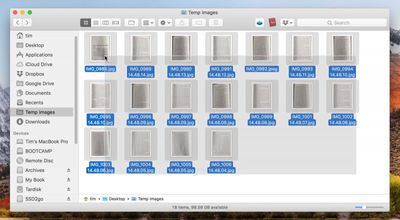
  1. In Finder, select all the images you want to include in the PDF. To do this, drag a box over several images files using your mouse cursor, or select them individually by holding the Command key and clicking them one by one.
    1 select images to pdf

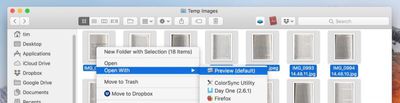
  2. Right-click (or Ctrl-click) one of the highlighted files and select Open With -> Preview in the contextual dropdown menu.
    2 open images in preview to pdf

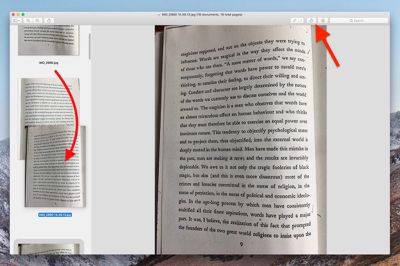
  3. In Preview's sidebar, drag the thumbnail images into the order that you want them to appear in the PDF document. Use the Rotate button in Preview's toolbar to change the orientation of individual pages (drag a selection over multiple pages to rotate several at once).
    3 rearrange images to pdf

  4. In the Preview menu bar, select File -> Print..., or use the Command+P keyboard shortcut to bring up the Print dialog.

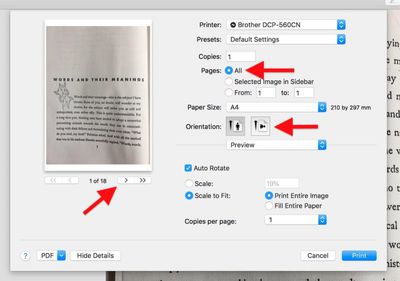
  5. Click Show Details to expand the Print dialog and browse the full set of options. Make sure the All button is selected in the Pages options. Note that you can double-check the orientation of each image by clicking the arrows below the print preview, and use the Orientation buttons to correct any if required.
    4 print options to pdf

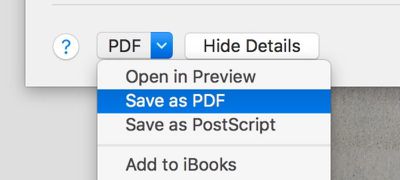
  6. Select Save as PDF from the PDF dropdown menu in the lower left of the Print dialog.
    5 save as pdf

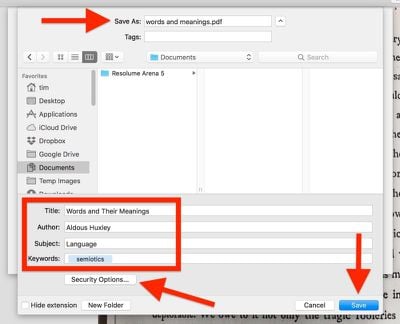
  7. The Save dialog will appear. Give your new PDF a name and choose a save location. Fill in the Title, Author, Subject, and Keywords fields if desired (these details are searchable in Spotlight). The Security Options... button also lets you optionally set a password to open the document, copy from it, and/or print it.
    6 name saved pdf

  8. Click Save when you're done.

Note that the Save as PDF option can be accessed from the Print dialog window within a number of macOS apps, not just Preview. You can use it to create PDFs of web pages viewed in Safari, or Word documents opened in Pages, for example.


Tag: Preview

Top Rated Comments

110 months ago
you guys ever get 2 preview windows when opening a bunch of .jpgs for example? i dont get why that happens to me sometimes. All images could be taken from same camera in same session too
Preferences > Images > Open all files in one window.
Score: 9 Votes (Like | Disagree)
philosopherdog Avatar
110 months ago
Preview is one of the most powerful apps that comes with MacOS. So many people who started on Windows think they need adobe PDF reader. Preview will do it all without opening your Mac to adobes insecure reader.
Score: 7 Votes (Like | Disagree)
Xavier Avatar
110 months ago
That sounds handy, mind sharing how you did it?
Sure. And you can change the values to what you'd like.


Attachment Image
Score: 5 Votes (Like | Disagree)
Solomani Avatar
110 months ago
Very useful tip, thanks MR. IMHO, this one single tip is more valuable than the last 50 rumor articles on this website.
Score: 3 Votes (Like | Disagree)
110 months ago
Neat tip! Reorganising and merging pages in Preview needs to be advertised more. So many people think you need Adobe Acrobat.
Score: 3 Votes (Like | Disagree)
110 months ago
I agreed with that statement until High Sierra. Several features are broken and PDF scaling is a blurry mess. There have been countless bug reports but no fixes. The majority of Apple's development resources have been reassigned to iOS and it is starting to show.
I'm not sure about that. This went around the Trolliverse awhile back, and came back as not true. Many people are using Preview with no problems at all.

So, unless you can more clearly state the problem as you see it and provide some way of duplicating it, I am going to have to say that I do not believe this statement.
[doublepost=1526751694][/doublepost]
Another thought about PDF on the Mac. It is not (as intimated by the article) merely a file format supported by Preview that was added because it is useful across platforms. The integration of PDF into the Mac is much deeper than that. One of the best design decisions Apple made with the development of OS X was creating Quartz as a display technology. Quartz is essentially Apple's implementation of PDF. Native outputting of virtually any document to PDF has been a feature of OS X from day one because it's integrated into the OS. At one point early in the OS X development process Apple even demonstrated a PDF editing tool. That app disappeared pretty quickly though. I suspect they ran into trouble with Adobe.
Copyright lawyers rule the world!
[doublepost=1526752307][/doublepost]
Very nice tip. Not around my Mac so can't test. Does it tip only work for images? I would like to combine some pdf files. And can it delete pdf pages? That's the only feature I miss when I stop using adobe acrobat.
its easy to combine pdf files in Preview. One way is to have both files open in separate windows, display the thumbnails in the sidebar, and drag or copy and paste from one to the other. you can also change the order of pages and and delete pages fro thumbnails. You can even create an automator workflow to select the pdfs and then combine them into one.
[doublepost=1526752361][/doublepost]
Neat. How do you get it to arrange the order of images in the pdf?
view thumbnails, and drag
[doublepost=1526753307][/doublepost]
Anyone know of a way to create the PDF in B&W so the size isn't gargantuan?
you can file print, then select pdf, this "flattens" the file and makes it very small. but not in black and white.

if you really want that, select file Export, use "quartz filter" to select Black and White
[doublepost=1526753610][/doublepost]
I wrote a native MacOS app in Swift that does the same! Was a fun project. Workflow is much simpler if all you want to do it convert images to a PDF.

Search Concat in Mac App Store (sorry on phone and cannot provide link)
Sounds fun. I wrote an Automator Action, that I also save as a service to Preview. This program annotates widgets (example was forms using fillable fields). It has multiple modes. Reset to clear widgets, index to number the widgets, import to load widgets from csv, and paste to paste widgets from Numbers (I guess could also be Excel or others too). Very fun, contact me if you want code, I also aim to post on GitHub. Love to see someone pick it up and go commercial
[doublepost=1526754694][/doublepost]
Very timely for me. I have been trying to do this from my Win machine, but the resulting PDF is too large for email. Does anyone know if Preview will compress the images or resulting PDF to a manageable size?

Also, is there an equivalent workflow in iOS? My source images are all pictures taken from my iPhone. Would be a huge timesaver to dump them into a single PDF for sharing by email on my iPhone.
Many ways to compress pdfs. "Flatten", by file print, then select PDF. file Export, choose format, save as images. Automator to compress images.

iOS: https://thesweetsetup.com/apps/best-pdf-manager-editor-ipad/. this reviews many PDF editor apps. I personally used PDF Expert by Readle - excellent app.
Score: 2 Votes (Like | Disagree)

Popular Stories

M5 MacBook Pro

RIP, MacBook Ultra

Monday October 19, 2026 9:37 am PDT by
Apple today sent out invites for an experience in Los Angeles on Wednesday, October 28, and the "Pro and tell" tagline on the invitation likely means that the rumored MacBook models with touch-enabled OLED displays will stick with MacBook Pro branding instead of the once-rumored "MacBook Ultra" name. The long-rumored "iPhone Ultra" ended up being named iPhone Duo, so speculation that Apple...
iPhone Duo Trio

Here's What Apple's Apps Look Like on the iPhone Duo

Tuesday October 20, 2026 11:12 am PDT by
With just three days to go until the iPhone Duo is released, Apple is getting ready for the launch. Behind the scenes, the App Store now has screenshots of Apple's built-in apps running on the Duo. We've seen some apps in marketing materials, but images of the ones we haven't seen give us an idea of what it will be like using the iPhone Duo day to day. Many apps are shown in landscape...
apple pro tell logo

Apple Announcing New Products Next Week: 'Pro and Tell'

Monday October 19, 2026 9:05 am PDT by
Apple's Greg Joswiak today hinted at new product announcements coming next week, sharing a social media post that says "Can't wait to pro and tell next week." Rumors suggest Apple is planning to debut the new MacBook Pro with an OLED touchscreen display, an M6 entry-level MacBook Pro, an M6 iMac, an iPad mini with an OLED display. Can't wait to pro and tell next week....
Latest Stories
F1 on Apple TV Now Available in Dolby Atmos
3 minutes ago
Apple Reveals More Than 50 Apps That Will Be Updated for iPhone Duo
34 minutes ago
Apple Blocks Certificates That Could Help Attackers Fake Websites
2 hours ago
Giant iPhone Duo Installations Spotted at Apple Fifth Avenue
3 hours ago
iPhone Duo 2 Prototypes Include Under-Display Face ID
3 hours ago
Tesla App Gains iPad and iPhone Duo Support
7 hours ago
Apple Reportedly Boosts iPhone Duo Orders by 44%
7 hours ago
Fortnite Returning to Australian App Store After Court Ruling
8 hours ago
Apple Ordered to Open iPhone to Rival App Stores in Australia
8 hours ago
Apple Suppliers Face Hurdles Cutting Circuit Board Emissions
8 hours ago
Things Updated for iPhone Duo With Adaptive Layout
9 hours ago
Simplicity and Siri AI Are HomeView's Killer Features, Apple Says
9 hours ago
iPhone Duo Reviewers Really Miss Face ID
14 hours ago
Does the iPhone Duo Run Hot? Here's What Reviews Found
16 hours ago
Apple Music's New Look is Now Live on Apple's Website
16 hours ago
Anthropic Launches Claude Duet, a Proactive AI Agent
17 hours ago
What 32,000 Folds Did to the iPhone Duo's Hinge
18 hours ago
iPhone Duo's Hidden FaceTime Camera Takes 'Trash' Photos
19 hours ago
iPhone Duo Has 'Edge Light' Feature That Debuted on Macs Last Year
20 hours ago
Apple Support App Updated for iPhone Duo's Larger Display
20 hours ago
Amazon Sweetens the Deal on Entry-Level 16-Inch MacBook Pro With $570 Off
20 hours ago
iPhone Duo Tips Over on MagSafe Stands When Unfolded
20 hours ago
Apple Music's New Look Officially Announced
22 hours ago
iPhone Duo Supports Apple Pencil Starting With iOS 27.2
22 hours ago
iPhone Duo Accessories Roundup: Cases and Screen Protectors From OtterBox, ZAGG, and More
23 hours ago
Apple Stores Will Have 'Limited' Availability of iPhone Duo for Walk-In Customers
23 hours ago
iPhone Duo Reviews Explain Why Device is Both 'Fun' and 'Frustrating'
1 day ago
Apple Says 'Reachability' Feature Coming to iPhone Duo Later This Year
1 day ago
Loop Capital Cuts Apple Rating Over iPhone Sales Outlook
1 day ago
Apple Stores in Bordeaux and Lille Looted During French Protests
1 day ago