How to Customize Apple Music With Loves and Dislikes - GeekWebGuides
Skip to Content

How to Customize Apple Music With Loves and Dislikes

by

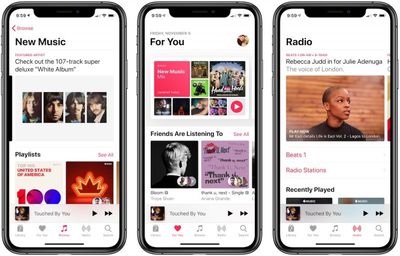
When you first subscribe to Apple Music, you're asked to provide information about your favorite genres and artists so that it can offer you accurate suggestions and curated playlists as soon as you start using the service.
apple music image november 2018
This personalization gradually improves as you continue to use ‌Apple Music‌, and the best way to influence it is to generously use the Love and Dislike buttons.

How to Use Apple Music's Love and Dislike Buttons

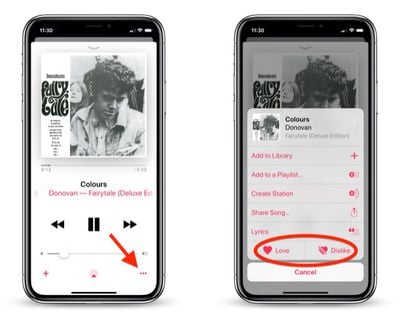
Next time you're playing a song or listening to a custom-generated or live radio station, tap the ellipsis button at the bottom right of the screen.
how to use love dislike buttons apple music
This brings up an additional options pane, at the bottom of which you'll see Love and Dislike buttons. You can tap either of these, and ‌Apple Music‌ will use your preference to guide its recommendation algorithms going forward.

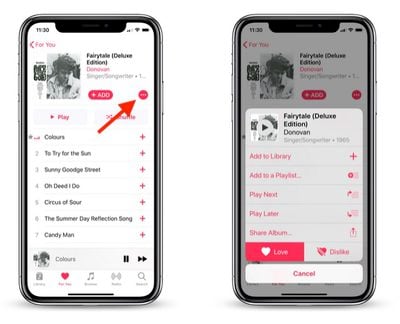
You can also access these buttons to indicate whether you enjoy an album or not. From any album screen, tap the red ellipsis button in the upper right area of the screen.
how to use love dislike buttons apple music 2
This brings up a smaller pane of options, but you'll still find the Love and Dislike buttons at the bottom.

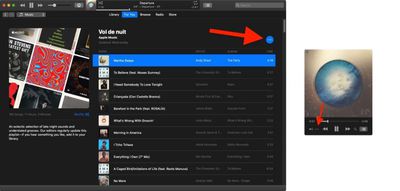
If you're listening to ‌Apple Music‌ on a PC or Mac, you can find the Love and Dislike options in iTunes via the Song menu bar menu.
how to use apple music love dislike buttons 4
They can also be accessed using a similar ellipsis button that appears in the upper left of the album/playlist window, and at the bottom of the mini player view.

Dealing With Inaccurate Recommendations

Occasionally, you may find that ‌Apple Music‌ continues to play songs by artists or from genres you've indicated you don't like. This appears to be tied to the way Apple's algorithms use your listening history and the albums in your music library.
how to use love dislike buttons apple music 3
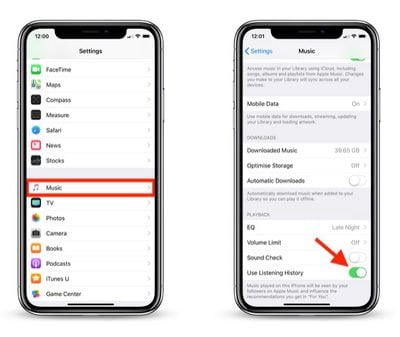
It's worth checking your library to make sure you haven't accidentally added any songs or albums you don't like (if you have, you can easily delete them). Another solution you can try is to launch the Settings app on an iPhone or iPad, then tap Music and turn off the Use Listening History toggle.

Popular Stories

Apple Music New Branding

Apple Music's New Look Officially Announced

Wednesday October 21, 2026 9:06 am PDT by
Following the introduction of a new Apple Music logo and app icon earlier this month, Apple today officially introduced Apple Music's new brand identity. In a YouTube video shared today, Apple said the new Apple Music visuals were "made by sound." More specifically, Apple said it played a sound through a container of water, resulting in the liquid moving at the frequency of the notes. Apple...
apple music new logo red

Apple Music Is Getting a New Logo

Tuesday October 6, 2026 4:06 am PDT by
Apple appears to be rolling out a new logo for Apple Music in its upcoming set of software updates. The logo has been spotted in both macOS 27.2 beta 3 and iOS 27.2 beta 3, and it's identical to the one that Apple used in its Apple Music Hall announcement last month. When Apple used the logo in the venue's press materials and on its new official website, it wasn't clear if this was a one-off ...
Apple Music New Logo on Website

Apple Music's New Look is Now Live on Apple's Website

Wednesday October 21, 2026 2:24 pm PDT by
As spotted by Hidde Collee, the Apple Music page on Apple's website now has the updated branding that Apple officially introduced earlier today. Apple Music has a new black-and-white logo and app icon, with Apple doing away with the red color scheme that it previously used for the streaming music service. In a YouTube video released earlier today, Apple showed how the new Apple Music...
Latest Stories
iPhone Duo Demand Reportedly Exceeds Apple's Expectations
1 hour ago
iPhone Duo Launch Begins as First Orders Reach Customers
7 hours ago
1Password for Agents Keeps Your Passwords Hidden From AI
8 hours ago
iPhone Duo 24 Hours Later: Your Questions Answered
9 hours ago
Apple's iWork Apps Get 'Intelligent Assistant' and iPhone Duo Support
10 hours ago
Apple is Apparently Considering a Slightly Larger iPhone Duo
10 hours ago
Giant iPhone Duo Displays Coming to Four Apple Stores
11 hours ago
Apple Pulls Keynote, Pages and Numbers From App Store [Update: Back]
12 hours ago
Apple Updates More Apps With iPhone Duo Support
12 hours ago
Apple Will Label Apps 'Made for iPhone Duo' in App Store
15 hours ago
Amazon Takes $49 Off iPad With Prices Starting at $399.99
16 hours ago
F1 on Apple TV Now Available in Dolby Atmos
16 hours ago
Apple Reveals More Than 50 Apps That Will Be Updated for iPhone Duo
17 hours ago
Apple Blocks Certificates That Could Help Attackers Fake Websites
18 hours ago
Giant iPhone Duo Installations Spotted at Apple Fifth Avenue
19 hours ago
iPhone Duo 2 Prototypes Include Under-Display Face ID
19 hours ago
Tesla App Gains iPad and iPhone Duo Support
23 hours ago
Apple Reportedly Boosts iPhone Duo Orders by 44%
23 hours ago
Fortnite Returning to Australian App Store After Court Ruling
1 day ago
Apple Ordered to Open iPhone to Rival App Stores in Australia
1 day ago
Apple Suppliers Face Hurdles Cutting Circuit Board Emissions
1 day ago
Things Updated for iPhone Duo With Adaptive Layout
1 day ago
Simplicity and Siri AI Are HomeView's Killer Features, Apple Says
1 day ago
iPhone Duo Reviewers Really Miss Face ID
1 day ago
Does the iPhone Duo Run Hot? Here's What Reviews Found
1 day ago
Apple Music's New Look is Now Live on Apple's Website
1 day ago
Anthropic Launches Claude Duet, a Proactive AI Agent
1 day ago
What 32,000 Folds Did to the iPhone Duo's Hinge
1 day ago
iPhone Duo's Hidden FaceTime Camera Takes 'Trash' Photos
1 day ago
iPhone Duo Has 'Edge Light' Feature That Debuted on Macs Last Year
2 days ago