
How to Customize Apple TV to Show Only the Channels You Use - MacRumors
Skip to Content

How to Customize Apple TV to Show Only the Channels You Use

by

We've been waiting for the fourth-generation Apple TV for at least two years now, and we've been teased with vague comments, leaks from the supply chain, and analyst predictions for several years running. We thought we’d get a look at it this year at the Worldwide Developers Conference, but Apple was still not ready to show it off.
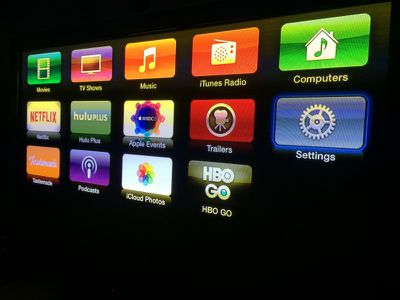
How to Customize Apple TV 4
Until we get a whole new model with, hopefully, a brand new look to the operating system, we have to stick with what we've got. The number of media channels is not getting any smaller, with Apple adding new content on a regular basis. For example, Apple recently added NatGeo TV. Content options are great, but sifting through dozens of channels can be a pain sometimes.

If you're tired of scrolling through the nearly seven dozen channels looking for the ones you use most, you can hide everything you don’t want to access, making it much easier to get to the content you want. We've got a quick tutorial to show you how.

Customizing Channels on the Main Menu
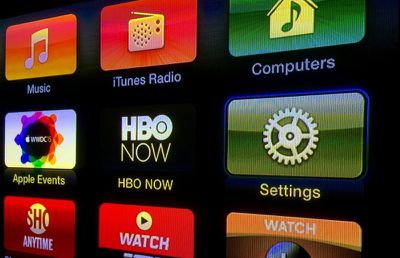
How to Customize Apple TV 2

  1. On Apple TV, go to your Settings app, which is always in the second row below your iTunes and shared computer channels.
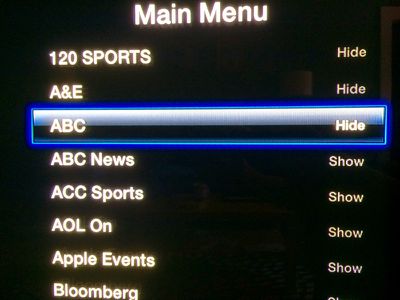
  2. Select Main Menu from the list.
  3. Select "Hide" for every channel that you don't want showing by selecting the channel and clicking the center select button on the Apple TV remote. Channels that will be visible on the Apple TV are listed as "Show," while channels that will no longer show up are listed as "Hide."
How to Customize Apple TV 3
New channels will appear on the Main Menu whenever they are added to Apple TV. If you don't want to see them, follow the steps above for the new channel.

You can also go back and add channels to Main Menu whenever you like by clicking on it until it has "Show" next to it instead.

Troubleshooting

If your Apple TV is running slowly, shuts off randomly, or is otherwise working poorly, one way to fix it is to restart it.

  1. Unplug the connection to your television set.
  2. Unplug the power cable from the box.
  3. Plug the TV cable back in.
  4. Plug the power cable back in.
  5. Wait for Apple TV to finish reloading.
How to Customize Apple TV 6
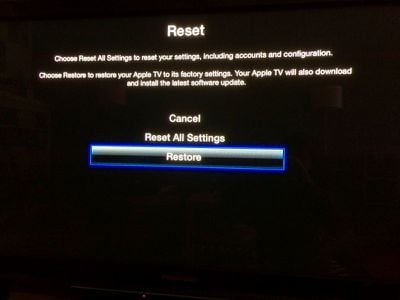
There may be deeper issues with your set-top box that a simple restart can't fix. If so, you may need to reset it to factory settings.

  1. On Apple TV, go to the Settings app.
  2. Select General.
  3. Scroll down to select Reset.
  4. Select Restore.

This will restore Apple TV to its factory settings, removing all passwords you have entered for all of your channels. The restoration will take a while. Don't unplug your Apple TV during the process.

If you can't restore Apple TV to its factory settings from the Main Menu (like, if your box is frozen and just stops working altogether), you can perform the process via iTunes by connecting your Apple TV to your computer.

You will need a micro-USB cable and the latest version of iTunes running on your Internet-connected computer for this process.

  1. Disconnect the power and television cables from Apple TV.
  2. Open iTunes on your computer. Then connect Apple TV to your computer using the micro-USB cable. If you have the third-generation Apple TV, you will also need to plug the box into a power source.
  3. Once connected, Go to the Apple TV summary page in iTunes and select "Restore Apple TV."
  4. When the restoration process is finished, disconnect Apple TV from your computer and reconnect it to your television set.

Hopefully, we wont be waiting around for too much longer before Apple finally presents us with the next big thing for television. But, until then, at least we can organize our channels the way we want to.


Related Roundup: Apple TV
Buyer's Guide: Apple TV (Buy Now)

Top Rated Comments

Mike Oxard Avatar
147 months ago
An alternative is to move away from the U.S., the rest of the world don't get enough channels to make it worth hiding any.
Score: 8 Votes (Like | Disagree)
147 months ago
@MacRumors

An easier way to hide channels is to simple stay on the home screen - Hold down the middle button - they'll start to "jiggle" - then hit "play" and you'll be prompted to hide the channel.

This way is much quicker.
Score: 4 Votes (Like | Disagree)
Sandstorm Avatar
147 months ago
On some fronts Apple is so pathetic and slow. This is one of them.
Score: 4 Votes (Like | Disagree)
147 months ago
Removing the channels you never watch or access is not the problem but the ugly UI it is like scrolling through huge wall of bricks which causes scan lines issue with my TV. Not sure why Apple just can not change the UI for the current Apple TV for the time being.
Score: 2 Votes (Like | Disagree)
Mike Oxard Avatar
147 months ago
Highly disagree, your overlooking regulatory and "deals in place" within other countries that prevent Apple from delivering the consistency of product found in the U.S.A. across other countries.

Channel choice is not a "black & white" situation as it should be.
Eh? My point ( though meant light-heartedly) was that other countries have less channels, I wasn't commenting on why that is so.

Score: 1 Votes (Like | Disagree)
donniedarko Avatar
147 months ago
@MacRumors

An easier way to hide channels is to simple stay on the home screen - Hold down the middle button - they'll start to "jiggle" - then hit "play" and you'll be prompted to hide the channel.

This way is much quicker.
Yep nailed it. This is much better, the other quicker.
Score: 1 Votes (Like | Disagree)

Popular Stories

Apple TV Sans Remote Feature

New Apple TV 4K Leaked

Friday September 25, 2026 8:16 am PDT by
MacRumors contributor Aaron Perris has uncovered an image file from Apple for an unreleased Apple TV 4K, suggesting that a new model will finally be released soon. The image is specifically for an "Apple TV 4K (4th generation)" model. Apple TV 4K (4th generation) image (on a gradient) The image reveals that the Apple TV will have the same external design as the current model, with all of its...
Apple TV 4K HomeView HomePod Mini tweaked

New Apple TV 4K, HomeView, and HomePod Mini: 16 Details Just Leaked

Sunday October 11, 2026 12:56 pm PDT by
Just two days before Apple's "Welcome home" experience in New York, Bloomberg's Mark Gurman has leaked several details about the new products set to be unveiled, including an all-new smart home hub, a HomePod mini 2, and a new Apple TV 4K. Here is an all-in-one summary of the details shared by Gurman:Apple's home hub with a touch-enabled display will be named HomeView, seemingly confirming a ...
HomePod minis Apple TV and iPad mini Leak Feature

iPad Mini With A20 Pro, New HomePod Mini Colors, and New Apple TV 4K All Just Leaked

Friday September 25, 2026 8:18 am PDT by
The next iPad mini, HomePod mini, and Apple TV 4K models have all leaked, just a few weeks before the devices are expected to be announced. Specifically, MacRumors contributor Aaron Perris discovered a few of Apple's official images of the devices, confirming their existence and some new features that are planned. The most notable iPad mini details revealed in today's leak include an A20 Pro ...
Latest Stories
Tesla App Gains iPad and iPhone Duo Support
46 minutes ago
Apple Reportedly Boosts iPhone Duo Orders by 44%
1 hour ago
Fortnite Returning to Australian App Store After Court Ruling
2 hours ago
Apple Ordered to Open iPhone to Rival App Stores in Australia
2 hours ago
Apple Suppliers Face Hurdles Cutting Circuit Board Emissions
2 hours ago
Things Updated for iPhone Duo With Adaptive Layout
3 hours ago
Simplicity and Siri AI Are HomeView's Killer Features, Apple Says
3 hours ago
iPhone Duo Reviewers Really Miss Face ID
8 hours ago
Does the iPhone Duo Run Hot? Here's What Reviews Found
9 hours ago
Apple Music's New Look is Now Live on Apple's Website
10 hours ago
Anthropic Launches Claude Duet, a Proactive AI Agent
11 hours ago
What 32,000 Folds Did to the iPhone Duo's Hinge
11 hours ago
iPhone Duo's Hidden FaceTime Camera Takes 'Trash' Photos
13 hours ago
iPhone Duo Has 'Edge Light' Feature That Debuted on Macs Last Year
14 hours ago
Apple Support App Updated for iPhone Duo's Larger Display
14 hours ago
Amazon Sweetens the Deal on Entry-Level 16-Inch MacBook Pro With $570 Off
14 hours ago
iPhone Duo Tips Over on MagSafe Stands When Unfolded
14 hours ago
Apple Music's New Look Officially Announced
15 hours ago
iPhone Duo Supports Apple Pencil Starting With iOS 27.2
16 hours ago
iPhone Duo Accessories Roundup: Cases and Screen Protectors From OtterBox, ZAGG, and More
17 hours ago
Apple Stores Will Have 'Limited' Availability of iPhone Duo for Walk-In Customers
17 hours ago
iPhone Duo Reviews Explain Why Device is Both 'Fun' and 'Frustrating'
18 hours ago
Apple Says 'Reachability' Feature Coming to iPhone Duo Later This Year
19 hours ago
Loop Capital Cuts Apple Rating Over iPhone Sales Outlook
23 hours ago
Apple Stores in Bordeaux and Lille Looted During French Protests
23 hours ago
Bluesound Adds Native Apple Music Support
23 hours ago
Apple CEO John Ternus Explains What Makes Good Product Design
1 day ago
UK Proposes New Ways to Help Apple Pay Rivals
1 day ago
WhatsApp Developing In-App Browser for All Chat Links on iPhone
1 day ago
Apple's App Store Chief Explains Its Push for Premium Games
1 day ago








































