How to Delete Your Siri Audio History and Opt Out of Siri Audio Sharing - MacRumors
Skip to Content

How to Delete Your Siri Audio History and Opt Out of Siri Audio Sharing

by

This article explains how to delete your Siri audio interaction history and opt out of sharing audio recordings with Apple on iPhone, iPad, and iPod touch.
siri iphone x
Earlier this year, it was discovered that Apple hired contractors to listen to a small percentage of anonymized ‌Siri‌ recordings to evaluate the virtual assistant's responses with the purpose of improving accuracy and reliability.

The Guardian revealed that Apple employees working on ‌Siri‌ often heard confidential details while listening to the audio recordings. Apple was subsequently criticized for not making it clear to customers that some of their ‌Siri‌ recordings were being used to improve the service.

Soon after the report, Apple suspended its ‌Siri‌ grading practices and promised users that it would introduce tools in a forthcoming update that would allow them to opt out of sharing their audio recordings.

With the release of iOS 13.2 in October, those new tools arrived. Apple now includes an option on iPhone and ‌iPad‌ that allows users to delete their ‌Siri‌ and Dictation history and opt out of sharing audio recordings. The following steps show you how to do both.

How to Opt Out of Siri Audio Sharing

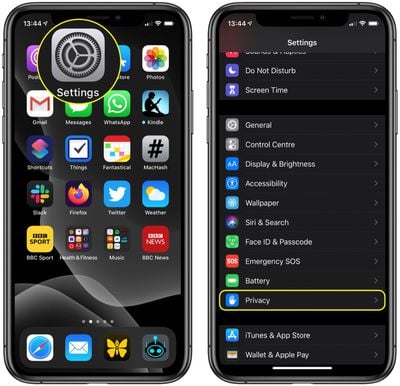
  1. Launch the Settings app on your iPhone, ‌iPad‌, or iPod touch.
  2. Scroll down and tap Privacy.
    settings

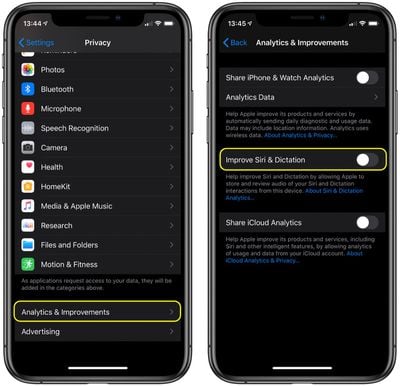
  3. Scroll to the bottom of the Privacy screen and tap Analytics & Improvements.
  4. If you don't want to let Apple review your recordings, toggle off the switch next to Improve Siri Dictation.
    settings

Note that you can tap the link under the toggle for more information relating to Apple's ‌Siri‌ analytics policy.

How to Delete Your Siri Audio History

  1. Launch the Settings app on your iPhone, ‌iPad‌, or iPod touch.
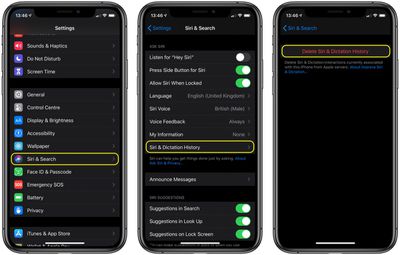
  2. Scroll down and tap Siri & Search.
    settings

  3. Tap Siri & Dictation History.
  4. Tap Delete Siri & Dictation History.

Apple will inform you that your request was received and that your ‌Siri‌ and dictation history will be deleted. That's all there is to it.

In addition to these new ‌Siri‌ and Dictation-related privacy features, Apple also says it is making further changes to its human grading process that will minimize the amount of data that reviewers have access to.


Related Forum: iOS 13

Top Rated Comments

jermwhl Avatar
84 months ago
I'd like to REVIEW my siri audio history. Is that possible? I'm curious what has been recorded, without my knowledge. Siri has, on a few occasions, butted herself into a conversation without the "Hey Siri" prompt. In addition, my cat's name is Stevie and whenever I call her, Siri thinks I'm talking to her.
Score: 5 Votes (Like | Disagree)
btrach144 Avatar
84 months ago
I would have considered opting in if it hadn’t taken a whistleblower to expose Apple. Since Apple can’t be trusted, I picked to opt out.
Score: 4 Votes (Like | Disagree)
OneInfiniteLooper Avatar
84 months ago
Here’s my take.. maybe an unpopular one. Have at it, Apple. I use your service to make things in my life easier, so why not use my Siri request recordings to make the service better for everyone else. It’s not like I’m sitting around spewing out my social security number, mothers maiden name and birthday all the time.
Listen to my recordings and “grade” them so it can improve that request next time. I realize that’s not the same for everyone, that’s just my scenario.
I trust them (as much as you can trust a huge company) with my Siri recordings because I’m not giving them any earth-shattering information... would it be nice to see Siri history, maybe, sure. But I really don’t care. If they let us see that I’d look at the first one, and then get bored and forget about it.
Score: 3 Votes (Like | Disagree)
DeepIn2U Avatar
84 months ago
In music signature there is a great quote from Netflix Anon “it’s not that I have anything to hide, it’s that I have nothing for you to see (or hear)!”

Apple is NOT being clear WHEN our individual requests will be deleted! @MacRumors this article while very helpful lacks the research your hundreds of thousands of regestieres users let alone visitors NEED & Expect from you - when will our requests be deleted?! Please follow up with Apple!!

Attachment Image
Score: 1 Votes (Like | Disagree)
84 months ago

I'd like to REVIEW my siri audio history. Is that possible? I'm curious what has been recorded, without my knowledge. Siri has, on a few occasions, butted herself into a conversation without the "Hey Siri" prompt. In addition, my cat's name is Stevie and whenever I call her, Siri thinks I'm talking to her.
Yes it is possible but it’s painfully challenging. I managed to get them to release what they had on me but I don’t fully trust it was the whole entirety. They tend to proof what they send to prevent you from seeing what they really collect. I terminated our contract with Apple last month for those reasons
Score: 1 Votes (Like | Disagree)

Popular Stories

iOS 26

iOS 26.4 Adds Two New Features to CarPlay

Tuesday March 24, 2026 1:55 pm PDT by
iOS 26.4 was released today, and it includes a couple of new features for CarPlay: an Ambient Music widget and support for voice-based chatbot apps. To update your iPhone 11 or newer to iOS 26.4, open the Settings app and tap on General → Software Update. CarPlay will automatically offer the new features so long as the iPhone connected to your vehicle is running iOS 26.4 or later....
Apple Business hero

Apple Unveils 'Apple Business' All-in-One Platform

Tuesday March 24, 2026 8:53 am PDT by
Apple today announced Apple Business, a new all-in-one platform that unifies device management, productivity tools, and customer outreach features. The service is designed to be a consolidated replacement for several of Apple's existing business-focused offerings, including Apple Business Essentials, Apple Business Manager, and Apple Business Connect. It provides organizations with a single...
AirPods Pro Firmware Feature

Apple Releases New Firmware for AirPods Pro 3, AirPods Pro 2 and AirPods 4

Tuesday March 24, 2026 12:31 pm PDT by
Apple today released new firmware for the AirPods Pro 2, AirPods Pro 3, and the AirPods 4. The firmware has a version number of 8B39, up from 8B34 on the AirPods Pro 3, 8B28 on the AirPods Pro 2, and 8B21 on the AirPods 4. There is no word on what's included in the firmware, but Apple has a support document with limited notes. Most updates are limited to bug fixes and performance...