How to Disable Transparency Effects in macOS Mojave - GeekWebGuides
Skip to Content

How to Disable Transparency Effects in macOS Mojave

by

In macOS, transparency – or more properly, translucency – is a visual effect many apps use to create a sense of depth by hinting at content residing in the background.

how to disable transparency in macos 00
An example of transparency is when content behind a window shows through in interface elements like menus and sidebars. It's evident in the screenshot above, for example, in which the colors of the desktop wallpaper bleed through the sidebar in the Photos app.

A similar effect is sometimes used within app interface elements that are windowed, allowing window content to show through other elements like toolbars. An instance of this can be seen below, where the folders are visible through Finder's toolbar as if through frosted glass.

how to disable transparency in macos 000

Transparency enabled (left); transparency disabled

The effect can look cool, but it can also be distracting if you're trying to focus on content, especially if you're editing photos. Fortunately, macOS lets you turn off transparency, but the way to do it isn't immediately obvious. The following steps show you how.

How to Disable Transparency in macOS Mojave

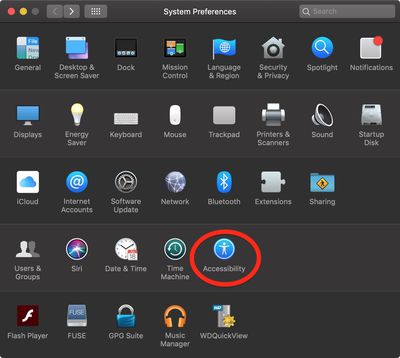
  1. Launch System Preferences from your Mac's Dock, from the Applications folder, or from the Apple menu bar ( -> System Preferences...).
    how to disable transparency in macos 01

  2. Select the Accessibility preference pane.
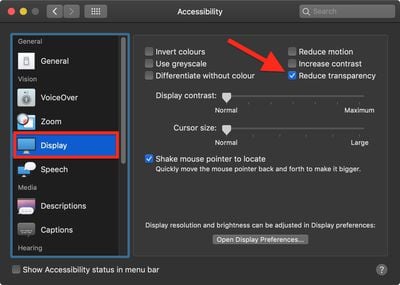
  3. In the sidebar, under Vision, click Display.
    how to disable transparency in macos 02

  4. Check the box next to Reduce transparency.
Related Forum: macOS Mojave

Top Rated Comments

103 months ago
Setting your Accent Colour to Greyscale also turns off wallpaper window tinting. Another tip to increase legibility.
[doublepost=1544791052][/doublepost]
Does this save resources at all? I used to do this on my iphones back in the day thinking I saved CPU cycles and ram.

None of this makes any difference on modern computers.
Score: 5 Votes (Like | Disagree)
102 months ago
There's no accent color called "Greyscale". It's called "Graphite".
You still knew which colour I was talking about.
I hope you realize that's an issue with whatever third-party browser and/or theme you're using.
I hope you realise they were being sarcastic.

Stop being obtusely fastidious.
Score: 2 Votes (Like | Disagree)
BigMcGuire Avatar
103 months ago
I still do this on my iPhone XR (started with the iPhone 5 and iOS 7). It’s less about resources at this stage, and more that I’ve come to prefer low transparency and reduced motion.


Same here! I thought I was the only one that did this. I am so happy to have found Reduced Motion for my MacBook thanks to this article, all these years I had no clue it existed (same for transparency for Mac OS). I've used both since my 6+ iPhone and prefer it.
Score: 2 Votes (Like | Disagree)
2499723 Avatar
103 months ago
Does this save resources at all? I used to do this on my iphones back in the day thinking I saved CPU cycles and ram.
I still do this on my iPhone XR (started with the iPhone 5 and iOS 7). It’s less about resources at this stage, and more that I’ve come to prefer low transparency and reduced motion.
Score: 2 Votes (Like | Disagree)
103 months ago
Setting your Accent Colour to Greyscale also turns off wallpaper window tinting. Another tip to increase legibility.
[doublepost=1544791052][/doublepost]
Recent betas remove the window tinting when using any accent color with reduce transparency enabled (I'm on 10.14.3 Beta (18D21c)). This is great. Tinting still remains in the dock, notification center, and alerts - no big deal, window tinting was the one that was really annoying.
Score: 2 Votes (Like | Disagree)
n-evo Avatar
102 months ago
You still knew which colour I was talking about.
Yeah, I did. However your instructions are meant for someone with less knowledge than me. "Greyscale" and "Graphite" are simply two wildly different things in the macOS landscape. If someone actually starts looking for "Greyscale" chances are they'll end up in Accessibility turning their entire screen black and white. Try to accept a well-meant correction with a little bit more grace. Especially when a fairly small textual difference makes a world of difference in practice.

I hope you realise they were being sarcastic.
Hah, I actually didn't catch it so I'll give you that. Truth be told it wouldn't be the first time around here someone doesn't know where the bug is actually coming from and thinks it's a macOS bug.
Score: 1 Votes (Like | Disagree)

Popular Stories

M5 MacBook Pro

RIP, MacBook Ultra

Monday October 19, 2026 9:37 am PDT by
Apple today sent out invites for an experience in Los Angeles on Wednesday, October 28, and the "Pro and tell" tagline on the invitation likely means that the rumored MacBook models with touch-enabled OLED displays will stick with MacBook Pro branding instead of the once-rumored "MacBook Ultra" name. The long-rumored "iPhone Ultra" ended up being named iPhone Duo, so speculation that Apple...
iPhone Duo Trio

Here's What Apple's Apps Look Like on the iPhone Duo

Tuesday October 20, 2026 11:12 am PDT by
With just three days to go until the iPhone Duo is released, Apple is getting ready for the launch. Behind the scenes, the App Store now has screenshots of Apple's built-in apps running on the Duo. We've seen some apps in marketing materials, but images of the ones we haven't seen give us an idea of what it will be like using the iPhone Duo day to day. Many apps are shown in landscape...
apple pro tell logo

Apple Announcing New Products Next Week: 'Pro and Tell'

Monday October 19, 2026 9:05 am PDT by
Apple's Greg Joswiak today hinted at new product announcements coming next week, sharing a social media post that says "Can't wait to pro and tell next week." Rumors suggest Apple is planning to debut the new MacBook Pro with an OLED touchscreen display, an M6 entry-level MacBook Pro, an M6 iMac, an iPad mini with an OLED display. Can't wait to pro and tell next week....
Latest Stories
Apple Blocks Certificates That Could Help Attackers Fake Websites
30 minutes ago
Giant iPhone Duo Installations Spotted at Apple Fifth Avenue
1 hour ago
iPhone Duo 2 Prototypes Include Under-Display Face ID
1 hour ago
Tesla App Gains iPad and iPhone Duo Support
5 hours ago
Apple Reportedly Boosts iPhone Duo Orders by 44%
6 hours ago
Fortnite Returning to Australian App Store After Court Ruling
6 hours ago
Apple Ordered to Open iPhone to Rival App Stores in Australia
7 hours ago
Apple Suppliers Face Hurdles Cutting Circuit Board Emissions
7 hours ago
Things Updated for iPhone Duo With Adaptive Layout
7 hours ago
Simplicity and Siri AI Are HomeView's Killer Features, Apple Says
8 hours ago
iPhone Duo Reviewers Really Miss Face ID
13 hours ago
Does the iPhone Duo Run Hot? Here's What Reviews Found
14 hours ago
Apple Music's New Look is Now Live on Apple's Website
15 hours ago
Anthropic Launches Claude Duet, a Proactive AI Agent
15 hours ago
What 32,000 Folds Did to the iPhone Duo's Hinge
16 hours ago
iPhone Duo's Hidden FaceTime Camera Takes 'Trash' Photos
18 hours ago
iPhone Duo Has 'Edge Light' Feature That Debuted on Macs Last Year
18 hours ago
Apple Support App Updated for iPhone Duo's Larger Display
18 hours ago
Amazon Sweetens the Deal on Entry-Level 16-Inch MacBook Pro With $570 Off
19 hours ago
iPhone Duo Tips Over on MagSafe Stands When Unfolded
19 hours ago
Apple Music's New Look Officially Announced
20 hours ago
iPhone Duo Supports Apple Pencil Starting With iOS 27.2
21 hours ago
iPhone Duo Accessories Roundup: Cases and Screen Protectors From OtterBox, ZAGG, and More
22 hours ago
Apple Stores Will Have 'Limited' Availability of iPhone Duo for Walk-In Customers
22 hours ago
iPhone Duo Reviews Explain Why Device is Both 'Fun' and 'Frustrating'
22 hours ago
Apple Says 'Reachability' Feature Coming to iPhone Duo Later This Year
1 day ago
Loop Capital Cuts Apple Rating Over iPhone Sales Outlook
1 day ago
Apple Stores in Bordeaux and Lille Looted During French Protests
1 day ago
Bluesound Adds Native Apple Music Support
1 day ago
Apple CEO John Ternus Explains What Makes Good Product Design
1 day ago