How to Disable WhatsApp Message Previews on iPhone - MacRumors
Skip to Content

How to Disable WhatsApp Message Previews on iPhone

by

whatsappiconcleanedFacebook's free WhatsApp instant messaging app uses end-to-end encryption so that messages exchanged over the platform can only be read by the intended recipient.

If you use WhatsApp for important conversations and you want to further ensure your privacy, you can prevent WhatsApp messages from showing previews on your iPhone.

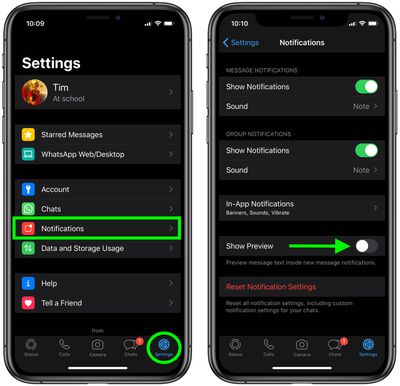
When you receive a WhatsApp message on your iPhone, the notification that appears displays a preview of the message content by default. You can disable message previews by following these simple steps.

  1. Launch WhatsApp on your iPhone.
  2. Tap the Settings icon in the bottom-right corner of the screen.
  3. Tap Notifications.
  4. Toggle off the switch next to Show Previews.
    whatsapp

Once you've performed these simple steps you will only receive the sender's name whenever there a notification of a message from someone. To turn message previews back on, just toggle the Show Previews switch back to the green ON position.


Popular Stories

Whatsapp Feature

WhatsApp Testing Paid 'Plus' Subscription Tier – Here's What's Included

Tuesday April 21, 2026 6:22 am PDT by
WhatsApp has started testing a paid subscription tier called WhatsApp Plus, which adds a set of personalization options on top of the standard messaging experience, according to WABetaInfo. The paid plan Meta is testing appears to be geared towards hardcore users who spend a lot of time in the app: subscribers get access to premium sticker packs with fullscreen overlay animations (visible to ...

Apple Event Logo

Apple's Next Era Begins September 1

Thursday May 7, 2026 10:36 am PDT by
Apple recently announced that Tim Cook will be stepping down as CEO later this year, after 15 years of leading the company. Effective September 1, Apple's hardware engineering chief John Ternus will become the company's next CEO, while Cook will become executive chairman of Apple's board of directors. In his new role, Apple said Cook will assist with "certain aspects" of the company,...
Instagram Feature 2

PSA: Instagram Encrypted Messaging Ends on Friday, May 8

Tuesday May 5, 2026 8:24 am PDT by
Instagram will remove end-to-end encryption for direct messages between users from May 8, 2026. When the date comes around, Meta will potentially be able to see the contents of all messages between users on the social media platform. Encrypting messages has been an optional feature in Instagram since 2023, but in March of this year the social media platform quietly updated a help page to say ...