
How to Use Do Not Disturb While Driving - MacRumors
Skip to Content

How to Use Do Not Disturb While Driving

by

Starting with iOS 11, Apple introduced a Do Not Disturb While Driving Feature that's designed to mute incoming calls, texts, and notifications while you're driving to cut down on accident-causing distractions.

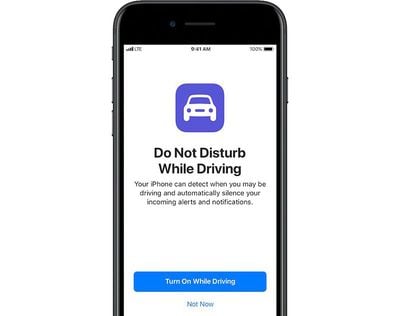
Do Not Disturb While Driving is not a feature that's enabled automatically, but you will see a popup prompting you to turn it on when Apple detects the motion of a car after installing iOS 11 or later for the first time. Despite the notification, you'll still need to choose how you want to use the feature if you miss the initial setup process.
donotdisturbdriving
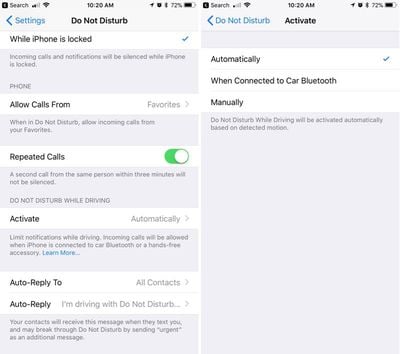
Do Not Disturb can be set to turn on manually, automatically when the iPhone detects a car's acceleration, or when an iPhone connects to a car's Bluetooth.

Enabling Do Not Disturb While Driving

  1. Open the Settings app.
  2. Tap Do Not Disturb.
  3. Scroll down to "Do Not Disturb While Driving." donotdisturbwhiledrivingsetup
  4. Tap on "Activate" to choose how you want Do Not Disturb While Driving to be turned on. If you don't want to use Do Not Disturb While Driving, set it to manual.
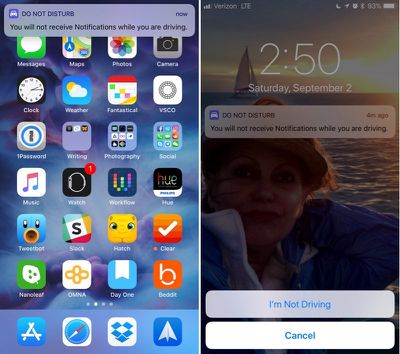
Whenever Do Not Disturb While Driving is activated, you'll see a bar at the top of the screen letting you know incoming notifications are being muted.

Do Not Disturb While Driving Control Center Toggle

If you don't want to have Do Not Disturb While Driving turn on automatically but still want to use it, there's a Control Center setting for activating it.

  1. Open the Settings app.
  2. Choose Control Center.
  3. Select Customize Controls. dndcontrolcenter
  4. Add Do Not Disturb While Driving, which has an image of a car.
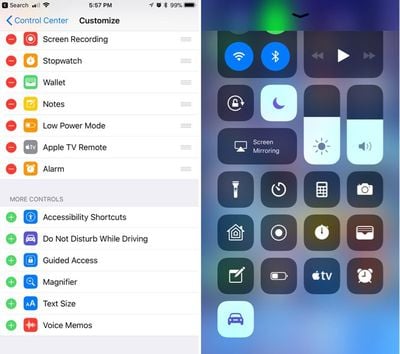
This adds the Do Not Disturb While Driving toggle to your Control Center. To turn it on or off, you just need to swipe to open the Control Center and tap it.

If You're a Passenger

When the automatic setting is enabled, Do Not Disturb While Driving will turn on whenever your iPhone detects the acceleration of a vehicle. This can be inconvenient if you're a passenger, so you'll need to turn it off through the Control Center or by tapping the persistent Do Not Disturb While Driving popup at the top of the display to let Apple know you're a passenger.
donotdisturbwhiledriving

Choosing Your Auto Reply Options

When you're driving, all of your incoming text messages are muted. You can choose an automatic text message that lets people know you're in the car and will text later, and you can customize who sees the message.
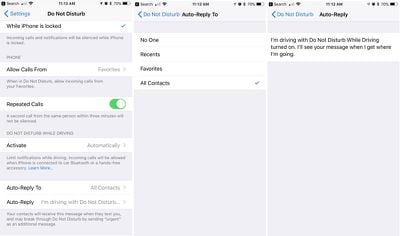
dndtextcustomization

  1. Open the Settings app.
  2. Choose Do Not Disturb.
  3. Scroll down to "Auto-Reply To" and tap it.
  4. You can choose for automatic texts to be sent to Recents, Favorites, All Contacts, or No one, if you would rather not have your phone send automatic replies.

Customizing Your Auto Reply

  1. Open the Settings app.
  2. Choose Do Not Disturb.
  3. Scroll down to "Auto-Reply" and tap it.

Apple sets a default message in this section, but you can change it to say whatever you want. This is the message people will receive when texting you when Do Not Disturb While Driving is enabled.

If there's an urgent issue and someone needs to get in contact with you immediately, they can break through Do Not Disturb While Driving by texting you "urgent." This will override your Do Not Disturb settings and will notify you of the text immediately.
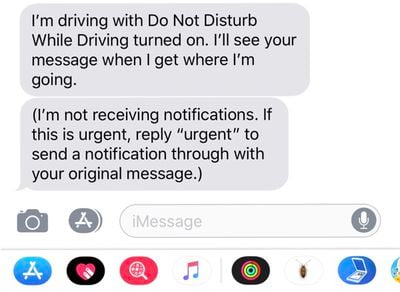
donotdisturbwhiledrivintext
An ideal setup is to set auto replies to your favorites, which likely translates to close friends and family. This will let them text you in an emergency situation, but will prevent other less urgent messages from being a distraction.

Phone Calls

If your iPhone is connected to your car's Bluetooth system, iOS is smart enough to know you have a hands-free calling method available. In this situation, calls will continue to come through even when Do Not Disturb While Driving is enabled. Texts and notifications from apps will continue to be muted, though.

If you're not connected to Bluetooth and have no hands-free accessory, calls will be blocked like text messages and notifications.

Parental Restrictions

For parents of teenagers, there's an option to enable a restriction that will prevent Do Not Disturb While Driving settings from being changed or toggled off, guaranteeing children are using the feature whenever they're in the car. Here's how to turn it on (iOS 12 or later):

  1. Open the Settings app.
  2. Choose Screen Time.
  3. Tap on Content & Privacy Restrictions.
  4. Tap on the Content & Privacy Restrictions toggle to turn on restrictions.
  5. Scroll down to Do Not Disturb While Driving and tap it.
  6. Choose Don't Allow.

On devices running an earlier version of iOS, there are different steps to follow to access device restrictions. Open the Settings app, choose General, scroll down to Restrictions and then tap it. Enter your passcode and then find the "Do Not Disturb While Driving" option and choose "Don't Allow Changes."


Top Rated Comments

soupcan Avatar
119 months ago
I have a way shorter version.

Step 1: put phone on silent.
Step 2: put phone in pocket and keep it there.
Step 2: ???
Step 3: profit.

And if you're the kind of person who can't keep his hands off of his phone and thinks it's more important than paying attention to the road then you shouldn't even have a drivers licence.
Score: 7 Votes (Like | Disagree)
Westside guy Avatar
119 months ago
This has happened to me twice now. You are not alone.
It makes me think of Microsoft Office back when they implemented Clippy.

"IT LOOKS LIKE YOU'RE DRIVING A CAR!" :confused:
Score: 4 Votes (Like | Disagree)
Peel Avatar
119 months ago
Do Not Disturb while Driving sounds good, but it's a bit infuriating. If I could decide which features to turn on it would be great, but as it is, it's all or nothing. I'm tired of getting in the car and saying "Hey Siri, open Waze", only to get a reply, "I'm sorry, I can't do that while you're driving." Well, if I can't open a navigation app while driving, that's pretty useless. I mean, when else would I want to open that app?

Score: 3 Votes (Like | Disagree)
sandman42 Avatar
118 months ago
I like the idea of this feature, but not the way that it now contradicts and completely invalidates using my phone for navigation once I’m underway, even hands-free. I access Siri hands-free, “give me directions to X”, and get the expected response “getting directions to X”, then... nothing happens. Why update navigation with lane guidance, etc, then do this? I hope they fix this with a setting. Seems like at the very least I should be able to get “eyes free” audio only directions.
Score: 2 Votes (Like | Disagree)
TheCannonator Avatar
119 months ago
I have a way shorter version.

Step 1: put phone on silent.
Step 2: put phone in pocket and keep it there.
Step 2: ???
Step 3: profit.

And if you're the kind of person who can't keep his hands off of his phone and thinks it's more important than paying attention to the road then you shouldn't even have a drivers licence.
Excuse me Mr. Perfect it lets people know you are driving so they don’t bother you.
Score: 2 Votes (Like | Disagree)
Westside guy Avatar
119 months ago
Brainless because it's something that various people have been asking for and will use?
I don't think "Do Not Disturb While Driving" is a bad idea. I don't necessarily even think enabling it by default is a bad idea.

I find current implementation, though, is rather... sub-optimal.
Score: 1 Votes (Like | Disagree)

Popular Stories

M5 MacBook Pro

RIP, MacBook Ultra

Monday October 19, 2026 9:37 am PDT by
Apple today sent out invites for an experience in Los Angeles on Wednesday, October 28, and the "Pro and tell" tagline on the invitation likely means that the rumored MacBook models with touch-enabled OLED displays will stick with MacBook Pro branding instead of the once-rumored "MacBook Ultra" name. The long-rumored "iPhone Ultra" ended up being named iPhone Duo, so speculation that Apple...
iPhone Duo Trio

Here's What Apple's Apps Look Like on the iPhone Duo

Tuesday October 20, 2026 11:12 am PDT by
With just three days to go until the iPhone Duo is released, Apple is getting ready for the launch. Behind the scenes, the App Store now has screenshots of Apple's built-in apps running on the Duo. We've seen some apps in marketing materials, but images of the ones we haven't seen give us an idea of what it will be like using the iPhone Duo day to day. Many apps are shown in landscape...
apple pro tell logo

Apple Announcing New Products Next Week: 'Pro and Tell'

Monday October 19, 2026 9:05 am PDT by
Apple's Greg Joswiak today hinted at new product announcements coming next week, sharing a social media post that says "Can't wait to pro and tell next week." Rumors suggest Apple is planning to debut the new MacBook Pro with an OLED touchscreen display, an M6 entry-level MacBook Pro, an M6 iMac, an iPad mini with an OLED display. Can't wait to pro and tell next week....
Latest Stories
Tesla App Gains iPad and iPhone Duo Support
2 hours ago
Apple Reportedly Boosts iPhone Duo Orders by 44%
3 hours ago
Fortnite Returning to Australian App Store After Court Ruling
3 hours ago
Apple Ordered to Open iPhone to Rival App Stores in Australia
3 hours ago
Apple Suppliers Face Hurdles Cutting Circuit Board Emissions
4 hours ago
Things Updated for iPhone Duo With Adaptive Layout
4 hours ago
Simplicity and Siri AI Are HomeView's Killer Features, Apple Says
5 hours ago
iPhone Duo Reviewers Really Miss Face ID
10 hours ago
Does the iPhone Duo Run Hot? Here's What Reviews Found
11 hours ago
Apple Music's New Look is Now Live on Apple's Website
12 hours ago
Anthropic Launches Claude Duet, a Proactive AI Agent
12 hours ago
What 32,000 Folds Did to the iPhone Duo's Hinge
13 hours ago
iPhone Duo's Hidden FaceTime Camera Takes 'Trash' Photos
15 hours ago
iPhone Duo Has 'Edge Light' Feature That Debuted on Macs Last Year
15 hours ago
Apple Support App Updated for iPhone Duo's Larger Display
15 hours ago
Amazon Sweetens the Deal on Entry-Level 16-Inch MacBook Pro With $570 Off
16 hours ago
iPhone Duo Tips Over on MagSafe Stands When Unfolded
16 hours ago
Apple Music's New Look Officially Announced
17 hours ago
iPhone Duo Supports Apple Pencil Starting With iOS 27.2
18 hours ago
iPhone Duo Accessories Roundup: Cases and Screen Protectors From OtterBox, ZAGG, and More
19 hours ago
Apple Stores Will Have 'Limited' Availability of iPhone Duo for Walk-In Customers
19 hours ago
iPhone Duo Reviews Explain Why Device is Both 'Fun' and 'Frustrating'
19 hours ago
Apple Says 'Reachability' Feature Coming to iPhone Duo Later This Year
20 hours ago
Loop Capital Cuts Apple Rating Over iPhone Sales Outlook
1 day ago
Apple Stores in Bordeaux and Lille Looted During French Protests
1 day ago
Bluesound Adds Native Apple Music Support
1 day ago
Apple CEO John Ternus Explains What Makes Good Product Design
1 day ago
UK Proposes New Ways to Help Apple Pay Rivals
1 day ago
WhatsApp Developing In-App Browser for All Chat Links on iPhone
1 day ago
Apple's App Store Chief Explains Its Push for Premium Games
1 day ago








































