
In iOS 14.5, Apple has made some notable changes to its native Podcasts app. Some of these changes reflect the fact that Apple announced an optional paid podcast subscription service (beginning May 2021), while others are interface improvements to make it easier to find, follow, and listen to new episodes.
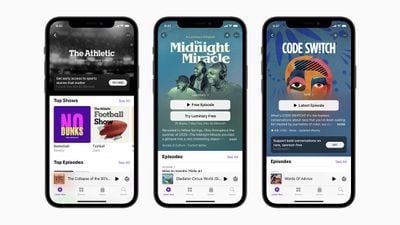
Apple Podcasts iOS 14 5
One example of these changes is the new Smart play button, which is designed to help you automatically start episodic shows from the latest episode and serialized shows from the beginning of each series. The Smart play button also display Resume if you've already listened to some of an episode but have yet to finish it.

Another notable change is in the Search tab, which now offers quick access to Top Charts and categories below the search input field, much like Apple Music search. Other tweaks include larger podcast artwork and a rejigged show page that has a more logical arrangement and is more aesthetically appealing.
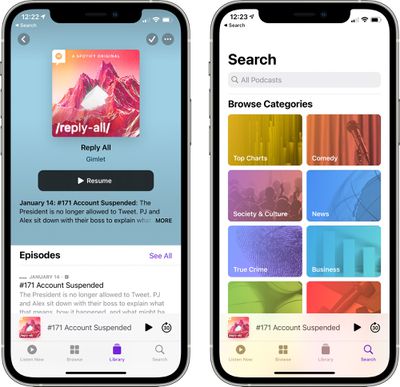
podcast app design changes
Perhaps most importantly, the way you "subscribe" to shows and download episodes has changed. Keep reading to learn how.

How to Follow Shows

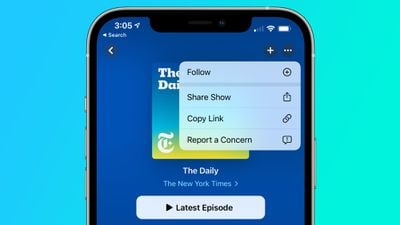
In previous versions of iOS, you could "subscribe" to shows in Apple's Podcasts app. But now that Apple offers a paid podcast subscription mode, it has removed the "subscribe" language from the app entirely and replaced it with Follow options, which should make things less confusing.

Despite the new terminology, following a podcast offers the same functionality as subscribing had before it. Namely, it means that you'll stay up-to-date with new show episodes as they're published and you'll be able to download them individually.
ios 14 5 podcasts
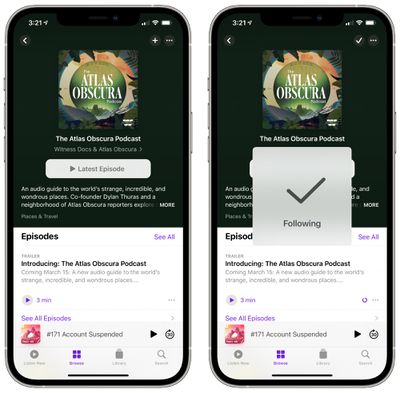
To follow a show, select one by browsing the Podcasts section, or search for one using the Search tab, then tap the plus (+) icon in the top-right corner of the Show's page.
podcast app ios 14 5
To stop following a show, tap the tick icon and select Unfollow Show. You can also follow or unfollow shows by using the dropdown options that appear when you tap the More icon (three dots in a circle).

How to Automatically Download New Episodes

In previous versions of the Podcasts app, you had to add a show to your library before you could download new episodes. In iOS 14.5 and later, that's no longer the case, and you can download individual episodes right from a show's page.

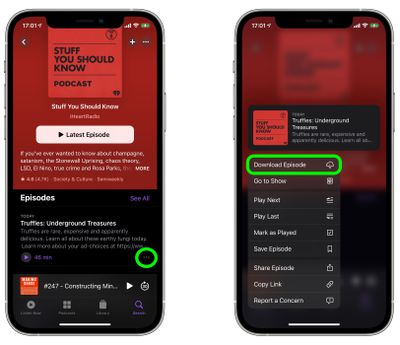
To download an episode, tap the ellipsis icon (three dots) to the right of its card and select Download Episode from the pop-up menu.
podcasts
Alternately, you can long press on an episode and the same pop-up menu will appear with the Download Episode option at the bottom. If the episode is already downloaded, the option appears as Remove Download instead.

If you're already following a show, you can turn off automatic downloads: Tap the tick icon at the top of a show page and select Turn Off Automatic Downloads. To turn them back on again, tap the down arrow icon that replaced the tick icon, and select Turn On Automatic Downloads.


Related Forum: iOS 14

Top Rated Comments

Jaro65 Avatar
63 months ago
At what point will we say, "enough with the darn subscriptions!"?
Score: 8 Votes (Like | Disagree)
Desmondhuz Avatar
63 months ago
The updated podcast app downloaded about 50 old episodes of shows I had already listened to and I had to manually delete them. Smh
Score: 8 Votes (Like | Disagree)
FloatingBones Avatar
63 months ago
Overcast works just fine for me. No thanks.
Score: 7 Votes (Like | Disagree)
NeuralControl Avatar
63 months ago
Visually, the update is nice. However, as someone who did not subscribe to podcasts before, but rather had them in my library and I could manually add the episodes I wanted, I'm not loving the new "follow" feature. Despite going into Settings and turning off automatic downloads, every episode I play is downloaded.
I also really don't like that you can't delete episodes of "followed" podcasts from your feed. You can only mark them as played.
Score: 5 Votes (Like | Disagree)
macfacts Avatar
63 months ago

The updated podcast app downloaded about 50 old episodes of shows I had already listened to and I had to manually delete them. Smh
Apple respects your privacy, they have no idea what you listened to.
Score: 3 Votes (Like | Disagree)
robjulo Avatar
63 months ago
Won't be a popular opinion, but I had actually gotten to like the podcast app. Interested to see how well the new features work.
Score: 3 Votes (Like | Disagree)

Popular Stories

Apple Logo Zoomed

Tim Cook Teases Plans for Apple's Upcoming 50th Anniversary

Thursday February 5, 2026 12:54 pm PST by
Apple turns 50 this year, and its CEO Tim Cook has promised to celebrate the milestone. The big day falls on April 1, 2026. "I've been unusually reflective lately about Apple because we have been working on what do we do to mark this moment," Cook told employees today, according to Bloomberg's Mark Gurman. "When you really stop and pause and think about the last 50 years, it makes your heart ...
wwdc sans text feature

Apple Rumored to Announce New Product on February 19

Thursday February 5, 2026 12:22 pm PST by
Apple plans to announce the iPhone 17e on Thursday, February 19, according to Macwelt, the German equivalent of Macworld. The report, citing industry sources, is available in English on Macworld. Apple announced the iPhone 16e on Wednesday, February 19 last year, so the iPhone 17e would be unveiled exactly one year later if this rumor is accurate. It is quite uncommon for Apple to unveil...
Finder Siri Feature

Why Apple's iOS 26.4 Siri Upgrade Will Be Bigger Than Originally Promised

Friday February 6, 2026 3:06 pm PST by
In the iOS 26.4 update that's coming this spring, Apple will introduce a new version of Siri that's going to overhaul how we interact with the personal assistant and what it's able to do. The iOS 26.4 version of Siri won't work like ChatGPT or Claude, but it will rely on large language models (LLMs) and has been updated from the ground up. Upgraded Architecture The next-generation...
iOS 26

iOS 26.3 and iOS 26.4 Will Add These New Features to Your iPhone

Tuesday February 3, 2026 7:47 am PST by
While the iOS 26.3 Release Candidate is now available ahead of a public release, the first iOS 26.4 beta is likely still at least a week away. Following beta testing, iOS 26.4 will likely be released to the general public in March or April. Below, we have recapped known or rumored iOS 26.3 and iOS 26.4 features so far. iOS 26.3 iPhone to Android Transfer Tool iOS 26.3 makes it easier...
iphone 17 pro dark blue 1

iPhone 18 Pro Max Rumored to Deliver Next-Level Battery Life

Friday February 6, 2026 5:14 am PST by
The iPhone 18 Pro Max will feature a bigger battery for continued best-in-class battery life, according to a known Weibo leaker. Citing supply chain information, the Weibo user known as "Digital Chat Station" said that the iPhone 18 Pro Max will have a battery capacity of 5,100 to 5,200 mAh. Combined with the efficiency improvements of the A20 Pro chip, made with TSMC's 2nm process, the...














