
Disappearing Safari Tabs on iPhone or iPad? How to Find Them - MacRumors
Skip to Content

Disappearing Safari Tabs on iPhone or iPad? How to Find Them

by

Every so often, a seemingly small bug in Apple's operating systems survives the company's annual OS launches and continues to cause users huge frustration from one software update to the next.
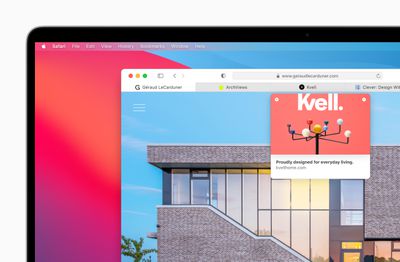
apple macos bigsur safari improvedtabs 06222020
The phenomenon of disappearing tabs in Safari is one such problem -– reports of multiple Safari tabs vanishing without a trace go back to at least iOS 13 and the issue still to this day blights the browser experience for some.

While there isn't an accepted solution to the problem of disappearing tabs, there are cases where it might seem that your tabs are gone, when in fact they are just hidden from view. Here are some ways that you may be able to get them back or stop them from disappearing in the first place.

Reveal Hidden Tabs

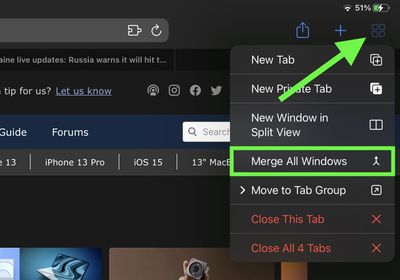
On iPadOS, for example, if you press and hold the Show Tab Overview button (four squares in a quadrant) in the top-right corner of the Safari window, this will reveal a dropdown menu that includes an option to Merge All Windows.
safari
Select this option, and all of your open tabs should appear in the current window, potentially including some that were not visible in the Tab Overview screen. Why this happens isn't entirely clear, but it may have something to do with the way iPadOS manages Safari windows that have been opened in Split View mode.

Reveal the Shelf

Another action worth trying on iPadOS is pressing and holding the Safari icon in the Dock or on the Home Screen and selecting Show All Windows from the popup menu that appears.

shelf
This will reveal any open windows in a shelf directly above the Dock, allowing you to switch between them and potentially reveal any tabs that had gotten lost.

Recently Closed Tabs

If you have an inkling that some of the tabs you're missing have been inadvertently closed, you can always use the Recently Closed Tabs option to re-open them. All you have to do is open up the tab view in Safari and long press on the "+" icon to get a look at all of the tabs that you've recently closed.


Even if you're aware of the gesture, it's worth a reminder that this feature exists in case someone gets ahold of your phone and checks your browser. Even if you've closed out a tab, it's still going to be visible in Safari, unless you were using a private browser window or have cleared your browsing history.

Turn Off Auto-Close Tabs

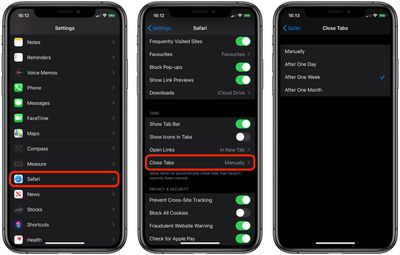
If you still haven't been able to find some of your tabs, make sure that Safari isn't closing them after a certain duration on your behalf: Open Settings, tap through to Safari -> Close Tabs and ensure that Manually is selected.
safari tabs

Bookmark All Open Tabs

If the above suggestions haven't worked for you, there is a workaround: Consider bookmarking your open tabs after each browsing session. This might sound like more hassle than it's worth, but since iOS 13 Apple has included a one-tap option to just that.
safari tabs
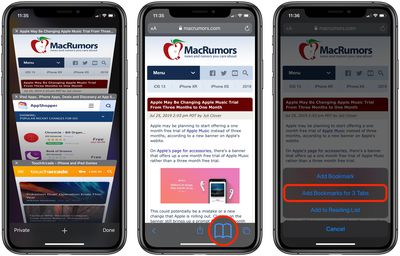
If you're on iPhone, make sure you have a few tabs open in Safari that you want to reference at a later time. Now, select one of those tabs, and in the main browsing window, long press the Bookmark icon (it looks like an open book).

A popup menu will appear at the on the screen from which you can select Add Bookmarks for X Tabs, the X being the number of tabs open.

Once you've tapped this option, you'll be asked to save the tabs in a new bookmarks folder (remember to give it a recognizable name). Alternately, you can choose a location from the existing folder list in which to save the tabs.
safari
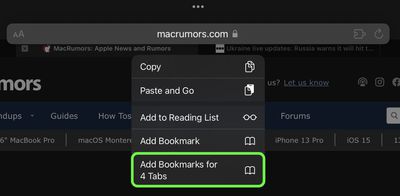
If you're on iPad, make sure you have a few tabs open in Safari, then simply press and hold on the address bar and select Add Bookmarks for X Tabs.

To access your bookmarks in Safari at any time, simply tap the Bookmarks icon in the main browsing interface or the sidebar to reveal all of your saved favorites and folders. Press and hold on the folder of bookmarks and select Open in New Tabs, or alternatively, Open in Tab Group if you want them grouped.


Tag: Safari

Popular Stories

Switch to Safari

Apple Explains Why Chrome Users Should 'Switch to Safari'

Tuesday October 13, 2026 5:29 am PDT by
Apple has launched a new "Switch to Safari" marketing campaign that encourages Chrome users to switch to Safari as their web browser of choice on the Mac. "Safari is a more powerful and private browser than Chrome," says Apple. Apple has a new "Switch to Safari" page on its website that outlines more than 10 reasons that Chrome users should switch to Safari, including faster performance...

M5 MacBook Pro

RIP, MacBook Ultra

Monday October 19, 2026 9:37 am PDT by
Apple today sent out invites for an experience in Los Angeles on Wednesday, October 28, and the "Pro and tell" tagline on the invitation likely means that the rumored MacBook models with touch-enabled OLED displays will stick with MacBook Pro branding instead of the once-rumored "MacBook Ultra" name. The long-rumored "iPhone Ultra" ended up being named iPhone Duo, so speculation that Apple...
iPhone Duo Trio

Here's What Apple's Apps Look Like on the iPhone Duo

Tuesday October 20, 2026 11:12 am PDT by
With just three days to go until the iPhone Duo is released, Apple is getting ready for the launch. Behind the scenes, the App Store now has screenshots of Apple's built-in apps running on the Duo. We've seen some apps in marketing materials, but images of the ones we haven't seen give us an idea of what it will be like using the iPhone Duo day to day. Many apps are shown in landscape...
Latest Stories
Apple Will Label Apps 'Made for iPhone Duo' in App Store
2 hours ago
Amazon Takes $49 Off iPad With Prices Starting at $399.99
3 hours ago
F1 on Apple TV Now Available in Dolby Atmos
3 hours ago
Apple Reveals More Than 50 Apps That Will Be Updated for iPhone Duo
4 hours ago
Apple Blocks Certificates That Could Help Attackers Fake Websites
5 hours ago
Giant iPhone Duo Installations Spotted at Apple Fifth Avenue
6 hours ago
iPhone Duo 2 Prototypes Include Under-Display Face ID
6 hours ago
Tesla App Gains iPad and iPhone Duo Support
10 hours ago
Apple Reportedly Boosts iPhone Duo Orders by 44%
11 hours ago
Fortnite Returning to Australian App Store After Court Ruling
11 hours ago
Apple Ordered to Open iPhone to Rival App Stores in Australia
11 hours ago
Apple Suppliers Face Hurdles Cutting Circuit Board Emissions
12 hours ago
Things Updated for iPhone Duo With Adaptive Layout
12 hours ago
Simplicity and Siri AI Are HomeView's Killer Features, Apple Says
12 hours ago
iPhone Duo Reviewers Really Miss Face ID
17 hours ago
Does the iPhone Duo Run Hot? Here's What Reviews Found
19 hours ago
Apple Music's New Look is Now Live on Apple's Website
20 hours ago
Anthropic Launches Claude Duet, a Proactive AI Agent
20 hours ago
What 32,000 Folds Did to the iPhone Duo's Hinge
21 hours ago
iPhone Duo's Hidden FaceTime Camera Takes 'Trash' Photos
22 hours ago
iPhone Duo Has 'Edge Light' Feature That Debuted on Macs Last Year
23 hours ago
Apple Support App Updated for iPhone Duo's Larger Display
23 hours ago
Amazon Sweetens the Deal on Entry-Level 16-Inch MacBook Pro With $570 Off
23 hours ago
iPhone Duo Tips Over on MagSafe Stands When Unfolded
1 day ago
Apple Music's New Look Officially Announced
1 day ago
iPhone Duo Supports Apple Pencil Starting With iOS 27.2
1 day ago
iPhone Duo Accessories Roundup: Cases and Screen Protectors From OtterBox, ZAGG, and More
1 day ago
Apple Stores Will Have 'Limited' Availability of iPhone Duo for Walk-In Customers
1 day ago
iPhone Duo Reviews Explain Why Device is Both 'Fun' and 'Frustrating'
1 day ago
Apple Says 'Reachability' Feature Coming to iPhone Duo Later This Year
1 day ago









































