
iOS 18: Hide App Names on Your iPhone Home Screen - MacRumors
Skip to Content

iOS 18: Hide App Names on Your iPhone Home Screen

by

In iOS 18, currently in beta, Apple has broadened the customization options for the Home Screen on iPhone, and thanks to a new setting it is now possible to make app icons and widgets bigger by hiding their labels.
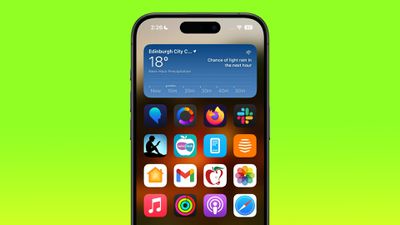
big icons home screen
With the setting enabled in iOS 18, the names of apps are removed from the grid, which increases the size of the icons and widgets on your Home Screen with the space saved. With larger icons, you still get a maximum of six icon rows with four icons each, the same that you're limited to when icon names are turned on.

If you're familiar enough with your favorite apps that you don't feel the need to see the names underneath the icons, then it's worth giving it a try. With the labels removed, the design of your app icons takes center stage, resulting in a cleaner look for your Home Screen. Note that this setting is universal, so you cannot have small icons on one app page and large icons on a different app page.

The following steps show you how it's done.

  1. Press on an empty space on your Home Screen to enter jiggle mode.
  2. Tap the Edit button in the top-left corner, then choose Customize.
  3. Tap the Large option in the customization panel.
  4. Tap on an empty space to hide the customization panel.
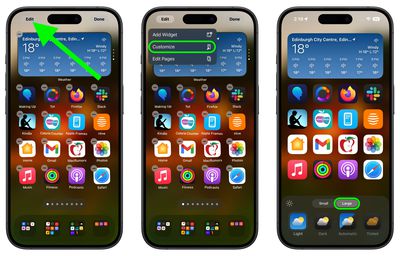
Home Screen
That's all there is to it. If you decide you want to see app labels again, simply repeat the steps, but choose the Small option in the customization panel instead. iOS 18 is currently in public beta and will be officially released to iPhone users in the fall.


Top Rated Comments

drinkingtea Avatar
23 months ago
I wish we could hide the labels without the icons going gigantic. Ugly.

Score: 37 Votes (Like | Disagree)
krspkbl Avatar
23 months ago
i want to keep icons the same size and remove names. when i increase the icon size it makes my iphone feel like a silly kids toy and a phone my grandparents would use!
Score: 29 Votes (Like | Disagree)
23 months ago
Keep icons the same size and remove the titles and we can get an extra row of icons on page. On my Max the icons look ridiculously large.
Score: 21 Votes (Like | Disagree)
23 months ago
Finally after a dozen years, iPhone is catching up to Android in terms of basic home screen customization.
Score: 13 Votes (Like | Disagree)
axantas Avatar
23 months ago

As well as covering more of the picture in the background.

Seems like something they can tweak through the Beta process (i.e. keep icons same size but remove text).

*someone on Beta program please request.
The option is just "make icons bigger". "Remove description" it can not be chosen separately. And as markgpearse writes, it also removes folder names. This is a bit silly then. I will report this.

Request done:
- make it selectable by user / Icon size / text /
- do not hide folder names, if selected.
Score: 8 Votes (Like | Disagree)
23 months ago
It not only removes app names :), but also removes folder names :(. I would like to remove app names only and keep the small size.
Score: 8 Votes (Like | Disagree)

Popular Stories

Apple Event Logo

Apple's Next Era Begins September 1

Thursday May 7, 2026 10:36 am PDT by
Apple recently announced that Tim Cook will be stepping down as CEO later this year, after 15 years of leading the company. Effective September 1, Apple's hardware engineering chief John Ternus will become the company's next CEO, while Cook will become executive chairman of Apple's board of directors. In his new role, Apple said Cook will assist with "certain aspects" of the company,...
Four iPhone 18 Pro Colors Mock Feature

iPhone 18 Pro Launching in September With These 10 New Features

Saturday May 9, 2026 6:03 am PDT by
While the iPhone 18 Pro and iPhone 18 Pro Max are not launching until September, there are already plenty of rumors about the devices. It was initially reported that the iPhone 18 Pro models would have fully under-screen Face ID, with only a front camera visible in the top-left corner of the screen. However, the latest rumors indicate that only one Face ID component will be moved under the...
MacBook Pro Low Angle Wide Lens

macOS 27: Two More Changes Leaked Ahead of WWDC Next Month

Sunday May 10, 2026 9:45 am PDT by
macOS 27 will have a "slight redesign" compared to macOS Tahoe, along with an option to automatically group tabs in Safari, according to Bloomberg's Mark Gurman. In his Power On newsletter today, Gurman said the design changes will help to address some of the criticism surrounding macOS Tahoe's new Liquid Glass interface. In particular, the changes should improve overall readability....








































