How to Install the iOS 16 Public Beta - GeekWebGuides
Skip to Content

How to Install the iOS 16 Public Beta

by

Apple today seeded new iOS 16 and iPadOS 16 beta updates to its public beta testing group, giving non-developers an opportunity to try out the new software ahead of its fall launch.


Signing up to get the iOS 16 or iPadOS 16 beta is simple, and can be done by enrolling an iPhone or iPad in Apple's free Apple Beta Software Program. Instructions are below.
apple beta software ios 16

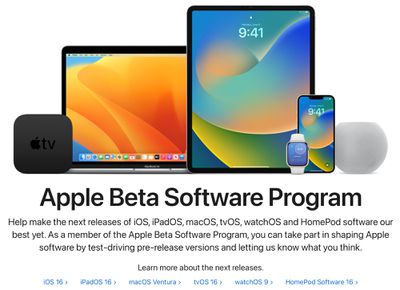
  1. On your iOS device, open up Safari and navigate to the Apple Beta Software Program website.
  2. Tap the Sign up button and enter your Apple ID credentials, or sign in with your ‌Apple ID‌ if you've signed up to beta test a previous update.
  3. Agree to the Apple Beta Software Program terms and conditions if required.
  4. After signing in, you'll see a main screen that's a Guide for Public Betas. Click on iOS (or iPadOS if you're installing on an ‌iPad‌).
  5. Read through Apple's instructions carefully, and then using the link in the "Get Started" section, select "enroll your iOS device."
  6. Make sure to make an archived backup of your current version of iOS using Finder by following Apple's instructions or using our tutorial below. This will allow you to downgrade back to iOS 15 if necessary and is crucial if you don't enjoy the iOS 16 testing experience.
  7. Scroll down and tap on the "Download profile" button.
  8. When you see a popup that says the website is trying to download a configuration profile, tap on "Allow."
  9. Open up the Settings app on your iOS device and then tap on the "Profile Downloaded" section that's located right below your ‌Apple ID‌ information.
  10. In the upper right corner of the screen, tap on "Install."
  11. Enter your passcode and then tap "Install" again. If you have a prior beta profile installed, you may need to remove it at this point under General > Profile and redo the above steps. Otherwise, agree to the consent text and tap "Install" a third time.
  12. Tap Done.
  13. Your phone will prompt you to restart. From there, go back to the main Settings screen.
  14. Under "General," choose "Software Update" and then "Download and Install."
  15. Once the beta update has been downloaded you can tap on "Install Now" to get it set up, and from there, the iPhone will install the software, restart, and you'll be up and running with the iOS 16 software.

Compatibility

iOS 16 is compatible with the iPhone 8 and later, and it unfortunately drops support for the iPhone 6s and iPhone 7 models. iPhones able to run iOS 16 are listed below.

  • iPhone 13
  • iPhone 13 mini
  • iPhone 13 Pro
  • iPhone 13 Pro Max
  • iPhone 12
  • iPhone 12 mini
  • iPhone 12 Pro
  • iPhone 12 Pro Max
  • iPhone 11
  • iPhone 11 Pro
  • iPhone 11 Pro Max
  • iPhone XS
  • iPhone XS Max
  • iPhone XR
  • iPhone X
  • iPhone 8
  • iPhone 8 Plus
  • iPhone SE (2nd generation or later)

iPadOS 16 is compatible with the following iPads:

  • iPad Pro (all models)
  • iPad Air (3rd generation and later)
  • ‌iPad‌ (5th generation and later)
  • iPad mini (5th generation and later)

How to Make an Archived Backup

As mentioned in our tutorial for installing the public beta, it's essential to make an archived backup of your device if you want to be able to downgrade to a version of iOS 15. Once you upgrade to iOS 16, an iOS 16 backup cannot be restored to the iOS 15 software, which is why you need to make a backup beforehand. Here's how:

  1. Plug your iPhone, ‌iPad‌, or iPod touch into your Mac using the supplied cable.
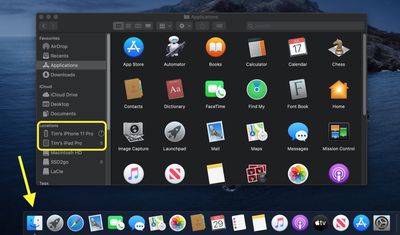
  2. Open a Finder window by clicking the Finder icon in the Dock.
  3. Click your iOS device's name in the sidebar.
    finder
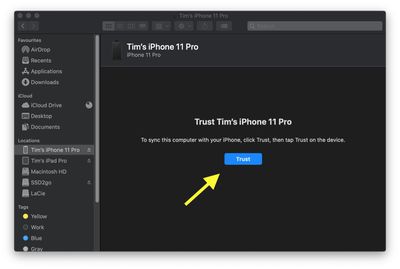
  4. If this is the first time connecting your device to your Mac, click Trust in the Finder window.
    finder
  5. Tap Trust on your device when prompted, then enter your passcode to confirm.
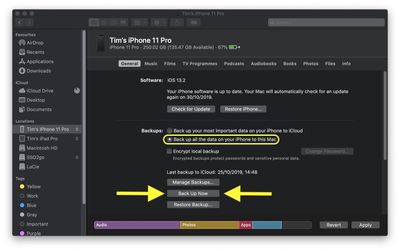
  6. In the General tab, click the circle next to where it says Back up all of the data on your [iPhone/iPad/iPod touch] to this Mac.
  7. If you don't want to create an encrypted backup, or you've already set up encrypted backups, click Back Up Now at the bottom of the General tab.
    finder

When the backup is finished, you can find the date and time of the last backup in the General tab, just above the Manage Backups button.

iOS 16 Features

iOS 16 is a significant update that brings an entirely overhauled Lock Screen experience on the iPhone, letting you customize the look of your device in new ways. Lock Screens can now have widgets, and can be linked to Focus modes.

FaceTime supports Handoff, there are new health and fitness features, Apple added better photo sharing with iCloud Shared Photo Library, and tons more. A full list of iOS 16 features can be found in our dedicated iOS 16 roundup.

Some of the iOS 16 features are not yet functional and won't be implemented until later in the beta testing period, which is something to be aware of. iOS and iPadOS 16 will be in beta testing for several months as Apple refines and updates the software ahead of its fall release.


Related Forum: iOS 16

Top Rated Comments

MacHiavelli Avatar
56 months ago
I use my iPhone to run the International Space station, control all the nuclear weapons on the planet, manage the electricity, gas, and water supplies of over eight billion people, and to take endless selfies of my over-inflated ego. Safe to install this beta?
Score: 23 Votes (Like | Disagree)
Apple_Robert Avatar
56 months ago
For the newbies: if you only have 1 phone, it is not a good idea to install the beta on your primary device. Too many bad things can go wrong using a beta and potentially leave you unable to use necessary apps or worse, the phone itself. It doesn't matter if 50% of the beta users here say they don't usually have any problems. What matters, is not putting yourself in a situation where you can't use your phone.


Score: 12 Votes (Like | Disagree)
56 months ago
If you don't know how to install this beta yourself, then you'd better not do it.
Score: 9 Votes (Like | Disagree)
iGeneo Avatar
56 months ago
Here we go folks... be nice to the newbies
Score: 6 Votes (Like | Disagree)
Rafagon Avatar
56 months ago

For the newbies: if you only have 1 phone, it is not a good idea to install the beta on your primary device. Too many bad things can go wrong using a beta and potentially leave you unable to use necessary apps or worse, the phone itself. It doesn't matter if 50% of the beta users here say they don't usually have any problems. What matters, is not putting yourself in a situation where you can't use your phone.
Thank you for this post. I don't consider myself a newbie, but I do have many apps that I wouldn't want to go without.

For a brief moment, I felt like trying out the beta, but your post convinced me not to. Two months is not a long time to wait to experience iOS 16.
Score: 5 Votes (Like | Disagree)
56 months ago

If you don't know how to install this beta yourself, then you'd better not do it.
This argument is pretty weak, we’ve all done it for the first time right?
Score: 5 Votes (Like | Disagree)

Popular Stories

M5 MacBook Pro

RIP, MacBook Ultra

Monday October 19, 2026 9:37 am PDT by
Apple today sent out invites for an experience in Los Angeles on Wednesday, October 28, and the "Pro and tell" tagline on the invitation likely means that the rumored MacBook models with touch-enabled OLED displays will stick with MacBook Pro branding instead of the once-rumored "MacBook Ultra" name. The long-rumored "iPhone Ultra" ended up being named iPhone Duo, so speculation that Apple...
iPhone Duo Trio

Here's What Apple's Apps Look Like on the iPhone Duo

Tuesday October 20, 2026 11:12 am PDT by
With just three days to go until the iPhone Duo is released, Apple is getting ready for the launch. Behind the scenes, the App Store now has screenshots of Apple's built-in apps running on the Duo. We've seen some apps in marketing materials, but images of the ones we haven't seen give us an idea of what it will be like using the iPhone Duo day to day. Many apps are shown in landscape...
apple pro tell logo

Apple Announcing New Products Next Week: 'Pro and Tell'

Monday October 19, 2026 9:05 am PDT by
Apple's Greg Joswiak today hinted at new product announcements coming next week, sharing a social media post that says "Can't wait to pro and tell next week." Rumors suggest Apple is planning to debut the new MacBook Pro with an OLED touchscreen display, an M6 entry-level MacBook Pro, an M6 iMac, an iPad mini with an OLED display. Can't wait to pro and tell next week....
Latest Stories
Apple Reveals More Than 50 Apps That Will Be Updated for iPhone Duo
15 minutes ago
Apple Blocks Certificates That Could Help Attackers Fake Websites
2 hours ago
Giant iPhone Duo Installations Spotted at Apple Fifth Avenue
2 hours ago
iPhone Duo 2 Prototypes Include Under-Display Face ID
3 hours ago
Tesla App Gains iPad and iPhone Duo Support
7 hours ago
Apple Reportedly Boosts iPhone Duo Orders by 44%
7 hours ago
Fortnite Returning to Australian App Store After Court Ruling
7 hours ago
Apple Ordered to Open iPhone to Rival App Stores in Australia
8 hours ago
Apple Suppliers Face Hurdles Cutting Circuit Board Emissions
8 hours ago
Things Updated for iPhone Duo With Adaptive Layout
8 hours ago
Simplicity and Siri AI Are HomeView's Killer Features, Apple Says
9 hours ago
iPhone Duo Reviewers Really Miss Face ID
14 hours ago
Does the iPhone Duo Run Hot? Here's What Reviews Found
15 hours ago
Apple Music's New Look is Now Live on Apple's Website
16 hours ago
Anthropic Launches Claude Duet, a Proactive AI Agent
16 hours ago
What 32,000 Folds Did to the iPhone Duo's Hinge
17 hours ago
iPhone Duo's Hidden FaceTime Camera Takes 'Trash' Photos
19 hours ago
iPhone Duo Has 'Edge Light' Feature That Debuted on Macs Last Year
19 hours ago
Apple Support App Updated for iPhone Duo's Larger Display
19 hours ago
Amazon Sweetens the Deal on Entry-Level 16-Inch MacBook Pro With $570 Off
20 hours ago
iPhone Duo Tips Over on MagSafe Stands When Unfolded
20 hours ago
Apple Music's New Look Officially Announced
21 hours ago
iPhone Duo Supports Apple Pencil Starting With iOS 27.2
22 hours ago
iPhone Duo Accessories Roundup: Cases and Screen Protectors From OtterBox, ZAGG, and More
23 hours ago
Apple Stores Will Have 'Limited' Availability of iPhone Duo for Walk-In Customers
23 hours ago
iPhone Duo Reviews Explain Why Device is Both 'Fun' and 'Frustrating'
1 day ago
Apple Says 'Reachability' Feature Coming to iPhone Duo Later This Year
1 day ago
Loop Capital Cuts Apple Rating Over iPhone Sales Outlook
1 day ago
Apple Stores in Bordeaux and Lille Looted During French Protests
1 day ago
Bluesound Adds Native Apple Music Support
1 day ago