Apple released a public beta of iPadOS for compatible iPad models, enabling users who aren't signed up for the Apple Developer Program to test the software update ahead of its official release in the fall.

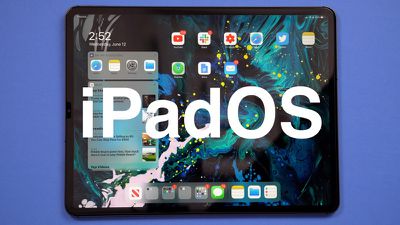
iPadOS is a rebranded version of iOS 13 specially made for iPads, with extra features designed to take advantage of larger tablet displays. It includes an updated Home screen, improved multitasking functionality, new Apple Pencil functionality, support for external drives, folder sharing in Files, text editing improvements, and all of the other new changes in iOS 13.
ipados 1
With that said, bear in mind that iPadOS is pre-release software, so installing the public beta on a secondary device is highly recommended. The stability of beta software cannot be guaranteed, as it often contains bugs and issues that have yet to be ironed out, so installing it on your day-to-day device isn't advised.

Is iPadOS Compatible With My iPad?

Apple's list of compatible devices confirms that iPadOS is compatible with all of these ‌iPad‌ models:

  • 12.9-inch iPad Pro 3rd generation
  • 12.9-inch ‌iPad Pro‌ 2nd generation
  • 12.9-inch ‌iPad Pro‌ 1st generation
  • 11-inch ‌iPad Pro‌
  • 10.5-inch ‌iPad Pro‌
  • 9.7-inch ‌iPad Pro‌
  • ‌iPad‌ 6th generation (2018 model)
  • ‌iPad‌ 5th generation
  • iPad Air 3 (2019 model)
  • ‌iPad Air‌ 2
  • iPad mini 5 (2019 model)
  • ‌iPad mini‌ 4

Installing the Public Beta shouldn't take longer than half an hour, but first you should create a backup of your device's contents and settings by following the step-by-step instructions below.

How to Create a Backup of Your iPad in iTunes

  1. Connect your ‌iPad‌ to a Mac or PC using a Lightning to USB cable or a USB-C to USB cable, depending on the model.

  2. Open iTunes.
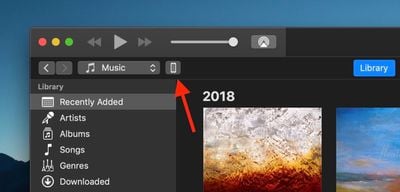
  3. Click the device icon in the top-left menu and select your ‌iPad‌.
    how to install the iPadOS Public Beta 1
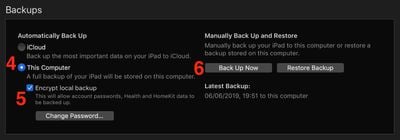
  4. Under Backups, click This computer.
  5. Tick the Encrypt local backup checkbox if you want to securely back up your login credentials and any Health and HomeKit data.
    how to install the iPadOS Public Beta 2
  6. Click Back Up Now.
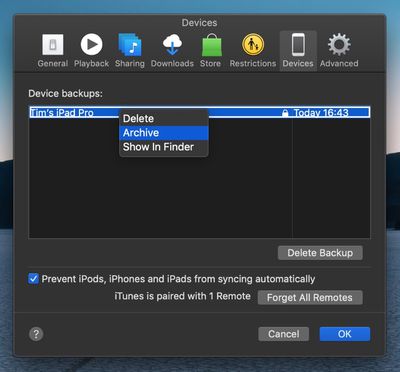
  7. Click iTunes -> Preferences… in the macOS menu bar.
  8. Click the Devices tab.
    how to install the ipados public beta 3
  9. Right-click (or Ctrl-click) the new backup, and select Archive from the contextual dropdown menu.
How to Enroll in the Apple Beta Software Program

Now that you've backed up your device, you're ready to download the iPadOS Public Beta. To do so, you must enroll your ‌iPad‌ in the free Apple Beta Software Program.

  1. Open Safari on your ‌iPad‌ and navigate to the Apple Beta Software Program.
  2. Tap the Sign up button, or sign in if you're already a member.
  3. Enter your Apple ID credentials and tap the Sign in button.
  4. Agree to the Apple Beta Software Program terms and conditions if necessary.
    how to install ipados public beta 4
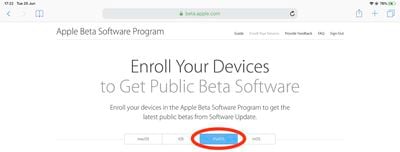
  5. A Guide for Public Betas screen will appear. Select the iPadOS tab, scroll down to the Get Started section and tap enroll your iOS device.
  6. On the Enroll Your Devices screen, with the iPadOS tab selected, scroll down and tap the Download profile button. how to install ipados public beta 5
  7. Tap Allow at the profile prompt.
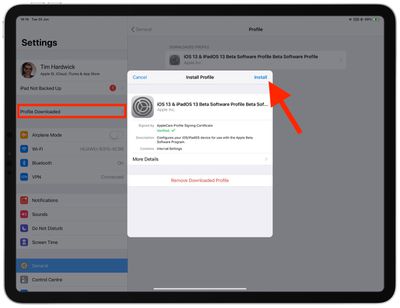
  8. Launch the Settings app on your iOS device and then tap Profile Downloaded below your ‌Apple ID‌ banner.
    how to install the iPadOS Public Beta 7
  9. Tap Install and follow the prompts to install the iOS Beta Software Profile.
  10. Restart your device after installing the profile by tapping the restart popup.
How to Install the iPadOS Public Beta

Once you're enrolled in the Apple Beta Software Program, you can install the iPadOS Public Beta on your iOS device just as you would a regular software update.

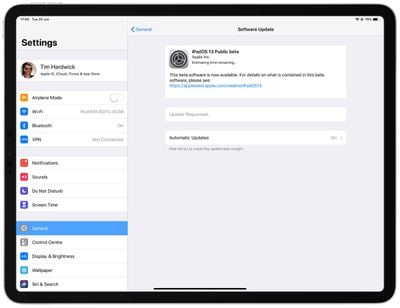
  1. Launch the Settings app on your ‌iPad‌.
  2. Tap General -> Software Update.
    how to install the iPadOS Public Beta 6
  3. Tap Download and Install.
  4. Tap Install Now.

If you come across any issues installing the iPadOS Public Beta, it may help to clear any previous profiles lingering on your device. You can find these in the Settings app under General -> Profile.


Want to discuss the iPadOS beta? Make sure to check out our iOS 13 discussion forum.

Related Forum: iOS 13

Top Rated Comments

dezza85 Avatar
87 months ago
So tempting as I cannot wait for the changes but not sure I want to install on a business critical daily driver!
Score: 3 Votes (Like | Disagree)
magicschoolbus Avatar
87 months ago
Beta testers are the real MVPs. I just want to know if a Sandisk extreme ssd will be able to be read from my lightning port...
Score: 2 Votes (Like | Disagree)
paulchat55 Avatar
87 months ago
I am on my second try of installing the public beta. First time was last night and it was taking awhile so I turned it off, back on, and had to do a restore today back to ios12, then to beta 12.4, then install my backup. Now I’m trying again and it’s rebooted and been on the Apple logo for a good hour. It’s a 10.5” iPad Pro.
I have the same issue on my 10.5 iPad Pro. tried the install multiple times.
Score: 1 Votes (Like | Disagree)
Shirasaki Avatar
87 months ago
Beta testers are the real MVPs. I just want to know if a Sandisk extreme ssd will be able to be read from my lightning port...
You need an adapter with power pass through to give power to your SSD. Apple has one of these adapters. Many other hubs can also work.
Your SSD also needs to be formatted as APFS (in the future) or HFS+, FAT or exFAT might also work. No NTFS or any Linux filesystem support whatsoever.
[doublepost=1561510866][/doublepost]
Should have been a redesigned home screen for the iPhone as well.Can’t believe that they’ve kept it the same again.:(
Well...
Apple definitely does not want to change their iconic Home screen grid layout anytime soon as they just release iOS 13 with no such intention whatsoever. The thing is, most people don’t care.
Score: 1 Votes (Like | Disagree)
twinlight Avatar
87 months ago
Tried it on my 12.9 and its stuck on springboard crashing. Login with code or touch, crash and reloads login. Good thing I didnt do a backup and that I dont have a computer with Itunes available! :p
Score: 1 Votes (Like | Disagree)
Gravydog316 Avatar
87 months ago
Tap the blue person account icon (App Store) and scroll down the short list. You will see any apps that need to be updated.
yeah i found it! i like the old way 'cause i'm obsessed with app updates for some reason haha
Score: 1 Votes (Like | Disagree)

Popular Stories

Apple Logo Zoomed

Tim Cook Teases Plans for Apple's Upcoming 50th Anniversary

Thursday February 5, 2026 12:54 pm PST by
Apple turns 50 this year, and its CEO Tim Cook has promised to celebrate the milestone. The big day falls on April 1, 2026. "I've been unusually reflective lately about Apple because we have been working on what do we do to mark this moment," Cook told employees today, according to Bloomberg's Mark Gurman. "When you really stop and pause and think about the last 50 years, it makes your heart ...
wwdc sans text feature

Apple Rumored to Announce New Product on February 19

Thursday February 5, 2026 12:22 pm PST by
Apple plans to announce the iPhone 17e on Thursday, February 19, according to Macwelt, the German equivalent of Macworld. The report, citing industry sources, is available in English on Macworld. Apple announced the iPhone 16e on Wednesday, February 19 last year, so the iPhone 17e would be unveiled exactly one year later if this rumor is accurate. It is quite uncommon for Apple to unveil...
Finder Siri Feature

Why Apple's iOS 26.4 Siri Upgrade Will Be Bigger Than Originally Promised

Friday February 6, 2026 3:06 pm PST by
In the iOS 26.4 update that's coming this spring, Apple will introduce a new version of Siri that's going to overhaul how we interact with the personal assistant and what it's able to do. The iOS 26.4 version of Siri won't work like ChatGPT or Claude, but it will rely on large language models (LLMs) and has been updated from the ground up. Upgraded Architecture The next-generation...
iOS 26

iOS 26.3 and iOS 26.4 Will Add These New Features to Your iPhone

Tuesday February 3, 2026 7:47 am PST by
While the iOS 26.3 Release Candidate is now available ahead of a public release, the first iOS 26.4 beta is likely still at least a week away. Following beta testing, iOS 26.4 will likely be released to the general public in March or April. Below, we have recapped known or rumored iOS 26.3 and iOS 26.4 features so far. iOS 26.3 iPhone to Android Transfer Tool iOS 26.3 makes it easier...
iphone 17 pro dark blue 1

iPhone 18 Pro Max Rumored to Deliver Next-Level Battery Life

Friday February 6, 2026 5:14 am PST by
The iPhone 18 Pro Max will feature a bigger battery for continued best-in-class battery life, according to a known Weibo leaker. Citing supply chain information, the Weibo user known as "Digital Chat Station" said that the iPhone 18 Pro Max will have a battery capacity of 5,100 to 5,200 mAh. Combined with the efficiency improvements of the A20 Pro chip, made with TSMC's 2nm process, the...