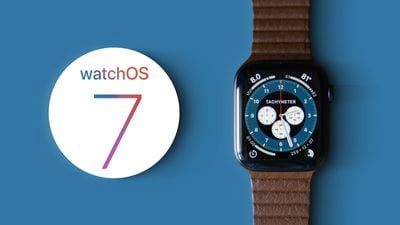
Apple doesn't normally release a public beta of its upcoming Apple Watch software, but with watchOS 7, the company appears to have had a change of heart. That means anyone with a compatible Apple Watch can get a taste of the latest new Apple Watch features, such as sleep tracking, new watch faces, watch face sharing, new workout types, and more.
watchOS7 hands on feature2
Before you rush to install the watchOS 7 public‌ beta, it's worth remembering that this is pre-release software, so don't expect things to work 100 percent trouble-free. Apple has released relatively stable beta versions of its operating systems this year, but beta software is inherently unstable, as it contains bugs and issues that have yet to be ironed out.

Another thing to note before installing the beta is that watchOS 7 completely removes the Force Touch gesture from the operating system, so expect a slightly different experience for some functions and menus. Also, bear in mind that there's no way to downgrade to watchOS 6 after installing the watchOS 7 beta.

watchOS 7 is compatible with Apple Watch Series 3, 4, and 5. If you have one of those models, here's how you can install the watchOS 7 public beta.

How to Install the watchOS 7 Public Beta

You need to be running the iOS 14 beta on the iPhone that your Apple Watch is paired with. Follow our walkthrough guide on how to do that, then come back and follow these steps.

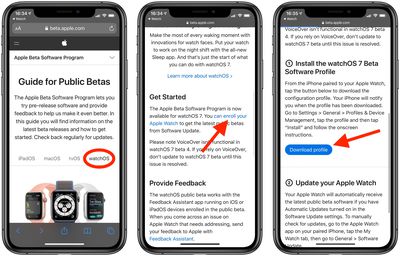
  1. Open a browser on your ‌iPhone‌ and navigate to the Apple Beta Software Program website.
  2. Tap the chevron in the top-right corner of the webpage and select Sign In from the dropdown menu.
  3. Enter your Apple ID credentials.
  4. A Guide for Public Betas screen will appear. Select the watchOS tab, scroll down to the Get Started section and tap enroll your Apple Watch.
  5. Scroll down and tap Download Profile.
    beta install

  6. Follow the onscreen instructions to install the watchOS 7 public beta.
  7. Tap Allow in the prompt to download the beta profile to your ‌iPhone‌.
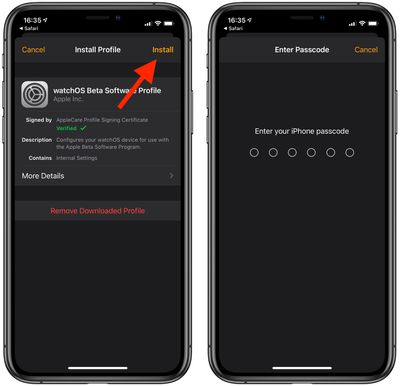
  8. Tap Install in the top-right corner of the screen and enter your passcode if required.
    beta install

  9. Read the consent information, then tap Install two more times.
  10. Tap Restart if prompted to restart your ‌iPhone‌.
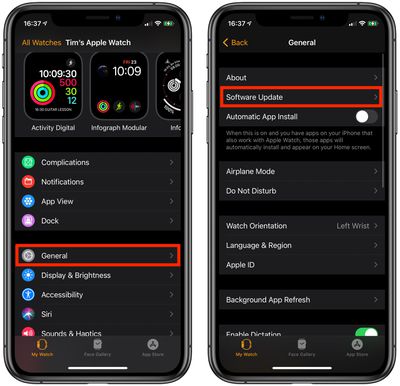
  11. Launch the Watch app on your ‌iPhone‌.
  12. Select General -> Software Update.
    beta install

  13. After a few moments, you should see watchOS 7 available to download. Place your Apple Watch on its charger and tap Download and Install.
After a few minutes your Apple Watch will restart with the new watchOS public beta running.


Click here to learn more about some of the new features of watchOS 7.

Related Roundup: Apple Watch 11
Buyer's Guide: Apple Watch (Neutral)

Top Rated Comments

zed1291 Avatar
72 months ago
Keep the same title, change the article body to just say "Don't."
Score: 9 Votes (Like | Disagree)
MickeyAlexander Avatar
72 months ago
The trouble with trying out the beta software on the watch, is that you have no personal recourse if the software somehow bricks the device—which, as we know, has happened even with official releases. Fixing the software requires sending the thing in to Apple, which is horribly inconvenient with a piece of tech you wear daily. It’s too bad Apple doesn’t (or can’t?) enable some sort of emergency data troubleshooting access using the charging cable.
Score: 7 Votes (Like | Disagree)
oscar_aa Avatar
72 months ago

This isn’t true. You can send in your watch for a software downgrade via mail-in or depot repair. Software service for watches are free regardless of warranty status, just happens at the depot.
all true, but a big difference from the experience with iOS public betas and it should be highlighted in the article. Eg “be aware that there is no way for the public to downgrade from watchOS public beta. If you decide to downgrade, you must make a service request at a depot or use mail-in repair.”
Score: 4 Votes (Like | Disagree)
oscar_aa Avatar
72 months ago

I'm curious if there is an official disclaimer by Apple. If not, it would be highly irresponsible of them not to. Especially since it's a public beta and it's intended to illicit feedback.
It’s the very last sentence on the beta program’s watchOS page. All the more reason to highlight it in the article.

“Please note Apple Watch cannot be restored to previously-released OS versions once the public beta is installed.”

https://beta.apple.com/sp/betaprogram/guide#watchos
Score: 3 Votes (Like | Disagree)
max2 Avatar
72 months ago
Thank you! Can't wait to test!
Score: 2 Votes (Like | Disagree)
rdavis41 Avatar
72 months ago
Going to be honest, not liking the removal of force touch one bit thus far.
Score: 2 Votes (Like | Disagree)

Popular Stories

Apple Logo Zoomed

Tim Cook Teases Plans for Apple's Upcoming 50th Anniversary

Thursday February 5, 2026 12:54 pm PST by
Apple turns 50 this year, and its CEO Tim Cook has promised to celebrate the milestone. The big day falls on April 1, 2026. "I've been unusually reflective lately about Apple because we have been working on what do we do to mark this moment," Cook told employees today, according to Bloomberg's Mark Gurman. "When you really stop and pause and think about the last 50 years, it makes your heart ...
wwdc sans text feature

Apple Rumored to Announce New Product on February 19

Thursday February 5, 2026 12:22 pm PST by
Apple plans to announce the iPhone 17e on Thursday, February 19, according to Macwelt, the German equivalent of Macworld. The report, citing industry sources, is available in English on Macworld. Apple announced the iPhone 16e on Wednesday, February 19 last year, so the iPhone 17e would be unveiled exactly one year later if this rumor is accurate. It is quite uncommon for Apple to unveil...
Finder Siri Feature

Why Apple's iOS 26.4 Siri Upgrade Will Be Bigger Than Originally Promised

Friday February 6, 2026 3:06 pm PST by
In the iOS 26.4 update that's coming this spring, Apple will introduce a new version of Siri that's going to overhaul how we interact with the personal assistant and what it's able to do. The iOS 26.4 version of Siri won't work like ChatGPT or Claude, but it will rely on large language models (LLMs) and has been updated from the ground up. Upgraded Architecture The next-generation...
iOS 26

iOS 26.3 and iOS 26.4 Will Add These New Features to Your iPhone

Tuesday February 3, 2026 7:47 am PST by
While the iOS 26.3 Release Candidate is now available ahead of a public release, the first iOS 26.4 beta is likely still at least a week away. Following beta testing, iOS 26.4 will likely be released to the general public in March or April. Below, we have recapped known or rumored iOS 26.3 and iOS 26.4 features so far. iOS 26.3 iPhone to Android Transfer Tool iOS 26.3 makes it easier...
iphone 17 pro dark blue 1

iPhone 18 Pro Max Rumored to Deliver Next-Level Battery Life

Friday February 6, 2026 5:14 am PST by
The iPhone 18 Pro Max will feature a bigger battery for continued best-in-class battery life, according to a known Weibo leaker. Citing supply chain information, the Weibo user known as "Digital Chat Station" said that the iPhone 18 Pro Max will have a battery capacity of 5,100 to 5,200 mAh. Combined with the efficiency improvements of the A20 Pro chip, made with TSMC's 2nm process, the...