How to Create Your iPhone Contact Poster - MacRumors
Skip to Content

How to Create Your iPhone Contact Poster

by

With iOS 17, Apple introduced Contact Posters to its stock Phone and Contacts apps. Keep reading to learn what Contact Posters are and how to use them.
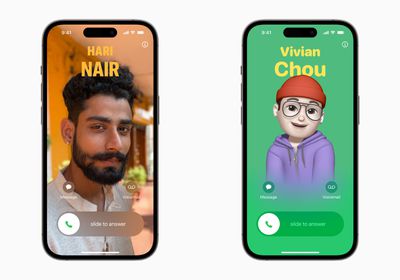
Contact Posters iOS 17
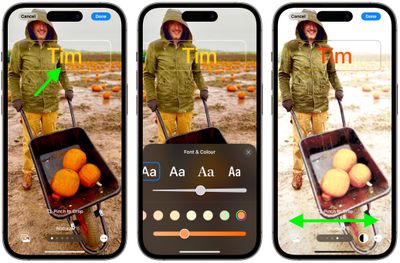
Apple in iOS 17 offers iPhone users a novel way to express themselves when it comes to calls, with the addition of personalizable Contact Posters.

Contact Posters allow you to customize how you're represented when you call another iPhone owner. You can use photos and emoji to personalize your Contact Poster, which appears on a person's iPhone when you call them. And like the iPhone Lock Screen, you can match images with eye-catching typography.

But your Contact Poster doesn't just show up in calls. It's also part of your contact card in the Contacts app, giving consistency in the places where you communicate and share. Apple has also made APIs available to developers so that Contact Posters appear for third-party VoIP apps, too.

As mentioned above, customizing your Contact Poster works a lot like personalizing your Lock Screen. You can choose an image, font, and color. The following steps show you how it's done on devices running iOS 17 and later.

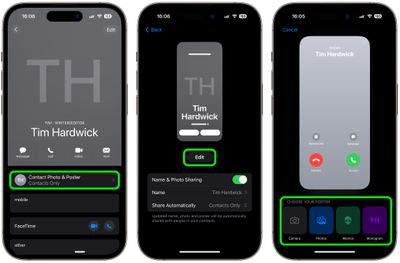
  1. Open the Contacts app and tap on your own name.
  2. Tap the Contact Photo & Poster option.
  3. Tap Edit, then tap Customize.
  4. Tap Poster.
  5. Use the buttons at the bottom of the screen to take a photo, choose a photo you want to use from your library, pick a Memoji, or add a simple Monogram of your initials.
    contacts

  6. To go along with your chosen image, you can optionally customize the font size, style, and color. (Note that you cannot change your name from this interface - that needs to be done by changing your contact info.)
  7. Swipe across the poster to preview a selection of filters, including black and white, duotone, and color wash in the color of your choice.
  8. When you're ready, tap Done to preview what a person sees when you call them. If you're happy with the look, tap Continue.
  9. Now you can opt to edit the crop of your Contact Photo, choose a different photo to use, or Skip this step.
    contacts

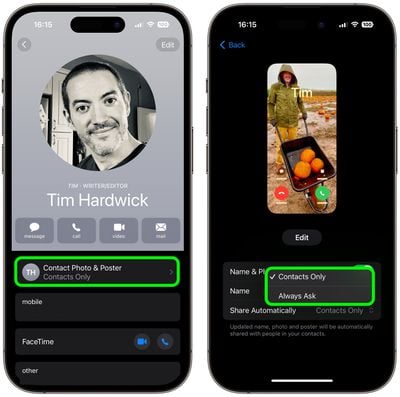
That's your Contact Poster and Contact Photo complete. Contact Posters can be shared with your contacts automatically, or you can wait to be prompted to share your poster with anyone who calls you so that no one sees your custom imagery without your permission.

Note that to account for Contact Posters, the design of the Contacts app has been tweaked. When you tap on a contact, you'll now see that their contact image, Memoji, or initials take up a much larger portion of the screen. This also counts for contacts where you've assigned an image.
contacts
You can tap on the Contact Photo and Poster option underneath the person's name to choose to update to the latest info automatically when your contact changes something like their profile photo, or turn on manual updates so you're prompted for the update.


Top Rated Comments

jaster2 Avatar
41 months ago
Hmm… so if someone creates their contact poster with some kind of obscene or NSFW image, it’s going to display on the unlucky recipient’s phone?
Score: 16 Votes (Like | Disagree)
JungleNYC Avatar
41 months ago

Hmm… so if someone creates their contact poster with some kind of obscene or NSFW image, it’s going to display on the unlucky recipient’s phone?
Making my poster now! 😉
Score: 6 Votes (Like | Disagree)
41 months ago

It’s weird how they seem to have decided to merge the setting of your iCloud / Apple ID Profile Picture with the settings of your Caller ID Poster like those are two completely different things? It took me forever to figure out how to change my iCloud Account photo (the one in a circle) and not the Call Poster unless I missed some settings somewhere.

Also you can do the same changes in settings > Messages which makes it even more confusing
This reminds me of the iOS 16 locked screen image/style/widget management accessed from the locked screen rather than from the device settings where we typically do everything - it's completely counterintuitive, I've had to explain how to get there to several folks around me, but somehow Apple thinks it's where it belongs.

Score: 6 Votes (Like | Disagree)
contacos Avatar
41 months ago
It’s weird how they seem to have decided to merge the setting of your iCloud / Apple ID Profile Picture with the settings of your Caller ID Poster like those are two completely different things? It took me forever to figure out how to change my iCloud Account photo (the one in a circle) and not the Call Poster unless I missed some settings somewhere.

Also you can do the same changes in settings > Messages which makes it even more confusing
Score: 6 Votes (Like | Disagree)
41 months ago
For those of you who say that Apple doesnt innovate any longer. How do you explain contact posters? Checkmate ppl....
Score: 5 Votes (Like | Disagree)
kingtj1971 Avatar
41 months ago

If you were at my dinner party your phone would be in your jacket pocket in the cloakroom. Give your fellow diners and your hosts your full attention or hit the road. :)
Fair enough. I'm not the kind to attend dinner parties formal enough to require suit jackets or restaurants with coat rooms, though. (After buying the new iPhone, my budget is more Arby's or Wendy's. Heh.)
Score: 4 Votes (Like | Disagree)

Popular Stories

M5 MacBook Pro

RIP, MacBook Ultra

Monday October 19, 2026 9:37 am PDT by
Apple today sent out invites for an experience in Los Angeles on Wednesday, October 28, and the "Pro and tell" tagline on the invitation likely means that the rumored MacBook models with touch-enabled OLED displays will stick with MacBook Pro branding instead of the once-rumored "MacBook Ultra" name. The long-rumored "iPhone Ultra" ended up being named iPhone Duo, so speculation that Apple...
iPhone Duo Trio

Here's What Apple's Apps Look Like on the iPhone Duo

Tuesday October 20, 2026 11:12 am PDT by
With just three days to go until the iPhone Duo is released, Apple is getting ready for the launch. Behind the scenes, the App Store now has screenshots of Apple's built-in apps running on the Duo. We've seen some apps in marketing materials, but images of the ones we haven't seen give us an idea of what it will be like using the iPhone Duo day to day. Many apps are shown in landscape...
apple pro tell logo

Apple Announcing New Products Next Week: 'Pro and Tell'

Monday October 19, 2026 9:05 am PDT by
Apple's Greg Joswiak today hinted at new product announcements coming next week, sharing a social media post that says "Can't wait to pro and tell next week." Rumors suggest Apple is planning to debut the new MacBook Pro with an OLED touchscreen display, an M6 entry-level MacBook Pro, an M6 iMac, an iPad mini with an OLED display. Can't wait to pro and tell next week....
Latest Stories
Apple Will Label Apps 'Made for iPhone Duo' in App Store
57 minutes ago
Amazon Takes $49 Off iPad With Prices Starting at $399.99
2 hours ago
F1 on Apple TV Now Available in Dolby Atmos
2 hours ago
Apple Reveals More Than 50 Apps That Will Be Updated for iPhone Duo
3 hours ago
Apple Blocks Certificates That Could Help Attackers Fake Websites
4 hours ago
Giant iPhone Duo Installations Spotted at Apple Fifth Avenue
5 hours ago
iPhone Duo 2 Prototypes Include Under-Display Face ID
5 hours ago
Tesla App Gains iPad and iPhone Duo Support
9 hours ago
Apple Reportedly Boosts iPhone Duo Orders by 44%
9 hours ago
Fortnite Returning to Australian App Store After Court Ruling
10 hours ago
Apple Ordered to Open iPhone to Rival App Stores in Australia
10 hours ago
Apple Suppliers Face Hurdles Cutting Circuit Board Emissions
10 hours ago
Things Updated for iPhone Duo With Adaptive Layout
11 hours ago
Simplicity and Siri AI Are HomeView's Killer Features, Apple Says
11 hours ago
iPhone Duo Reviewers Really Miss Face ID
16 hours ago
Does the iPhone Duo Run Hot? Here's What Reviews Found
18 hours ago
Apple Music's New Look is Now Live on Apple's Website
18 hours ago
Anthropic Launches Claude Duet, a Proactive AI Agent
19 hours ago
What 32,000 Folds Did to the iPhone Duo's Hinge
20 hours ago
iPhone Duo's Hidden FaceTime Camera Takes 'Trash' Photos
21 hours ago
iPhone Duo Has 'Edge Light' Feature That Debuted on Macs Last Year
22 hours ago
Apple Support App Updated for iPhone Duo's Larger Display
22 hours ago
Amazon Sweetens the Deal on Entry-Level 16-Inch MacBook Pro With $570 Off
22 hours ago
iPhone Duo Tips Over on MagSafe Stands When Unfolded
22 hours ago
Apple Music's New Look Officially Announced
1 day ago
iPhone Duo Supports Apple Pencil Starting With iOS 27.2
1 day ago
iPhone Duo Accessories Roundup: Cases and Screen Protectors From OtterBox, ZAGG, and More
1 day ago
Apple Stores Will Have 'Limited' Availability of iPhone Duo for Walk-In Customers
1 day ago
iPhone Duo Reviews Explain Why Device is Both 'Fun' and 'Frustrating'
1 day ago
Apple Says 'Reachability' Feature Coming to iPhone Duo Later This Year
1 day ago