
iOS 18.4: Access Hidden Ambient Music Playlists - MacRumors
Skip to Content

iOS 18.4: Access Hidden Ambient Music Playlists

by

In Apple's iOS 18.4 software update, there's a new Ambient Music feature available in the Control Center options on iPhone. It's free to use, and does not require an Apple Music subscription. It's also more customizable than most users probably realize. Keep reading to learn how.
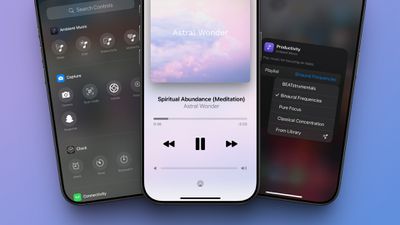
iOS 18 4 Ambient Music Control Center
There are four different sound categories to Ambient Music, including Sleep, Chill, Productivity, and Wellbeing. You can add each category individually to your Control Center, and then tap on one to start a playlist of songs in the chosen category.

Add Ambient Music Buttons to Control Center

  1. Open Control Center by swiping down from the top-right corner of your screen.
  2. Tap the + button in the top-left corner, or long press on a blank space.
  3. Tap Add a Control at the bottom of the screen.
  4. Scroll down to the new "Ambient Music" controls section and choose from Sleep, Chill, Productivity, and Wellbeing.
  5. Tap any blank space to exit out of edit mode.
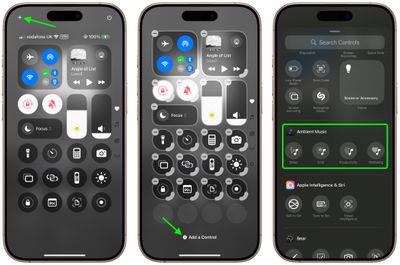
control center
When you turn on one of the Ambient Music options in Control Center, playback controls will appear on the screen. You can also tap or long press the Dynamic Island on newer iPhones to access playback controls or bring up a fullscreen music player with album art.

Changing Ambient Music Category Playlists

It's not obvious, but you can actually choose different playlists for each Ambient Music category. In fact, this option is so hidden in the interface that some might even call it an "easter egg" – or perhaps a non-intuitive UI design choice. Apple describes the playlists as follows:

  • Sleep: Sleep Sounds, Bedtime Beats, Sound Bath, and Piano Sleep.
  • Chill: Piano Chill, Ambient Chill, Lo-Fi Jazz, and Pure Chill.
  • Productivity: BEATstrumentals, Binaural Frequencies, Pure Focus, and Classical Concentration.
  • Wellbeing: Pure Meditation, Spa, Beats & Breath, and Pure Calm.

Here's what you need to do to choose a different playlist – or even one of your own:

  1. Open Control Center, then tap the + icon in the top-left corner of the screen.
  2. Tap one of the Ambient Music buttons that you added to your Control Center (try to avoid tapping the minus symbol or the button will disappear).
  3. Tap the playlist name in blue next to "Playlist," then select one of the playlists from the dropdown. If you select From Library, tap Choose to pick a playlist from your Music library.
  4. Tap any blank space, then tap again to exit out of edit mode.
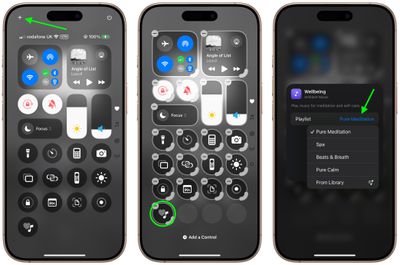
control center
So now you know how to switch up the playlists when listening to Ambient Music, whether that's for restful sleep, relaxation, focusing on tasks, or for meditation and self-care.


Top Rated Comments

15 months ago
Is it just me or is anyone else also trying to add a "control" by clicking on the empty circle space instead of the tiny "+ Add a control" on the bottom? This is so not intuitive - arrrrgh.
Also, wow, this playlist feature could not be more hidden and secretive. I miss 3D Touch - would have been THE perfect use case.
Score: 17 Votes (Like | Disagree)
TechWhisperer Avatar
15 months ago
I love it, but I don’t like the fact that it shows up in my history and subsequently altering my personalized algorithm.
Score: 13 Votes (Like | Disagree)
15 months ago
I like this feature but worry it will mess with my algorithms.

I used to listen to ambient music whilst working but all my personalised stations quickly assumed I despised anything with lyrics. Took me months to correct!
Score: 12 Votes (Like | Disagree)
15 months ago
I don’t understand why this isn’t a standalone app.
Score: 7 Votes (Like | Disagree)
15 months ago

Is it just me or is someone else also trying to add a "control" by clicking on the empty circle space instead of the tiny "+ Add a control" on the bottom? This is so not intuitive - arrrrgh.
Also, wow, this playlist feature could not be more hidden and secretive. I miss 3D Touch - would have been THE perfect use case.
Yes the interface is ridiculous, and the fact that you have to make a separate control for each genre. And then you have to tell which is which by symbol only.


I guess this is the next step in emoji devolution. Nobody wants words, just pictures, I guess?
Score: 6 Votes (Like | Disagree)
WU27f1xcCs Avatar
15 months ago
Wow I have been using this since the Beta and did not realise you could change playlists, this is a horrible UI. You can even open Ambient Music as a separate application and it doesn’t let you change the playlist even in the dedicated application?
Score: 6 Votes (Like | Disagree)

Popular Stories

Dynamic Island iPhone 18 Pro Feature

11 Reasons to Wait for the iPhone 18 Pro

Monday May 11, 2026 9:01 am PDT by
We're only four months out from the launch of Apple's premium next-generation smartphone lineup, and while we're not expecting a sea change in terms of functionality, there are still several enhancements rumored to be coming to the iPhone 18 Pro and iPhone 18 Pro Max. One thing worth noting is that Apple is reportedly planning a major change to its iPhone release cycle this year, adopting a...
iOS 26

iOS 26.5 Features: Everything New in iOS 26.5

Monday May 11, 2026 5:09 pm PDT by
Apple released iOS 26.5 after a few months of beta testing, and while it doesn't have the Siri features we were hoping for since those are being held until iOS 27, there are a handful of useful changes worth knowing about. Subscribe to the MacRumors YouTube channel for more videos. End-to-End Encryption for RCS Support for end-to-end encryption (E2EE) for RCS messages between iPhone and...
General Apps Reddit Feature

Reddit Starts Blocking Mobile Website, Pushing Users to App Instead

Monday May 11, 2026 6:10 am PDT by
Social network Reddit recently began blocking mobile visitors to its website while pushing them to download the official Reddit app, and it's fair to say that the move is not going down well with users. If you visit reddit.com on your iPhone today, you may see a new popup that can't be dismissed, asking you to "get the app to keep using Reddit." A Reddit spokesperson told Ars Technica...








































