

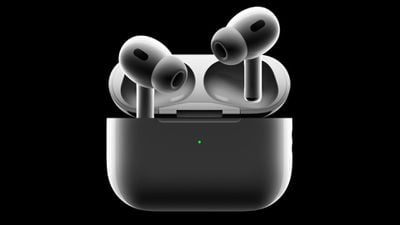
Do you ever fall asleep with your Beats or AirPods still playing? If so, then Apple's new "Pause Media When Falling Asleep" feature in iOS 26 may be just for you. It automatically stops playback once you drift off, ensuring your earbuds rest when you do.
The option to pause audio when asleep will save your spot in an audiobook or a podcast, but it should also preserve battery life by preventing your earbuds from staying on all night.
Apple has not explained how Beats or AirPods detect that you've fallen asleep, but it doesn't require wearing an Apple Watch. It may rely on the accelerometers and other sensors in the AirPods themselves. Perhaps the earbuds notice your head has remained still for a certain period, infer from this that you're falling asleep, and then pause playback.
All we know for sure is that for the feature to be available you will need an iPhone running iOS 26 (by installing the pre-release beta or updating once the official release it's available). If you're running the beta, you also need to give Apple permission to install beta firmware on your AirPods.
Enabling AirPods Beta Firmware Update
- Connect your AirPods to your iPhone or iPad, then open Settings ➝ [Your Name]'s AirPods.
- Scroll to the bottom of the menu and select AirPods Beta Updates.

- Toggle the switch next to AirPods Beta Updates to the green ON position.
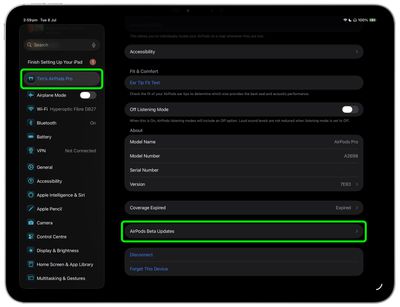
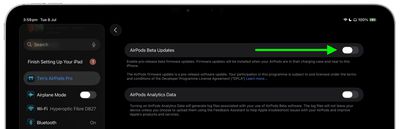
After you've completed these steps, the firmware update will be installed automatically when your AirPods are in their charging case and near to your iPhone/iPad/Mac. This could take anywhere from a few seconds to several minutes, so be patient.
Pause Audio on Sleep Setting
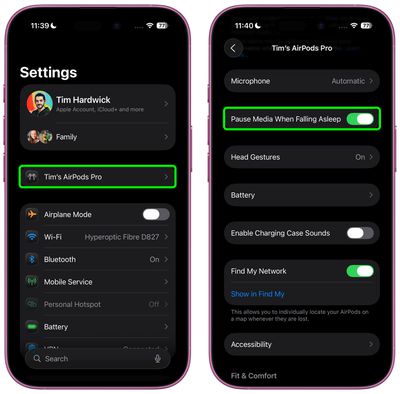
After updating the firmware of your AirPods, you can set the Pause Media on Falling Asleep feature. Pausing audio should actually be on by default when you install iOS 26, but it can be enabled in the following manner:
- Connect your AirPods to your iPhone, then open Settings.
- Tap your AirPods name under the Apple Account banner.
- Scroll down, then toggle on the Pause Media When Falling Sleep switch to the green position.
That's all there is to it. iOS 26 also brings additional AirPods features and improvements like the ability to remotely control your iPhone's camera with AirPods gestures and improved call quality. A general release of iOS 26 is expected around mid-September.




















