In iOS 26, Live Translation enables hands-free communication by allowing users who don't share the same language to speak naturally while wearing AirPods. For conversations with non-AirPods users, the iPhone can display live transcriptions horizontally, showing translations in the other person's preferred language. Keep reading to learn how to use it.
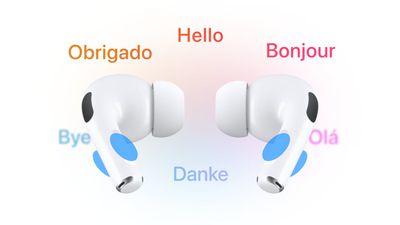
airpods translate
In iOS 26, Live Translation is integrated into Messages, FaceTime, and Phone to help users communicate across languages, translating text and audio on the fly.

However, the feature is at its most impressive when both conversation participants wear compatible AirPods with Live Translation enabled. Active Noise Cancellation automatically lowers the volume of the other speaker, helping users focus on translated audio while maintaining natural interaction flow.

Apple's Live Translation was a headline feature when it announced AirPods Pro 3, but it also works with older models running iOS 26, including AirPods 4 with Active Noise Cancellation and AirPods Pro 2.

What You'll Need

  • AirPods 4 (ANC), AirPods Pro 2, or AirPods Pro 3.
  • iPhone 15 Pro or later.
  • iOS 26 or later.
  • The Translate app downloaded.
  • The latest AirPods firmware version.

Supported Languages

Live Translation supports real-time translation between English (UK and U.S.), French, German, Portuguese (Brazil), and Spanish. Apple plans to add Italian, Japanese, Korean, and Chinese (simplified) support later this year.

Before you can use Live Translation, you'll need to download the language the other person is speaking and the language you'd like to translate it to.

  1. Put your AirPods in your ears and make sure they're connected to your iPhone.
  2. Open Settings on your iPhone, then tap the name of your AirPods.
  3. Under "Translation," tap Languages, then select the languages you want to download.
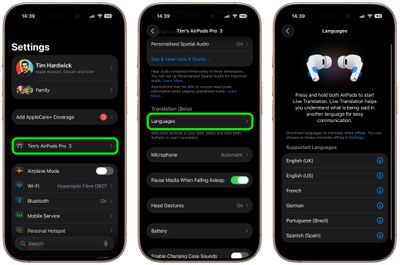
settings

Start a Live Translation Conversation

  1. Wear your AirPods and connect them to your iPhone.
  2. Make sure Apple Intelligence is turned on (Settings ➝ Apple Intelligence & Siri).
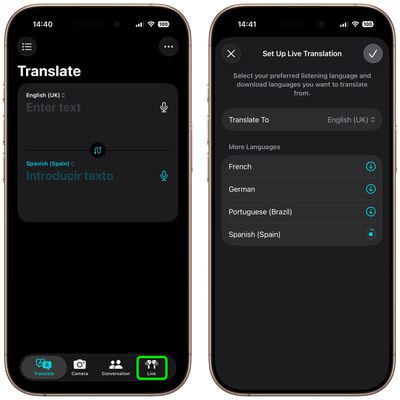
  3. Open the Translate app, then tap Live.
  4. Select the language that the other person is speaking and the language that you want your AirPods to translate it to.
  5. Tap Start Translation.

translate app airpods

Once the other person speaks, your AirPods instantly translate their words into your chosen language. If you're in a noisy place, you can boost accuracy by letting your iPhone's microphones join in – just move your iPhone closer to the speaker.

When it's your turn, simply reply as you normally would. The Translate app's Live tab can display a transcript of your words on your iPhone screen, or you can tap the Play button to have your iPhone read the translation aloud.

If the person you're talking with also has supported AirPods set up with Live Translation, they'll be able to hear your response directly through their own AirPods. To stop Live Translation at any time, just tap the X button.

Other Ways to Use Live Translation

airpods live translation

To start Live Translation at any time, open the Translate app on your iPhone, tap Live, and then tap Start Translation. You can also set the Action button on your iPhone to launch the Translate app, letting you jump straight into Live Translation while wearing your AirPods.

There are several other quick ways to begin. You can press and hold the stems on both AirPods at once, or ask Siri by saying something like "Start Live Translation." You can also swipe down from the top-right corner of your iPhone to open Control Center and tap Translate. (To add Translate to Control Center, long press on a space between the buttons, tap Add Control, then search for and select Translate.)


Related Roundups: AirPods 4, AirPods Pro 3
Related Forum: AirPods

Top Rated Comments

Mr. Heckles Avatar
20 weeks ago
Does it translate Gen Z to Gen X?
Score: 10 Votes (Like | Disagree)
Night Spring Avatar
20 weeks ago
I tried this, and I wish it would do English to English. That would be the perfect hearing aid. Instead of trying to amplify the sound of the speaker you are talking to, it replaces that with a perfectly articulated speech right in your ear. That's exactly what hard of hearing people need in order to carry on a conversation
Score: 10 Votes (Like | Disagree)
csilverman Avatar
20 weeks ago
I remember when I first read about the Babel Fish in Hitchhiker's Guide and thought "man, I wish something like that existed".

I guess it sort of does, now, except it also functions as headphones and isn't as slimy.
Score: 9 Votes (Like | Disagree)
wanha Avatar
20 weeks ago
does it translate wife to husband? Asking, uhh, for a friend
Score: 7 Votes (Like | Disagree)
Rigby Avatar
20 weeks ago
This works surprisingly well. The quality of the translation is quite impressive, especially given that it works fully offline. Improvements I would like to have: the ability to adjust how much the other person's volume is lowered via ANC while the translation is played (I find it is currently still a little too loud) and of course more languages.
Score: 6 Votes (Like | Disagree)
Night Spring Avatar
20 weeks ago

Does this allow you to translate foreign television programs as well, or just person to person conversations?
This was exactly what I tried. I sat in front of a tv playing something and turned on live translation. It worked.
Score: 5 Votes (Like | Disagree)

Popular Stories

Apple Logo Zoomed

Tim Cook Teases Plans for Apple's Upcoming 50th Anniversary

Thursday February 5, 2026 12:54 pm PST by
Apple turns 50 this year, and its CEO Tim Cook has promised to celebrate the milestone. The big day falls on April 1, 2026. "I've been unusually reflective lately about Apple because we have been working on what do we do to mark this moment," Cook told employees today, according to Bloomberg's Mark Gurman. "When you really stop and pause and think about the last 50 years, it makes your heart ...
iOS 26

iOS 26.3 and iOS 26.4 Will Add These New Features to Your iPhone

Tuesday February 3, 2026 7:47 am PST by
While the iOS 26.3 Release Candidate is now available ahead of a public release, the first iOS 26.4 beta is likely still at least a week away. Following beta testing, iOS 26.4 will likely be released to the general public in March or April. Below, we have recapped known or rumored iOS 26.3 and iOS 26.4 features so far. iOS 26.3 iPhone to Android Transfer Tool iOS 26.3 makes it easier...
imac video apple feature

Apple Makes Its Second-Biggest Acquisition Ever

Tuesday February 3, 2026 12:45 pm PST by
Apple recently acquired Israeli startup Q.ai for close to $2 billion, according to Financial Times sources. That would make this Apple's second-biggest acquisition ever, after it paid $3 billion for the popular headphone maker Beats in 2014. This is also the largest known Apple acquisition since the company purchased Intel's smartphone modem business and patents for $1 billion in 2019....
wwdc sans text feature

Apple Rumored to Announce New Product on February 19

Thursday February 5, 2026 12:22 pm PST by
Apple plans to announce the iPhone 17e on Thursday, February 19, according to Macwelt, the German equivalent of Macworld. The report, citing industry sources, is available in English on Macworld. Apple announced the iPhone 16e on Wednesday, February 19 last year, so the iPhone 17e would be unveiled exactly one year later if this rumor is accurate. It is quite uncommon for Apple to unveil...
Finder Siri Feature

Why Apple's iOS 26.4 Siri Upgrade Will Be Bigger Than Originally Promised

Friday February 6, 2026 3:06 pm PST by
In the iOS 26.4 update that's coming this spring, Apple will introduce a new version of Siri that's going to overhaul how we interact with the personal assistant and what it's able to do. The iOS 26.4 version of Siri won't work like ChatGPT or Claude, but it will rely on large language models (LLMs) and has been updated from the ground up. Upgraded Architecture The next-generation...