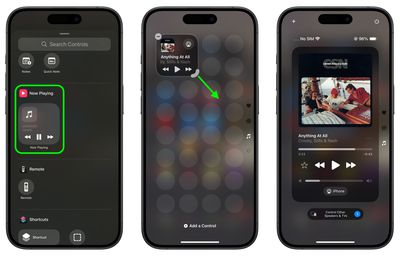
iOS 18 overhauls the Control Center by letting you reorder, resize, and remove buttons, access a controls gallery, and add multiple screens, moving away from the single-screen layout of recent years. In this article we are going to show you how you can create dedicated pages for various control types, such as connectivity, HomeKit devices, and Accessibility options.
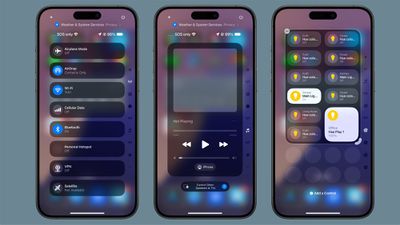
ios 18 control center pages
The new Control Center comes pre-configured with multiple default pages, which you can freely customize, add to, or remove. The system accommodates up to 15 separate screens, offering unprecedented flexibility when compared to previous versions of iOS.

Navigation between these pages is easy. You can swipe up and down through Control Center, tap small icons on the right side of the display, or hold and scrub through these icons for quick access. The following steps explain how to add additional pages to your Control Center.

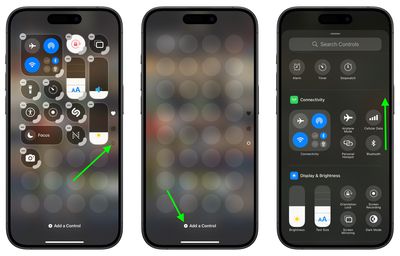
  1. Swipe down from the top-right corner of the screen to launch Control Center.
  2. Tap the circle icon at the bottom of the icon list, which indicates a new blank page.
  3. Tap Add a Control to open the Controls Gallery.
  4. Use the search field at the top, or browse the controls with a finger scroll to find the control that you want to include on the page, then tap it.
    control center

  5. Using the corner anchor, drag with your finger to expand the control if you wish.
  6. When finished, tap a space on the page to exit editing mode.
    control center

Control Center intelligently assigns icons to each page based on its content. When controls exceed the available space on a page, or if a resized control becomes too large, Control Center automatically creates a new page and relocates the excess controls. Bear in mind that the option to create a new page only appears when an existing page is approximately half full, ensuring adequate spacing between icons and maintaining a clean, organized layout.

iOS 18 and iPadOS 18 are currently in beta and expected to go on general release around mid-September.


Top Rated Comments

Cirillo Gherardo Avatar
19 months ago
Reorganizing Control Center is a complete disaster. It has a fixed grid...so WHY does it have to automatically rearrange EVERYTHING on the page when I try to move a control from 1 spot to another? It's like having a rubix cube mini game in the way.
Score: 10 Votes (Like | Disagree)
Radin.Y Avatar
19 months ago
There is no constancy in design language here. there are way too many different designs. And the team that worked on this was not in communication with the rest of iOS teams, so the UI is so fragmented. This screen is so ugly!!
And with ever-growing size of displays, it is getting more and more difficult to reach the top corner to access the Control Center.
Score: 6 Votes (Like | Disagree)
Macalicious2011 Avatar
19 months ago
iOS is becoming as complex as Windows 7.
Score: 5 Votes (Like | Disagree)
miamialley Avatar
19 months ago
I took away the extra pages, only to leave the one page of shortcuts.
Score: 5 Votes (Like | Disagree)
Kylo83 Avatar
19 months ago
To much it should just be one place and swipe from the bottom, it’s to complicated and over done now
Score: 4 Votes (Like | Disagree)
boak Avatar
19 months ago
Would be more useful if Control Center were most easily accessed, rather than having to stretch all the way up to reach for the tiny corner.
Score: 4 Votes (Like | Disagree)

Popular Stories

Apple Logo Zoomed

Tim Cook Teases Plans for Apple's Upcoming 50th Anniversary

Thursday February 5, 2026 12:54 pm PST by
Apple turns 50 this year, and its CEO Tim Cook has promised to celebrate the milestone. The big day falls on April 1, 2026. "I've been unusually reflective lately about Apple because we have been working on what do we do to mark this moment," Cook told employees today, according to Bloomberg's Mark Gurman. "When you really stop and pause and think about the last 50 years, it makes your heart ...
wwdc sans text feature

Apple Rumored to Announce New Product on February 19

Thursday February 5, 2026 12:22 pm PST by
Apple plans to announce the iPhone 17e on Thursday, February 19, according to Macwelt, the German equivalent of Macworld. The report, citing industry sources, is available in English on Macworld. Apple announced the iPhone 16e on Wednesday, February 19 last year, so the iPhone 17e would be unveiled exactly one year later if this rumor is accurate. It is quite uncommon for Apple to unveil...
Finder Siri Feature

Why Apple's iOS 26.4 Siri Upgrade Will Be Bigger Than Originally Promised

Friday February 6, 2026 3:06 pm PST by
In the iOS 26.4 update that's coming this spring, Apple will introduce a new version of Siri that's going to overhaul how we interact with the personal assistant and what it's able to do. The iOS 26.4 version of Siri won't work like ChatGPT or Claude, but it will rely on large language models (LLMs) and has been updated from the ground up. Upgraded Architecture The next-generation...
iOS 26

iOS 26.3 and iOS 26.4 Will Add These New Features to Your iPhone

Tuesday February 3, 2026 7:47 am PST by
While the iOS 26.3 Release Candidate is now available ahead of a public release, the first iOS 26.4 beta is likely still at least a week away. Following beta testing, iOS 26.4 will likely be released to the general public in March or April. Below, we have recapped known or rumored iOS 26.3 and iOS 26.4 features so far. iOS 26.3 iPhone to Android Transfer Tool iOS 26.3 makes it easier...
iphone 17 pro dark blue 1

iPhone 18 Pro Max Rumored to Deliver Next-Level Battery Life

Friday February 6, 2026 5:14 am PST by
The iPhone 18 Pro Max will feature a bigger battery for continued best-in-class battery life, according to a known Weibo leaker. Citing supply chain information, the Weibo user known as "Digital Chat Station" said that the iPhone 18 Pro Max will have a battery capacity of 5,100 to 5,200 mAh. Combined with the efficiency improvements of the A20 Pro chip, made with TSMC's 2nm process, the...