
iOS 18: Add a Tint to Your iPhone Home Screen Icons - MacRumors
Skip to Content

iOS 18: Add a Tint to Your iPhone Home Screen Icons

by

Apple in iOS 18 has made a wealth of customization options available for your iPhone Home Screen, one of which is the ability to add a tint to your app icons.
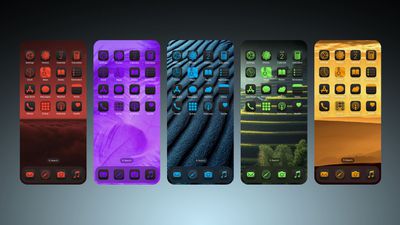
iOS 18 Home Screen Feature 1
Essentially, the tint feature offers a unique way to customize your device's appearance by changing the color of all your icons at once. Unlike individual icon customization, tinting affects every icon on your app pages, Home Screen, and App Library, creating a unified look across your entire interface.

Tinting works by first desaturating all icons and then applying a single color overlay. This process results in a monochromatic appearance, which means you'll lose the original colors of your app icons and widgets, but what you gain is a more cohesive look. It's a powerful tool for creating a coordinated, stylish interface that reflects your personal taste, so be sure to experiment with it.

To choose a tint color, you can also use an eyedropper tool to select a shade from your wallpaper, or manually adjust hue and saturation using two slider bars. This flexibility allows you to perfectly match your icons to your background or create a contrasting color scheme.

Lastly, it's important to remember that the tint setting is universal. You can't apply different tints to different app pages or sections of your device. Whatever color you choose will be applied everywhere icons appear. Here's how to tint your icons in iOS 18:

  1. Long press a space on your Home Screen.
  2. Tap Edit in the top-right corner.
  3. Tap Customize.
  4. Select the Tinted option.
  5. Adjust the sliders to change the tint. Note that you can also use the eyedropper icon to select a hue from a region of your wallpaper.
  6. Tap anywhere outside of the Customize panel to finish.
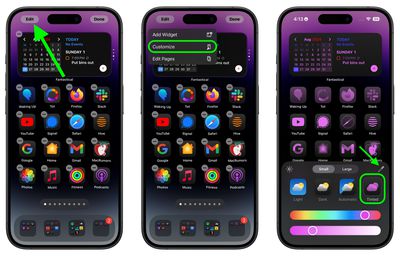
Home Screen

The tint feature is in addition to a new Dark mode option for your app icons in iOS 18, which you can learn more about by checking out our dedicated how-to.


Top Rated Comments

SouthBronx187 Avatar
22 months ago
Eye bleed 2009
Score: 25 Votes (Like | Disagree)
magicschoolbus Avatar
22 months ago
This looks like a bad myspace page
Score: 18 Votes (Like | Disagree)
DaniTheFox Avatar
22 months ago
Ugly as hell.

Edit: I am running iOS Beta 18 and I have already dicovert it. But when I see this 5 tint next to it in the picture above, I am glad I did not turn it on.
Score: 17 Votes (Like | Disagree)
22 months ago
All the good ideas have left the building it seems.
Score: 13 Votes (Like | Disagree)
22 months ago

Ugly as hell.
I can’t believe they allowed such hideous project to move forward.

I don’t want to be that guy, but no way Steve Jobs would have ever allowed such customisation and deviation from the default Apple experience and intended aesthetics.

And that’s coming from someone who still finds the default icons to be hideous as hell 10 years after iOS 6.
Score: 11 Votes (Like | Disagree)
coffeemilktea Avatar
22 months ago
All these new customization options are so excellent..... at making me appreciate how good the default icons and color schemes look. 🤪
Score: 9 Votes (Like | Disagree)

Popular Stories

Apple Event Logo

Apple's Next Era Begins September 1

Thursday May 7, 2026 10:36 am PDT by
Apple recently announced that Tim Cook will be stepping down as CEO later this year, after 15 years of leading the company. Effective September 1, Apple's hardware engineering chief John Ternus will become the company's next CEO, while Cook will become executive chairman of Apple's board of directors. In his new role, Apple said Cook will assist with "certain aspects" of the company,...
Instagram Feature 2

PSA: Instagram Encrypted Messaging Ends on Friday, May 8

Tuesday May 5, 2026 8:24 am PDT by
Instagram will remove end-to-end encryption for direct messages between users from May 8, 2026. When the date comes around, Meta will potentially be able to see the contents of all messages between users on the social media platform. Encrypting messages has been an optional feature in Instagram since 2023, but in March of this year the social media platform quietly updated a help page to say ...
macbook neo launch day

Apple May Drop Base $599 MacBook Neo as Chip, DRAM Costs Climb

Thursday May 7, 2026 4:55 am PDT by
Apple is considering dropping the cheapest MacBook Neo configuration as one possible response to the rising cost of building the popular laptop, according to Taiwan-based tech columnist and former Bloomberg reporter Tim Culpan. The Neo currently starts at $599 for a 256GB model, with a 512GB version at $699. Writing in his latest Culpium newsletter, Culpan says cutting the entry-level...









































