iPadOS 14.5: How to Search for Emoji on iPad - MacRumors
Skip to Content

iPadOS 14.5: How to Search for Emoji on iPad

by

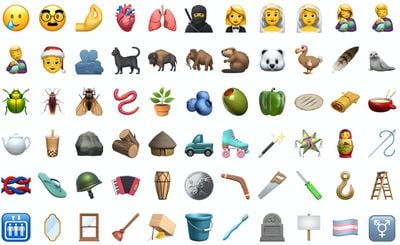
Apple introduced a much-requested emoji search feature in iOS 14, meaning iPhone users have been able to search for their favorite emoji for a while now. With the release of iPadOS 14.5, Apple has finally brought parity to its tablet devices by allowing iPad users to do the same thing. Here's how the new emoji search works.
ios142emoji
Before you follow the steps below, make sure you've enabled emoji in the Settings app: go to General -> Keyboard -> Keyboards -> Add New Keyboard, then select Emoji.

How to Search for Emoji on iPad

  1. Launch an app that lets you use the keyboard, like Messages or Notes, for example.
  2. Tap an input field to bring up the keyboard, then tap the smiley face or globe in the bottom-left corner of the screen.
    emoji

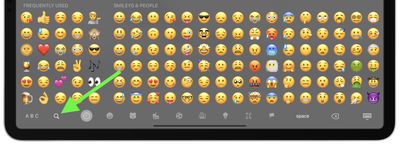
  3. Tap the search icon (the magnifying glass) in the bottom-left corner of the screen.
    emoji

  4. Enter your search term (vehicle, for example). If several filtered emoji match your search beyond what's visible on the screen, you can swipe across them to see more results.
    emoji

  5. Simply tap an emoji to use it.

Wondering how you can use emoji on your desktop in macOS? Click here to learn how.

Related Forum: iOS 14

Popular Stories

iOS 26

iOS 26.4 Adds Two New Features to CarPlay

Tuesday March 24, 2026 1:55 pm PDT by
iOS 26.4 was released today, and it includes a couple of new features for CarPlay: an Ambient Music widget and support for voice-based chatbot apps. To update your iPhone 11 or newer to iOS 26.4, open the Settings app and tap on General → Software Update. CarPlay will automatically offer the new features so long as the iPhone connected to your vehicle is running iOS 26.4 or later....
Apple Business hero

Apple Unveils 'Apple Business' All-in-One Platform

Tuesday March 24, 2026 8:53 am PDT by
Apple today announced Apple Business, a new all-in-one platform that unifies device management, productivity tools, and customer outreach features. The service is designed to be a consolidated replacement for several of Apple's existing business-focused offerings, including Apple Business Essentials, Apple Business Manager, and Apple Business Connect. It provides organizations with a single...
AirPods Pro Firmware Feature

Apple Releases New Firmware for AirPods Pro 3, AirPods Pro 2 and AirPods 4

Tuesday March 24, 2026 12:31 pm PDT by
Apple today released new firmware for the AirPods Pro 2, AirPods Pro 3, and the AirPods 4. The firmware has a version number of 8B39, up from 8B34 on the AirPods Pro 3, 8B28 on the AirPods Pro 2, and 8B21 on the AirPods 4. There is no word on what's included in the firmware, but Apple has a support document with limited notes. Most updates are limited to bug fixes and performance...