
iPhone 17: Using the New Dual Capture Video Feature - MacRumors
Skip to Content

iPhone 17: Using the New Dual Capture Video Feature

by

The iPhone 17 lineup brings a new video feature that lets you record from both the front and rear cameras simultaneously. Dual Capture creates picture-in-picture recordings that should be perfect for reaction videos, tutorials, or any scenario where you want to capture both yourself and the action in front of you. Here's what you need to know about the feature.
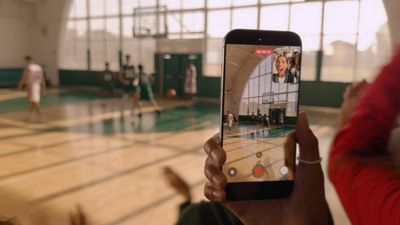
iphone 17 dual capture video
Dual Capture works across the iPhone 17 series, including the iPhone Air. Here's how to get up and running with the new feature.

iPhone 17: How to Enable Dual Capture Mode

  1. Open the Camera app on your iPhone.
  2. Tap Video at the bottom.
  3. Tap the icon made up of dots at the top right of the interface, or alternatively, tap again the selected video option in the carousel at the bottom of the interface.
  4. Select Dual Capture from the pop-up menu, then tap in the viewfinder.
  5. Tap the shutter to start recording via both front and rear cameras.
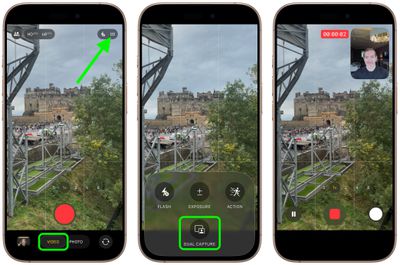
enable dual capture video iphone 17

Once you have used Dual Capture mode, for the rest of the app session the camera interface will show a handy new icon in the top-right corner, allowing you to turn it on and off without involving the pop-up menu.
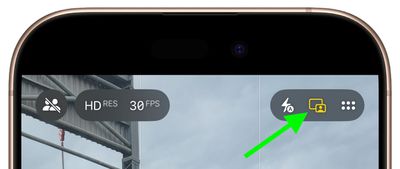
iphone 17 dual capture icon

What You Can Do While Recording

Once you start recording, you gain several useful controls. On iPhone 17 Pro and Pro Max models, you can switch between the 48MP main camera, 48MP ultrawide, and 48MP telephoto lenses for different perspectives without stopping your recording.

The smaller front camera window can also be moved around the screen by dragging it with your finger, which is handy if the preview window blocks something important in your shot. Bear in mind that any repositioning of the window gets saved in your final video, though.
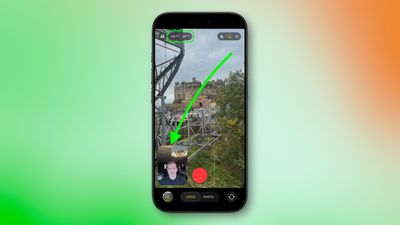
iphone 17 dual capture move camera window

Recording Quality and Limitations

Dual Capture records in either 1080p or 4K resolution at 24 or 30 fps. For maximum editing flexibility later, 4K at 30fps will likely deliver the best results.

The feature does come with some trade-offs. For one, you're locked into Apple's single layout design, where the rear camera takes up most of the frame while the front camera appears in a smaller window. Unlike Samsung's similar feature, you can't switch the feeds or choose a split-screen layout that shows both cameras equally.

Lastly, bear in mind that everything saves as one video file, not separate clips for each camera.

Related Roundups: iPhone 17, iPhone 17 Pro, iPhone Air
Related Forum: iPhone

Top Rated Comments

8 months ago
I'm not looking forward to more reaction videos
Score: 25 Votes (Like | Disagree)
mihighil Avatar
8 months ago

Understand & know this is new, but anyone know why it’s limited to the 17 series? Must be hardware requirements.

Use the rode capture app (usable on older models) its a arbitrary limitation on older models.
Score: 15 Votes (Like | Disagree)
8 months ago
Theres been apps doing this for years. I used to use DoubleTake when i was still doing Youtube. Hell of a good app. You could also record two seperate feeds though that and edit it how you like later on.
Score: 11 Votes (Like | Disagree)
Ralfi Avatar
8 months ago
This will result in very corny videos with non-genuine & staged reactions.

When the broadcasters script fans in the crowd to yell something when the camera pans to them, it’s fake, cringy & very off-putting.
Score: 7 Votes (Like | Disagree)
berrymetal Avatar
8 months ago
I wish the videos were non-destructive, in a way that you can reposition the selfie PiP later on when you edit the video (and resize it maybe). Perhaps that's something we will see in the future...
Score: 6 Votes (Like | Disagree)
mihighil Avatar
8 months ago
This was available through the Rode Capure app, great app and its free (no in app purchases)
Score: 6 Votes (Like | Disagree)

Popular Stories

astropad fresh coat comparison 4 feature

MacRumors Giveaway: Win an iPhone 17 and Astropad Fresh Coat Anti-Reflective Screen Protector

Friday April 10, 2026 10:50 am PDT by
For this week's giveaway, we've teamed up with Astropad to offer MacRumors readers a chance to win one of Apple's iPhone 17 models and a Fresh Coat anti-reflective screen protector from Astropad to use with it. Fresh Coat is a screen protector with an optical-grade anti-reflective coating to minimize glare and provide a better iPhone viewing experience. The technology reduces reflections by ...
better iphone 17 lineup

iPhone 17 Is Apple's Most Popular Lineup Ever

Thursday April 30, 2026 2:01 pm PDT by
Apple's iPhone 17 models are its most popular iPhones to date, Apple CFO Kevan Parekh told the Financial Times. Both Parekh and Apple CEO Tim Cook attributed Apple's stellar Q2 2026 performance to iPhone sales. "The iPhone 17 family is now the most popular line-up in our history... we believe we gained market share during the quarter," said Parekh. Cook told Reuters that iPhone demand was...
iPhone 17 Colors

iPhone 17 Outselling Every Other Phone Worldwide So Far This Year

Wednesday May 6, 2026 2:56 am PDT by
Apple's iPhone 17 was the best-selling smartphone globally in the first quarter of 2026, capturing 6 percent of worldwide unit sales, according to Counterpoint Research's latest Global Handset Model Sales Tracker. The iPhone 17 series dominated the top three spots, with the iPhone 17 Pro Max in second place and the iPhone 17 Pro in third. The previous-generation iPhone 16 also held on at...









































