iPhone 17: Using the New Center Stage Front Camera - GeekWebGuides
Skip to Content

iPhone 17: Using the New Center Stage Front Camera

by

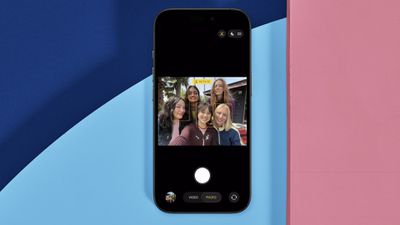
On all models in Apple's new iPhone 17 series as well as the iPhone Air, the new 18MP Center Stage front camera transforms mobile photography with its square sensor design and intelligent auto-adjustment features. Unlike traditional front cameras, the system automatically rotates and zooms to capture perfect selfie shots.

iphone 17 center stage camera
The square sensor also captures more image data than rectangular sensors, giving you unprecedented flexibility in framing and composition without sacrificing image quality.

Understanding Auto-Rotate and Auto-Zoom

Center Stage automatically switches between horizontal and vertical orientation when you're lining up a shot, meaning you don't need to physically rotate your iPhone. The camera also dynamically adjusts its field of view based on what's happening in front of it.

When you're taking a solo selfie, for example, Center Stage keeps the frame tight for a more personal feel. As friends join the shot, the view expands to include everyone without cropping anyone out.

Taking Photos with Center Stage
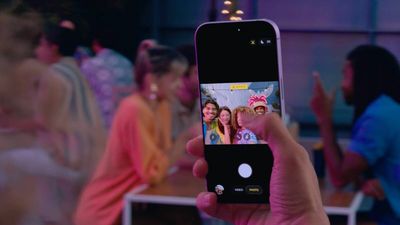
iphone 17 center stage camera shooting

  1. Open the Camera app on your iPhone.
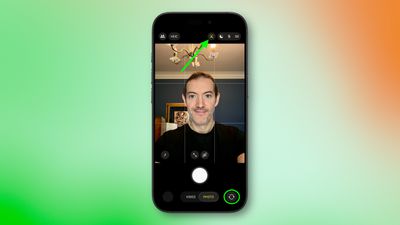
  2. Tap the circular arrows icon at the bottom right to switch to the selfie camera.
  3. The Center Stage button (the icon of a person's profile within a frame) above the viewfinder should appear as yellow, indicating the feature is enabled.
  4. Line up your shot – Center Stage automatically adjusts orientation and zoom.
  5. Hit the shutter button to capture your photo or video.
iphone 17 selfie center stage 1

Manual Camera Controls

You can override Center Stage's automatic functions when you need more control:

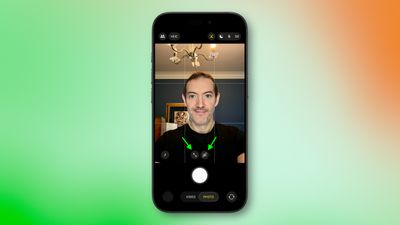
  • Manual rotation: Tap the orientation icon within the viewfinder to switch between portrait and landscape modes.
  • Manual zoom: Use the zoom icon (arrows pointing in/out) within the viewfinder to adjust the field of view yourself.
iphone 17 manual rotate zoom

How to Disable Auto-Rotate

iphone 17 center stage rotate
When the front camera is engaged, if Center Stage detects faces beside you or in the background and rotates to include them when you want a personal selfie:

  1. Tap the yellow Center Stage button.
  2. Tap Off next to "Auto Rotate."
  3. Take your photo normally – the camera will no longer auto-rotate. Alternatively, use the rotate orientation icon in the viewfinder to do so manually.
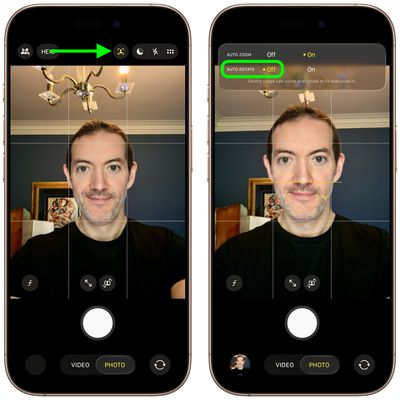
iphone 17 disable auto rotate

How to Disable Auto-Zoom

iphone 17 center stage auto zoom
When the front camera is engaged, if Center Stage's automatic zoom adjustments don't match your needs:

  1. Tap the yellow Center Stage button.
  2. Tap Off next to "Auto Zoom."
  3. Use the manual zoom button (with arrows pointing in/out) within the viewfinder to frame your shot exactly as desired.
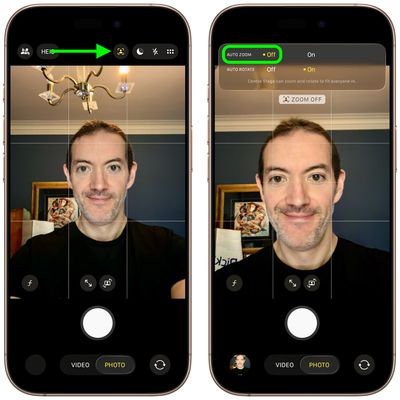
iphone 17 disable auto zoom

Center Stage works during FaceTime calls too, keeping your face centered, similar to how it functions on iPads and MacBooks. If you're interested to learn about dual capture video recording on iPhone 17, be sure to check out our dedicated how-to.

Related Roundups: iPhone 17, iPhone Air
Related Forum: iPhone

Top Rated Comments

cbaca51 Avatar
14 months ago
Seriously such a great feature for the front camera. That with the upgrade in MP, cameras are a really nice upgrade this year!
Score: 13 Votes (Like | Disagree)
14 months ago

Funny how the photo at the top shows the camera on the wrong side of the phone.
On the Air (which is the model of the photo), the camera is on the left side.
Score: 6 Votes (Like | Disagree)
Ntombi Avatar
14 months ago
Used it for the first time today with two friends and it was great. We take a selfie almost every time we get together, and usually, at least one of us is looking at the wrong side and needs a retake. This turned out so well, and we all looked good.

For reference, I’m a medium-brown Black woman, and one of my friends is a super duper pale white woman, and the other is in between. So getting our skin to all look good in one is already a big accomplishment. Add the portrait/landscape issue, and whew boy.

This camera is a big step up.
Score: 5 Votes (Like | Disagree)
jz0309 Avatar
14 months ago
Thanks for the article, haven’t had a chance yet to use the cameras on my 17PM much so will give this a try too
Score: 5 Votes (Like | Disagree)
14 months ago
Even more icons in the camera app. You need a manual if you don’t use the app every day.
Score: 4 Votes (Like | Disagree)
14 months ago

the auto rotate does not work on FaceTime. thanks Tim
FaceTime in iOS 26 has to be one of the worst “upgrades” in a while and it’s such a pain to use now, this doesn’t help it
Score: 4 Votes (Like | Disagree)

Popular Stories

iphone air thinness

iPhone Air 2 Could Be as Thin as an Unfolded iPhone Duo

Thursday October 8, 2026 4:21 am PDT by
Apple's iPhone Air 2 will be approximately 0.4mm thinner than the current model despite having a higher-capacity battery, claims the account "yeux1122" on the Korean Naver blog. Apple lists the original iPhone Air at 5.6mm thick, so a 0.4mm reduction would put its successor at approximately 5.2mm, around 7% thinner. Interestingly, that would match the thickness of the new iPhone Duo when...
M5 MacBook Pro

RIP, MacBook Ultra

Monday October 19, 2026 9:37 am PDT by
Apple today sent out invites for an experience in Los Angeles on Wednesday, October 28, and the "Pro and tell" tagline on the invitation likely means that the rumored MacBook models with touch-enabled OLED displays will stick with MacBook Pro branding instead of the once-rumored "MacBook Ultra" name. The long-rumored "iPhone Ultra" ended up being named iPhone Duo, so speculation that Apple...
iPhone Duo Trio

Here's What Apple's Apps Look Like on the iPhone Duo

Tuesday October 20, 2026 11:12 am PDT by
With just three days to go until the iPhone Duo is released, Apple is getting ready for the launch. Behind the scenes, the App Store now has screenshots of Apple's built-in apps running on the Duo. We've seen some apps in marketing materials, but images of the ones we haven't seen give us an idea of what it will be like using the iPhone Duo day to day. Many apps are shown in landscape...


Latest Stories
Apple Updates More Apps With iPhone Duo Support
23 minutes ago
Apple Will Label Apps 'Made for iPhone Duo' in App Store
3 hours ago
Amazon Takes $49 Off iPad With Prices Starting at $399.99
4 hours ago
F1 on Apple TV Now Available in Dolby Atmos
4 hours ago
Apple Reveals More Than 50 Apps That Will Be Updated for iPhone Duo
5 hours ago
Apple Blocks Certificates That Could Help Attackers Fake Websites
6 hours ago
Giant iPhone Duo Installations Spotted at Apple Fifth Avenue
7 hours ago
iPhone Duo 2 Prototypes Include Under-Display Face ID
7 hours ago
Tesla App Gains iPad and iPhone Duo Support
11 hours ago
Apple Reportedly Boosts iPhone Duo Orders by 44%
12 hours ago
Fortnite Returning to Australian App Store After Court Ruling
12 hours ago
Apple Ordered to Open iPhone to Rival App Stores in Australia
12 hours ago
Apple Suppliers Face Hurdles Cutting Circuit Board Emissions
13 hours ago
Things Updated for iPhone Duo With Adaptive Layout
13 hours ago
Simplicity and Siri AI Are HomeView's Killer Features, Apple Says
13 hours ago
iPhone Duo Reviewers Really Miss Face ID
18 hours ago
Does the iPhone Duo Run Hot? Here's What Reviews Found
20 hours ago
Apple Music's New Look is Now Live on Apple's Website
21 hours ago
Anthropic Launches Claude Duet, a Proactive AI Agent
21 hours ago
What 32,000 Folds Did to the iPhone Duo's Hinge
22 hours ago
iPhone Duo's Hidden FaceTime Camera Takes 'Trash' Photos
23 hours ago
iPhone Duo Has 'Edge Light' Feature That Debuted on Macs Last Year
1 day ago
Apple Support App Updated for iPhone Duo's Larger Display
1 day ago
Amazon Sweetens the Deal on Entry-Level 16-Inch MacBook Pro With $570 Off
1 day ago
iPhone Duo Tips Over on MagSafe Stands When Unfolded
1 day ago
Apple Music's New Look Officially Announced
1 day ago
iPhone Duo Supports Apple Pencil Starting With iOS 27.2
1 day ago
iPhone Duo Accessories Roundup: Cases and Screen Protectors From OtterBox, ZAGG, and More
1 day ago
Apple Stores Will Have 'Limited' Availability of iPhone Duo for Walk-In Customers
1 day ago
iPhone Duo Reviews Explain Why Device is Both 'Fun' and 'Frustrating'
1 day ago