How to Move Your Playlists from Spotify to Apple Music - MacRumors
Skip to Content

How to Move Your Playlists from Spotify to Apple Music

by

We've been experimenting with Apple Music for over a month now, but there are still a few important questions that pop up with the new music streaming service, the first being "How can I import my playlists from Spotify?"
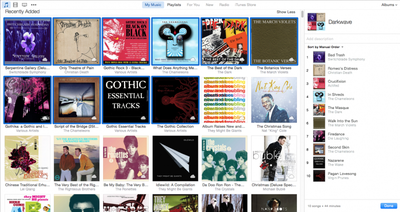
How to Move Spotify Playlist to Apple Music 9
The short answer is that you can't without using third-party software. After much research, we've found there are two fairly reliable third-party services that work well. One is called STAMP, and the other is called Move to Apple Music. Both automatically search for and add tracks from Spotify to Apple Music so you don't have to manually go through your entire collection song-by-song. While the end result is pretty much the same, each app offers different features.

Before you get started, make sure you are logged into iTunes with your Apple ID and subscribed to Apple Music.

With both STAMP and Move to Apple Music, you can download the program from each company's website. Both apps must be given special permission to control your computer.

How to Move Spotify Playlist to Apple Music 5
For STAMP, you have to allow the program to control your Accessibility features under the Security and Privacy tab in your Mac's System Preference. For Move to Apple Music, you will be prompted to first "like" a song by clicking the heart icon next to it. You will then receive a series of alerts saying that the certification is invalid. If you click "continue each time the alert pops up, eventually, you will grant access for the program to intercept your iTunes data and replicate the action of clicking the "Add to My Music" button.
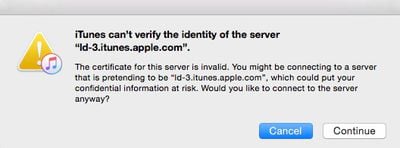
How to Move Spotfy Playlist to Apple Music 13
STAMP allows you to import any .CSV file that you've downloaded to your computer. So, whether you use Spotify, Rdio, or another music streaming service to create playlists, you can export anything that works with Exportify and then import them through this program. Move to Apple Music only allows you to move playlists from Spotify or Rdio.
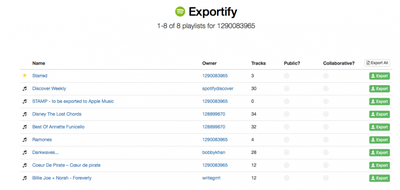
How to Move Spotify Playlist to Apple Music 7
However, Move to Apple Music does not lock you out of your computer while it is finding and adding tracks to your music library. The process of finding songs using these third-party apps can take hours. STAMP takes over control of your keyboard and mouse during the import process. Move to Apple Music runs in the background so you can continue to use your computer while it runs.
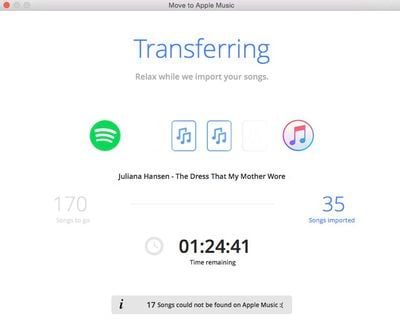
How to Move Spotfy Playlist to Apple Music 14
Neither app recreates the playlist directly into your music library. They find and add tracks from Apple Music automatically. You must manually create a playlist after the tracks are added.

Both apps were not able to import every song from every playlist. However, they both were just about 70 percent accurate. The error is most likely due to Apple Music not supporting certain songs, or they are listed different in Spotify or Rdio than they are listed on Apple Music, and therefore cannot be found.

Troubleshooting

In STAMP:

If you get a message that reads "No Assistive Access" you may need to start over.
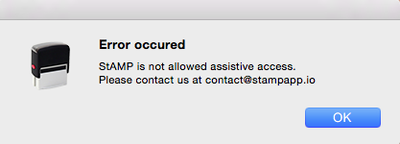
How to Move Spotify Playlist to Apple Music 4

  1. De-select STAMP from being able to control your Accessibility features by clicking on the remove (-) button.
  2. Quit both the STAMP app and iTunes.
  3. Restart your computer.
  4. Open the STAMP app again.
  5. Re-enable the app to control your Accessibility features.
  6. Continue with step three above.

If you get a message that reads "Can't get window 1 of process 'iTunes.' Invalid Index," try restarting iTunes and the STAMP app. I received that error a number of times and I just kept retrying until it eventually worked.

In Move to Apple Music:
When importing playlist files to iTunes, if you receive an error message that the .txt file is not a valid format.
How to Move Spotfy Playlist to Apple Music 9

  1. Create a random playlist in iTunes
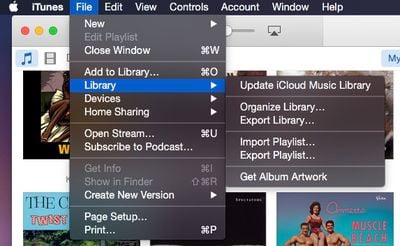
  2. Export the playlist you wish to add as a plain text file by accessing File in iTunes, selecting Library, and then selecting Export playlist.
  3. Open the file in TextEdit and reduce the size of the font.
  4. Copy the first line (name, album, artist). Then, open all exported playlists by Move to Apple Music.
  5. Replace the first line of each playlist with the line you previously copied.
  6. Save the files.
  7. Try to import the tracks in iTunes again.

If you lose your Internet connection while the program is capturing your iTunes session, you may need to cancel and restart. You could, however, wait until the session capture is complete if you don't need the Internet while it is processing.

For now, these third-party apps simply act as a workaround for allowing you to move your playlists from streaming music services like Spotify and Rdio to Apple Music. However, unless Apple adds a native feature, there are not many other options available and these two programs seem to work the best so far.


Top Rated Comments

146 months ago
iTunes was already bloated and crap, Apple Music just made it infinitely worse.
Score: 7 Votes (Like | Disagree)
LordQ Avatar
146 months ago
Apple Music is better than Spotify.


Attachment Image
Score: 5 Votes (Like | Disagree)
146 months ago
Thanks, but no thanks.
Score: 5 Votes (Like | Disagree)
146 months ago
iTunes was already bloated and crap, Apple Music just made it infinitely worse.
Totally agree. Love Apple but you can't be king with everything.

Apple Music is bloated. Spotify is super simple! Apple music streams have lag times Spotify doesn't. Spotify has easy to make folders and subfolders and easy to go from song to ALL of that artist's music and apple music doesn't.

I don't need a super celeb radio station. I just need what I want to hear. Radio is so, you know. Why would I want to hear constant one-liners from these cele Djs? Don't get it. Quick the babble, play the music.
Score: 3 Votes (Like | Disagree)
146 months ago
Finalmente. But I guess I have to go back from Apple Music to Spotify after my 3 months trial has ended.
Score: 3 Votes (Like | Disagree)
jeffUM Avatar
146 months ago
Actually, Move to Apple Music WILL transfer the playlists, not just the music.
Score: 2 Votes (Like | Disagree)

Popular Stories

Apple Music New Branding

Apple Music's New Look Officially Announced

Wednesday October 21, 2026 9:06 am PDT by
Following the introduction of a new Apple Music logo and app icon earlier this month, Apple today officially introduced Apple Music's new brand identity. In a YouTube video shared today, Apple said the new Apple Music visuals were "made by sound." More specifically, Apple said it played a sound through a container of water, resulting in the liquid moving at the frequency of the notes. Apple...
apple music new logo red

Apple Music Is Getting a New Logo

Tuesday October 6, 2026 4:06 am PDT by
Apple appears to be rolling out a new logo for Apple Music in its upcoming set of software updates. The logo has been spotted in both macOS 27.2 beta 3 and iOS 27.2 beta 3, and it's identical to the one that Apple used in its Apple Music Hall announcement last month. When Apple used the logo in the venue's press materials and on its new official website, it wasn't clear if this was a one-off ...
apple music icon 1

iOS 27.2 Adds New Apple Music Icon

Tuesday October 13, 2026 3:04 pm PDT by
In the fourth beta of iOS 27.2, Apple updated the Apple Music icon. The new icon is black and white, replacing the prior icon. In light mode, the logo is black on a white background, and in dark mode, it's white on a black background. The refreshed Music app icon comes after Apple debuted a new Apple Music logo in an earlier version of iOS 27.2 and in marketing materials for its recent...
Latest Stories
iPhone Duo Launch Begins as First Orders Reach Customers
2 hours ago
1Password for Agents Keeps Your Passwords Hidden From AI
3 hours ago
iPhone Duo 24 Hours Later: Your Questions Answered
4 hours ago
Apple's iWork Apps Get 'Intelligent Assistant' and iPhone Duo Support
5 hours ago
Apple is Apparently Considering a Slightly Larger iPhone Duo
5 hours ago
Giant iPhone Duo Displays Coming to Four Apple Stores
6 hours ago
Apple Pulls Keynote, Pages and Numbers From App Store [Update: Back]
7 hours ago
Apple Updates More Apps With iPhone Duo Support
7 hours ago
Apple Will Label Apps 'Made for iPhone Duo' in App Store
10 hours ago
Amazon Takes $49 Off iPad With Prices Starting at $399.99
11 hours ago
F1 on Apple TV Now Available in Dolby Atmos
11 hours ago
Apple Reveals More Than 50 Apps That Will Be Updated for iPhone Duo
12 hours ago
Apple Blocks Certificates That Could Help Attackers Fake Websites
13 hours ago
Giant iPhone Duo Installations Spotted at Apple Fifth Avenue
14 hours ago
iPhone Duo 2 Prototypes Include Under-Display Face ID
14 hours ago
Tesla App Gains iPad and iPhone Duo Support
18 hours ago
Apple Reportedly Boosts iPhone Duo Orders by 44%
18 hours ago
Fortnite Returning to Australian App Store After Court Ruling
19 hours ago
Apple Ordered to Open iPhone to Rival App Stores in Australia
19 hours ago
Apple Suppliers Face Hurdles Cutting Circuit Board Emissions
19 hours ago
Things Updated for iPhone Duo With Adaptive Layout
20 hours ago
Simplicity and Siri AI Are HomeView's Killer Features, Apple Says
20 hours ago
iPhone Duo Reviewers Really Miss Face ID
1 day ago
Does the iPhone Duo Run Hot? Here's What Reviews Found
1 day ago
Apple Music's New Look is Now Live on Apple's Website
1 day ago
Anthropic Launches Claude Duet, a Proactive AI Agent
1 day ago
What 32,000 Folds Did to the iPhone Duo's Hinge
1 day ago
iPhone Duo's Hidden FaceTime Camera Takes 'Trash' Photos
1 day ago
iPhone Duo Has 'Edge Light' Feature That Debuted on Macs Last Year
1 day ago
Apple Support App Updated for iPhone Duo's Larger Display
1 day ago