How to Add Photos to Playlists in Apple Music - MacRumors
Skip to Content

How to Add Photos to Playlists in Apple Music

by

Once you've created a playlist in Apple Music, adding a cover image of your own is easy. Here's how to do it.

apple music devices

Add a Photo to a Playlist on iPhone and iPad

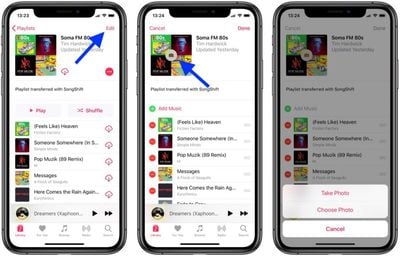
  1. Launch the Music app on your iOS device and navigate to the playlist you want to add a picture to.
  2. Tap Edit in the upper right corner of the screen.
  3. Tap the cover image.
    add a photo to a playlist in apple music

  4. Choose Take Photo or Choose Photo from the pop-up menu.
  5. Take the photo with your device's camera, or choose a photo from your photo albums.
  6. Tap Done.

Add a Photo for a Playlist on Your Computer

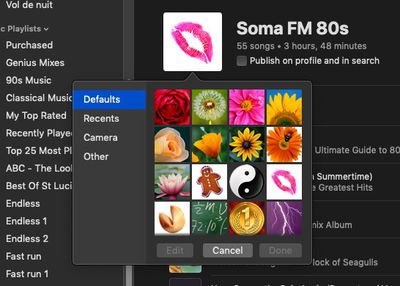
  1. Open iTunes on your computer and click the playlist in the sidebar that you want to add a photo to.
  2. Click the main cover image in the playlist.
    add photo to playlist itunes apple music

  3. Click Camera in the pop-up pane to take a photo with your computer's camera, or click Other to locate a photo on your hard disk. You can also click Recents to find a recent photo you used or Defaults to select an Apple profile picture.
  4. Click Done.

Popular Stories

apple music

Apple Music Is Down for Some Users

Monday April 20, 2026 12:18 pm PDT by
If Apple Music isn't working for you, you're not alone. According to Apple's System Status page, there's currently an Apple Music outage. Apple says that users may be experiencing intermittent issues with the service. The outage started at 2:38 p.m. Eastern Time, and it is ongoing. We'll update this article when the outage has been...
Apple Event Logo

Apple's Next Era Begins September 1

Thursday May 7, 2026 10:36 am PDT by
Apple recently announced that Tim Cook will be stepping down as CEO later this year, after 15 years of leading the company. Effective September 1, Apple's hardware engineering chief John Ternus will become the company's next CEO, while Cook will become executive chairman of Apple's board of directors. In his new role, Apple said Cook will assist with "certain aspects" of the company,...
Instagram Feature 2

PSA: Instagram Encrypted Messaging Ends on Friday, May 8

Tuesday May 5, 2026 8:24 am PDT by
Instagram will remove end-to-end encryption for direct messages between users from May 8, 2026. When the date comes around, Meta will potentially be able to see the contents of all messages between users on the social media platform. Encrypting messages has been an optional feature in Instagram since 2023, but in March of this year the social media platform quietly updated a help page to say ...