How to Protect Your Apple ID With Security Keys - GeekWebGuides
Skip to Content

How to Protect Your Apple ID With Security Keys

by

Apple has introduced security keys as an additional step to help users protect their Apple ID accounts. Keep reading to learn why the alternative authentication method is the most secure method available and what you need to do to set it up.
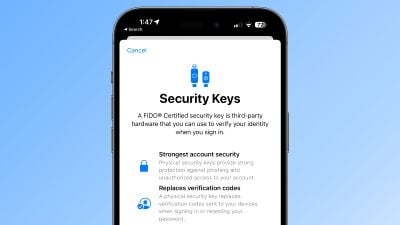
ios 16 3 security keys info

What Are Security Keys?

With the release of iOS 16.3, iPadOS 16.3, and macOS Ventura 13.2, Apple introduced support for security keys, or physical devices that can verify your ‌Apple ID‌ instead of a passcode.

Apple designed the feature for people who require additional protection from targeted attacks, such as phishing or social engineering scams.

The extra protection that security keys provide means that if someone had your ‌Apple ID‌ and your password, they still would not be able to access your account without your physical security key, which replaces the traditional verification code provided by two-factor authentication.

How Do Security Keys Work?

With a security key enabled, signing into an ‌Apple ID‌ requires entering your account's password and then using a security key to complete the two-factor authentication process, instead of the traditional six-digit verification code that is sent to another Apple device signed into the same account.

Why It's Worth Using Security Keys

It's worth noting from the outset that using physical security keys puts the onus on you to be careful not to lose them, otherwise you could permanently lose access to your Apple account. This is why Apple requires users to set up at least two security keys, and supports up to six in total.
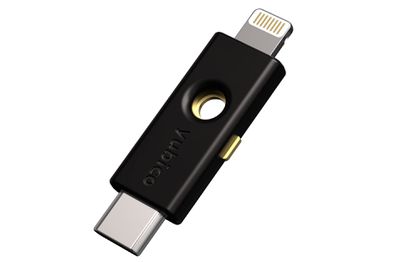
security keys
Having two physical security keys set up means you can keep them in more than one safe place. For example, you could keep one at home and one in your workplace, or you could keep one with you when traveling while the other one remains safe at home.

Once you have security keys set up, you can use them to sign in with your ‌Apple ID‌ on a new device or on the web, reset your ‌Apple ID‌ password, and add additional security keys or remove them from your account.

What You Can't Do With Security Keys

There are a few things worth noting that you can't do with security keys.

  • You can't use them to sign in to iCloud for Windows.
  • You can't sign in to older devices that can't be updated to a software version that supports security keys.
  • Security keys don't support child accounts and Managed Apple IDs.
  • Apple Watches that are paired with a family member's iPhone aren't supported.

Security Keys Worth Considering

Most security keys look similar to a typical USB thumb drive, with some options available with NFC for wireless use and others equipped with Lightning, USB-C, and/or USB-A ports for direct connectivity with iPhones, iPads, and Macs.

There are many options on the market when buying security keys, but the main things to consider when choosing one are that it is FIDO Certified and that it has a connector that works with your Apple devices. Some options recommended by Apple include:

Visit the FIDO Showcase website for a complete list of keys certified by the FIDO Alliance.

How to Enable Security Keys on iPhone and iPad

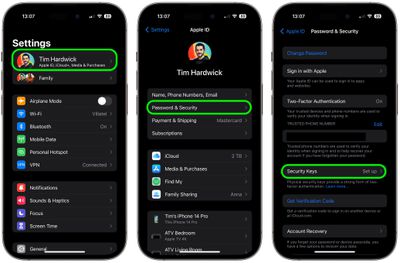
  1. Launch the Settings app on your iOS device.
  2. Tap your name in the ‌Apple ID‌ banner.
  3. Tap Password & Security.
  4. Tap Security Keys.
  5. Tap the blue Add Security Keys button and follow the on-screen instructions.
settings

You can remove security keys at any time by repeating the steps outlined above and tapping or clicking on Remove All Security Keys. Doing so causes your ‌Apple ID‌ to revert to using a traditional six-digit verification code for two-factor authentication.

How to Enable Security Keys on Mac

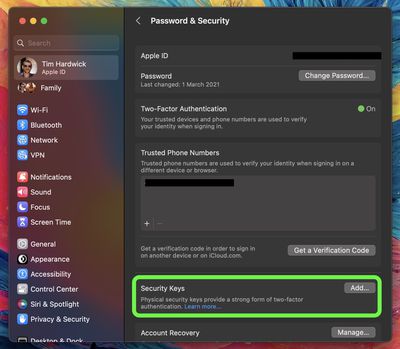
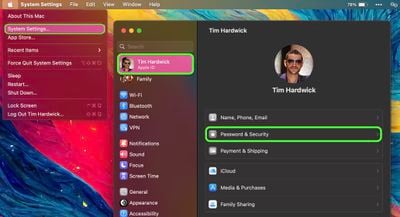
  1. Click the Apple symbol () in your Mac's menu bar and choose System Settings….
  2. Click your name at the top of the sidebar.
    settings

  3. Click Password & Security.
  4. In the "Security Keys" menu section, click Add…, then follow the onscreen instructions.
    settings

After following the above steps you will be given the opportunity to review the devices linked to your ‌Apple ID‌, with options to stay signed in to or log out of any associated Apple devices.

You can stop using security keys on your Mac by going to System Settings -> [your name] -> Password & Security. Click Security Keys, then click Remove All Security Keys. Doing so causes your ‌Apple ID‌ to revert to using a traditional six-digit verification code for two-factor authentication.

Top Rated Comments

F23 Avatar
45 months ago
Introducing the Apple Security Key for $199, we think you're going to love it.

Score: 17 Votes (Like | Disagree)
TheYayAreaLiving 🎗️ Avatar
45 months ago

Introducing the Apple Security Key for $199, we think you're going to love it.
I'm afraid it will be subscription-based :(. Apple's main focus is to generate money through Services nowadays :(
Score: 15 Votes (Like | Disagree)
antiprotest Avatar
45 months ago
Everything looks good until we find out Apple lets thieves use "shake to undo" to reset and switch to their own key.

And then everybody will have to use a screen time code to plug that hole too.
Score: 11 Votes (Like | Disagree)
centauratlas Avatar
45 months ago

I cannot tell you how many flash drives I have misplaced over the years, so I fear losing my security key and then I'm really screwed without anyone having to steal my device.

Am I missing something with this approach? How do the thieves bypass my second screen time pin without trying to crack the 4-digit pin? Is there a back door? I realize that it could take time to methodically run through the 10,000 combinations. Not the most secure I agree, but if it slows them down long enough for me to take action, then it's better than no security key and no password.

I'm just asking because I want to learn and know what I am up against.
Someone already answered this, but Apple needs additional steps to protect the AppleID. Some possibilities. Some/all could be optional:

1. 72 hour delay period before you are locked out - so you could back out of it from a different Apple Device, e.g. iPad.
2. Require FaceID/TouchID in addition to the password to reset it. And/or require the old password be entered to reset it.
3. Require confirmation on a different logged in Apple device, so it can't be done from the stolen device.
4. Sign phone out of iCloud for the paired iPhone from the Watch.
5. Or allow you to lock the paired phone from the Watch so that it needs a password AND confirmation from a different Apple device before they can do anything.

:-)
Score: 9 Votes (Like | Disagree)
Mr. Dee Avatar
45 months ago
Sorry, I’ll take my chances and just avoid using my passcode in public places.
Score: 9 Votes (Like | Disagree)
Apple_Robert Avatar
45 months ago
The security keys don't fully protect your Apple ID account. The keys are useless in protecting your Apple ID account if someone knows your phone passcode and takes control of your phone.
Score: 9 Votes (Like | Disagree)

Popular Stories

M5 MacBook Pro

RIP, MacBook Ultra

Monday October 19, 2026 9:37 am PDT by
Apple today sent out invites for an experience in Los Angeles on Wednesday, October 28, and the "Pro and tell" tagline on the invitation likely means that the rumored MacBook models with touch-enabled OLED displays will stick with MacBook Pro branding instead of the once-rumored "MacBook Ultra" name. The long-rumored "iPhone Ultra" ended up being named iPhone Duo, so speculation that Apple...
iPhone Duo Trio

Here's What Apple's Apps Look Like on the iPhone Duo

Tuesday October 20, 2026 11:12 am PDT by
With just three days to go until the iPhone Duo is released, Apple is getting ready for the launch. Behind the scenes, the App Store now has screenshots of Apple's built-in apps running on the Duo. We've seen some apps in marketing materials, but images of the ones we haven't seen give us an idea of what it will be like using the iPhone Duo day to day. Many apps are shown in landscape...
apple pro tell logo

Apple Announcing New Products Next Week: 'Pro and Tell'

Monday October 19, 2026 9:05 am PDT by
Apple's Greg Joswiak today hinted at new product announcements coming next week, sharing a social media post that says "Can't wait to pro and tell next week." Rumors suggest Apple is planning to debut the new MacBook Pro with an OLED touchscreen display, an M6 entry-level MacBook Pro, an M6 iMac, an iPad mini with an OLED display. Can't wait to pro and tell next week....
Latest Stories
Apple Will Label Apps 'Made for iPhone Duo' in App Store
3 hours ago
Amazon Takes $49 Off iPad With Prices Starting at $399.99
3 hours ago
F1 on Apple TV Now Available in Dolby Atmos
4 hours ago
Apple Reveals More Than 50 Apps That Will Be Updated for iPhone Duo
4 hours ago
Apple Blocks Certificates That Could Help Attackers Fake Websites
6 hours ago
Giant iPhone Duo Installations Spotted at Apple Fifth Avenue
6 hours ago
iPhone Duo 2 Prototypes Include Under-Display Face ID
7 hours ago
Tesla App Gains iPad and iPhone Duo Support
11 hours ago
Apple Reportedly Boosts iPhone Duo Orders by 44%
11 hours ago
Fortnite Returning to Australian App Store After Court Ruling
11 hours ago
Apple Ordered to Open iPhone to Rival App Stores in Australia
12 hours ago
Apple Suppliers Face Hurdles Cutting Circuit Board Emissions
12 hours ago
Things Updated for iPhone Duo With Adaptive Layout
12 hours ago
Simplicity and Siri AI Are HomeView's Killer Features, Apple Says
13 hours ago
iPhone Duo Reviewers Really Miss Face ID
18 hours ago
Does the iPhone Duo Run Hot? Here's What Reviews Found
19 hours ago
Apple Music's New Look is Now Live on Apple's Website
20 hours ago
Anthropic Launches Claude Duet, a Proactive AI Agent
20 hours ago
What 32,000 Folds Did to the iPhone Duo's Hinge
21 hours ago
iPhone Duo's Hidden FaceTime Camera Takes 'Trash' Photos
23 hours ago
iPhone Duo Has 'Edge Light' Feature That Debuted on Macs Last Year
23 hours ago
Apple Support App Updated for iPhone Duo's Larger Display
23 hours ago
Amazon Sweetens the Deal on Entry-Level 16-Inch MacBook Pro With $570 Off
1 day ago
iPhone Duo Tips Over on MagSafe Stands When Unfolded
1 day ago
Apple Music's New Look Officially Announced
1 day ago
iPhone Duo Supports Apple Pencil Starting With iOS 27.2
1 day ago
iPhone Duo Accessories Roundup: Cases and Screen Protectors From OtterBox, ZAGG, and More
1 day ago
Apple Stores Will Have 'Limited' Availability of iPhone Duo for Walk-In Customers
1 day ago
iPhone Duo Reviews Explain Why Device is Both 'Fun' and 'Frustrating'
1 day ago
Apple Says 'Reachability' Feature Coming to iPhone Duo Later This Year
1 day ago