How to Add, Remove, and Rearrange Menu Bar Icons in macOS Mojave - MacRumors
Skip to Content

How to Add, Remove, and Rearrange Menu Bar Icons in macOS Mojave

by

The macOS menu bar is a great place for quickly accessing system and application functions using menu extras or "menulets", but it can get cluttered pretty quickly as more and more icons vie for a space there.

If the corner of your Mac's screen is fast becoming an eyesore, here are some quick and simple actions you can perform to bring order to the chaos, plus a few additional tips for making the most of Apple's menu bar extras.

How to Rearrange Icons in the Menu Bar

Plenty of menu bar icons offer useful shortcuts to app and system functions, and may take up permanent residence on your screen. But left to their own devices, the arrangement of said icons is likely to become haphazard. Fortunately, re-organizing them is simple, once you know how to do it.

  1. Hold down the Command (⌘) key.

  2. Hover your mouse cursor over the icon you want to move.

  3. Holding down the left mouse button, drag the icon into your preferred position on the menu bar. Other icons will step aside to make space for it.

  4. Let go of the left mouse button.

move menu bar icon
Note that the Notifications icon in macOS is designed to sit in the far right corner of the menu bar and cannot be moved elsewhere.

How to Remove System Icons From the Menu Bar

Icons linked to system controls can be easily removed from the menu bar in the following way:

  1. Hold down the Command (⌘) key.

  2. Hover your mouse cursor over the icon you want to remove.

  3. Holding down the left mouse button, drag the icon out of the menu bar and onto the desktop.

  4. Let go of the left mouse button.

remove menu bar icon
If the icon doesn't vanish with a "whoosh" sound, then it was likely put there by a third-party app you or another user installed. In that case, look for an option in the associated app's settings such as "Show in Menu Bar" and uncheck it.

How to Add System Icons to the Menu Bar

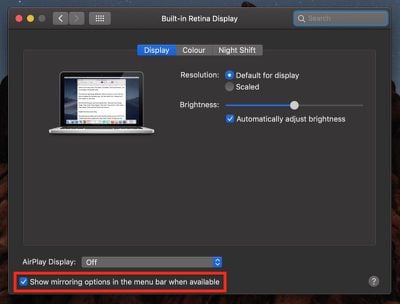
If you removed a system icon from the menu bar and would like it back, or if you'd like to add a fresh one, you can find options in the associated preference panes. For example, to reinstate the AirPlay icon in the menu bar:

  1. Click the apple symbol in the far left of the menu bar and select System Preferences....
  2. Select the Display preference pane.
  3. At the bottom of the pane, check the box to "Show mirroring options in the menu bar when available".
rearrange menu bar icons how to
Similar menu bar options relating to Sound volume, Bluetooth, Siri, Time Machine, and Accessibility status can be found in their respective preference panes. In addition to Wi-Fi status (listed below), the Network pane will also offer "menulet" options for things like modems and VPNs if you have them set up, while menu bar icons related to keyboard, battery, user account, and date/time are located less obviously in the following preference pane menus and tabs:

  • Keyboard -> Input Sources -> Show Input menu in menu bar.
  • Energy Saver -> Show battery status in menu bar.
  • Network -> Wi-Fi -> Show Wi-Fi status in menu bar.
  • Users & Groups -> Login Options -> Show fast user switching menu as Full Name / Account Name / Icon.
  • Date & Time -> Clock -> Show date and time in menu bar.

Menu Bar Extras

For one reason or another, some menulet options remain hidden in System Preferences by default. Interested users can find the full collection in the System folder: Open a Finder window, from the menu bar select Go -> Go to Folder..., and then navigate to /System/Library/CoreServices/Menu Extras.

Some of the extras in this folder are pretty obscure, but one or two might come in handy – like Eject if you use an optical drive, or Ink if you connect a graphics tablet to your Mac, for example. Just double-click any that look useful and they'll be added to the menu bar. They can be removed just as easily using the Command (⌘) key method described above.

Finally, users looking for a more comprehensive method of managing menu bar icons should consider third-party app Bartender 3 ($15).


Top Rated Comments

Westside guy Avatar
113 months ago
So, I already knew this - but... I wanted to say "Thank you!" to the author for writing a succinct, informative tutorial rather than an recording an eight-minute-long YouTube video!

Seriously, I get so tired of searching for information on some subject where the answer could be presented in 50 words of prose, but instead the search results page is littered with ridiculously long YouTube videos. The most ludicrous one I ever came across was a several-minute-long video that consisted of a live screen capture of some dude typing at the bash prompt! WHAT IS WRONG WITH THESE PEOPLE?
Score: 14 Votes (Like | Disagree)
MacDawg Avatar
113 months ago
Nice article, but I'm not sure people are wanting to move them as much as maybe remove them - I'm looking at you Creative Cloud
Why anyone would want to move them
I want to do both... move them and remove some of them (and hide others on a separate bar)
I just like things organized the way I want them and not the way the system organizes them

I use Bartender 3 now to have better control and accomplish what I want
Score: 8 Votes (Like | Disagree)
Schranke Avatar
113 months ago
Damm I have been using mac for many years now and I did not know this:eek:
Well it sure is helpful!
The more you know:apple:
Score: 6 Votes (Like | Disagree)
113 months ago
Nice article, but I'm not sure people are wanting to move them as much as maybe remove them - I'm looking at you Creative Cloud
Open Creative Cloud.
Click on those vertical dots (3 of them) on the icon in the Menu Bar - Prefferences
De-Select Launch at Login.

Do you mean this? If so - I hope it helps.
Score: 4 Votes (Like | Disagree)
maflynn Avatar
113 months ago
Nice article, but I'm not sure people are wanting to move them as much as maybe remove them - I'm looking at you Creative Cloud
Score: 4 Votes (Like | Disagree)
113 months ago
This has been around since OS X 10.2. BTW it doesn't work for all menu items so many will be frustrated when this doesn't work.
Allmost all of them work as of Sierra. Apple added this behaviour to third-party apps.
Score: 3 Votes (Like | Disagree)

Popular Stories

M5 MacBook Pro

RIP, MacBook Ultra

Monday October 19, 2026 9:37 am PDT by
Apple today sent out invites for an experience in Los Angeles on Wednesday, October 28, and the "Pro and tell" tagline on the invitation likely means that the rumored MacBook models with touch-enabled OLED displays will stick with MacBook Pro branding instead of the once-rumored "MacBook Ultra" name. The long-rumored "iPhone Ultra" ended up being named iPhone Duo, so speculation that Apple...
iPhone Duo Trio

Here's What Apple's Apps Look Like on the iPhone Duo

Tuesday October 20, 2026 11:12 am PDT by
With just three days to go until the iPhone Duo is released, Apple is getting ready for the launch. Behind the scenes, the App Store now has screenshots of Apple's built-in apps running on the Duo. We've seen some apps in marketing materials, but images of the ones we haven't seen give us an idea of what it will be like using the iPhone Duo day to day. Many apps are shown in landscape...
apple pro tell logo

Apple Announcing New Products Next Week: 'Pro and Tell'

Monday October 19, 2026 9:05 am PDT by
Apple's Greg Joswiak today hinted at new product announcements coming next week, sharing a social media post that says "Can't wait to pro and tell next week." Rumors suggest Apple is planning to debut the new MacBook Pro with an OLED touchscreen display, an M6 entry-level MacBook Pro, an M6 iMac, an iPad mini with an OLED display. Can't wait to pro and tell next week....
Latest Stories
Amazon Takes $49 Off iPad With Prices Starting at $399.99
1 minute ago
F1 on Apple TV Now Available in Dolby Atmos
31 minutes ago
Apple Reveals More Than 50 Apps That Will Be Updated for iPhone Duo
1 hour ago
Apple Blocks Certificates That Could Help Attackers Fake Websites
2 hours ago
Giant iPhone Duo Installations Spotted at Apple Fifth Avenue
3 hours ago
iPhone Duo 2 Prototypes Include Under-Display Face ID
3 hours ago
Tesla App Gains iPad and iPhone Duo Support
7 hours ago
Apple Reportedly Boosts iPhone Duo Orders by 44%
8 hours ago
Fortnite Returning to Australian App Store After Court Ruling
8 hours ago
Apple Ordered to Open iPhone to Rival App Stores in Australia
8 hours ago
Apple Suppliers Face Hurdles Cutting Circuit Board Emissions
9 hours ago
Things Updated for iPhone Duo With Adaptive Layout
9 hours ago
Simplicity and Siri AI Are HomeView's Killer Features, Apple Says
10 hours ago
iPhone Duo Reviewers Really Miss Face ID
15 hours ago
Does the iPhone Duo Run Hot? Here's What Reviews Found
16 hours ago
Apple Music's New Look is Now Live on Apple's Website
17 hours ago
Anthropic Launches Claude Duet, a Proactive AI Agent
17 hours ago
What 32,000 Folds Did to the iPhone Duo's Hinge
18 hours ago
iPhone Duo's Hidden FaceTime Camera Takes 'Trash' Photos
20 hours ago
iPhone Duo Has 'Edge Light' Feature That Debuted on Macs Last Year
20 hours ago
Apple Support App Updated for iPhone Duo's Larger Display
20 hours ago
Amazon Sweetens the Deal on Entry-Level 16-Inch MacBook Pro With $570 Off
21 hours ago
iPhone Duo Tips Over on MagSafe Stands When Unfolded
21 hours ago
Apple Music's New Look Officially Announced
22 hours ago
iPhone Duo Supports Apple Pencil Starting With iOS 27.2
23 hours ago
iPhone Duo Accessories Roundup: Cases and Screen Protectors From OtterBox, ZAGG, and More
1 day ago
Apple Stores Will Have 'Limited' Availability of iPhone Duo for Walk-In Customers
1 day ago
iPhone Duo Reviews Explain Why Device is Both 'Fun' and 'Frustrating'
1 day ago
Apple Says 'Reachability' Feature Coming to iPhone Duo Later This Year
1 day ago
Loop Capital Cuts Apple Rating Over iPhone Sales Outlook
1 day ago