How to Rebuild the Spotlight Index on Your Mac - MacRumors
Skip to Content

How to Rebuild the Spotlight Index on Your Mac

by

macos spotlight icon e1542458658324Apple has enhanced Spotlight search in macOS in recent years, with the addition of Spotlight Suggestions allowing it to tap into a variety of online data sources like weather and sports. Nevertheless, helping you find apps, documents and other files stored on your Mac is still what Spotlight does best.

That's not to say its core function is infallible, however. If Spotlight can't find files that you know exist on your Mac, or if it stops prioritizing results based on your earlier searches, then it's probably a sign that your system's search index is damaged somehow.

If you're experiencing odd behavior when using Spotlight, you should try rebuilding its search database index. There are Terminal commands that will do the job, but you can achieve the same result via the regular macOS user interface in just a few quick steps. Here's how.

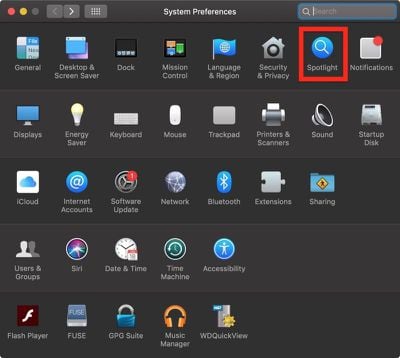
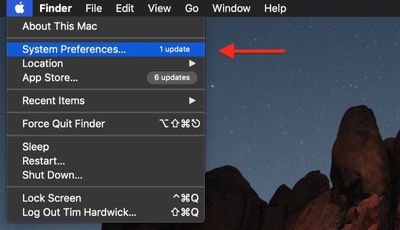
  1. Select System Preferences... from the Apple () menu at the top left of your screen.
    how to reindex spotlight00

  2. Click the Spotlight pane.
    how to reindex spotlight01

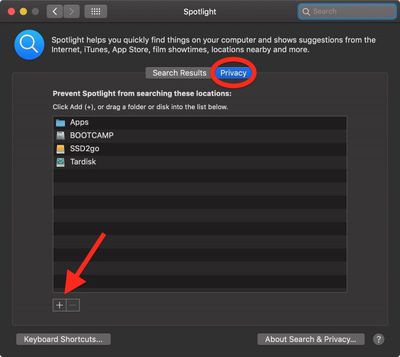
  3. Click the Privacy tab.
  4. Click the Add (+) button.
    how to reindex spotlight02

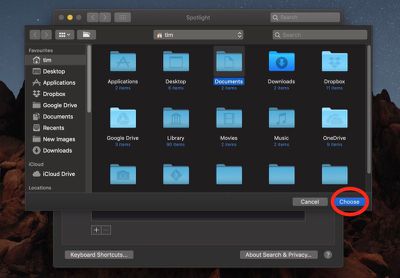
  5. Select the folder or disk whose index you wish to re-build, then click Choose. Alternatively, drag the folder or disk into the list. We've chosen Documents in our example.
    how to reindex spotlight03

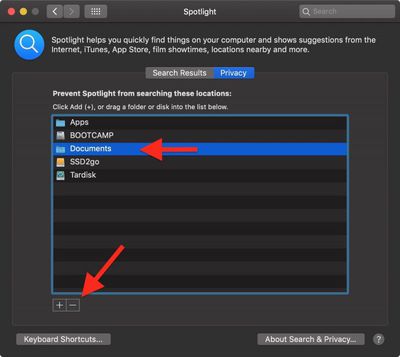
  6. In the same list, click the folder or disk that you just added and then click the Remove (-) button.
    how to reindex spotlight04

  7. Click the red traffic light button to close System Preferences.
Once you've completed these steps, Spotlight will begin reindexing the contents of the folder(s) or disk(s) you chose, which may take some time and a few processor cycles. Depending on which version of macOS you're running, you may see a rebuild progress indicator in Spotlight's menu bar item. With a bit of luck, your Spotlight problems will have been resolved once indexing is complete.

You can also perform a system-wide re-index of the Spotlight database, among many other optimizations, using Titanium Software's free Onyx utility, which is available for all recent versions of macOS.


Top Rated Comments

Weaselboy Avatar
104 months ago
You can also perform a system-wide re-index of the Spotlight database, among many other optimizations, using Titanium Software's free Onyx utility ('https://www.titanium-software.fr/en/onyx.html'), which is available for all recent versions of macOS.

You can also just run this command in Terminal and it will do a system-wide Spotlight reindex.

sudo mdutil -E /

I've tried this rebuild previously and found it did not change anything.
Anyone with different experience?
One issue I have noticed a Spotlight reindex will often fix is if you are getting an incorrect readout for Storage in System Report. If the Spotlight index is corrupted it will make that storage readout all wrong and a reindex can fix it.


Attachment Image
Score: 14 Votes (Like | Disagree)
103 months ago
It seems that Apple assumes Mac users only need to search Mac formatted drives that are connected directly to Mac computers running Mac OS. Forget about shared folders on Windows servers or read-only volumes such as NTFS drives or DVD media. Even with simple filename based searches, Mac OS 9 from 20 years ago or even Unix find seems to find filenames better than Spotlight when searching "non Apple approved" volumes.


Also, what search engine does Apple use on their own Support website? Trying to search for a simple phrase returns hundreds of pages of irrelevant results. It also seems like their website search uses implicit "OR" instead of "AND" for searches containing multiple words. It's pathetic that I have to use an external Google search to find stuff inside Apple's own website.
Score: 6 Votes (Like | Disagree)
macdaddy44 Avatar
104 months ago
This is a more extensive rebuild as it removes a possibly corrupt index database -

• mdutil -i off /
• sudo rm -rf /.Spotlight-V100
• sudo rm -rf /.Spotlight-V200
• mdutil -i on /
• mdutil -E /
Score: 6 Votes (Like | Disagree)
104 months ago
Onyx is a great utility, been using it for years. It also gives you access to enable a bunch of other hidden settings and options. For example, One option I like to enable is turning launchpad's background to greyscale. I find this makes it easier and faster to locate items on the launchpad that I don't frequently access.
Score: 5 Votes (Like | Disagree)
djlythium Avatar
104 months ago
I never knew this was possible.

I love these tutorials!
Score: 3 Votes (Like | Disagree)
103 months ago
when you combine spotlights PDF indexing with the Fujitsu Snapscan with OCR and coverflow, the results are amazeballs.

Apple should advertise this functionality. It’s an amazing paperless workflow. If apple added AI bill, business card, and receipt recognition to spotlight that would be even better.

That’s all I got to say about spotlight! Long live coverflow!
Score: 2 Votes (Like | Disagree)

Popular Stories

M5 MacBook Pro

RIP, MacBook Ultra

Monday October 19, 2026 9:37 am PDT by
Apple today sent out invites for an experience in Los Angeles on Wednesday, October 28, and the "Pro and tell" tagline on the invitation likely means that the rumored MacBook models with touch-enabled OLED displays will stick with MacBook Pro branding instead of the once-rumored "MacBook Ultra" name. The long-rumored "iPhone Ultra" ended up being named iPhone Duo, so speculation that Apple...
iPhone Duo Trio

Here's What Apple's Apps Look Like on the iPhone Duo

Tuesday October 20, 2026 11:12 am PDT by
With just three days to go until the iPhone Duo is released, Apple is getting ready for the launch. Behind the scenes, the App Store now has screenshots of Apple's built-in apps running on the Duo. We've seen some apps in marketing materials, but images of the ones we haven't seen give us an idea of what it will be like using the iPhone Duo day to day. Many apps are shown in landscape...
apple pro tell logo

Apple Announcing New Products Next Week: 'Pro and Tell'

Monday October 19, 2026 9:05 am PDT by
Apple's Greg Joswiak today hinted at new product announcements coming next week, sharing a social media post that says "Can't wait to pro and tell next week." Rumors suggest Apple is planning to debut the new MacBook Pro with an OLED touchscreen display, an M6 entry-level MacBook Pro, an M6 iMac, an iPad mini with an OLED display. Can't wait to pro and tell next week....
Latest Stories
Tesla App Gains iPad and iPhone Duo Support
43 minutes ago
Apple Reportedly Boosts iPhone Duo Orders by 44%
1 hour ago
Fortnite Returning to Australian App Store After Court Ruling
2 hours ago
Apple Ordered to Open iPhone to Rival App Stores in Australia
2 hours ago
Apple Suppliers Face Hurdles Cutting Circuit Board Emissions
2 hours ago
Things Updated for iPhone Duo With Adaptive Layout
3 hours ago
Simplicity and Siri AI Are HomeView's Killer Features, Apple Says
3 hours ago
iPhone Duo Reviewers Really Miss Face ID
8 hours ago
Does the iPhone Duo Run Hot? Here's What Reviews Found
9 hours ago
Apple Music's New Look is Now Live on Apple's Website
10 hours ago
Anthropic Launches Claude Duet, a Proactive AI Agent
11 hours ago
What 32,000 Folds Did to the iPhone Duo's Hinge
11 hours ago
iPhone Duo's Hidden FaceTime Camera Takes 'Trash' Photos
13 hours ago
iPhone Duo Has 'Edge Light' Feature That Debuted on Macs Last Year
14 hours ago
Apple Support App Updated for iPhone Duo's Larger Display
14 hours ago
Amazon Sweetens the Deal on Entry-Level 16-Inch MacBook Pro With $570 Off
14 hours ago
iPhone Duo Tips Over on MagSafe Stands When Unfolded
14 hours ago
Apple Music's New Look Officially Announced
15 hours ago
iPhone Duo Supports Apple Pencil Starting With iOS 27.2
16 hours ago
iPhone Duo Accessories Roundup: Cases and Screen Protectors From OtterBox, ZAGG, and More
17 hours ago
Apple Stores Will Have 'Limited' Availability of iPhone Duo for Walk-In Customers
17 hours ago
iPhone Duo Reviews Explain Why Device is Both 'Fun' and 'Frustrating'
18 hours ago
Apple Says 'Reachability' Feature Coming to iPhone Duo Later This Year
19 hours ago
Loop Capital Cuts Apple Rating Over iPhone Sales Outlook
23 hours ago
Apple Stores in Bordeaux and Lille Looted During French Protests
23 hours ago
Bluesound Adds Native Apple Music Support
23 hours ago
Apple CEO John Ternus Explains What Makes Good Product Design
1 day ago
UK Proposes New Ways to Help Apple Pay Rivals
1 day ago
WhatsApp Developing In-App Browser for All Chat Links on iPhone
1 day ago
Apple's App Store Chief Explains Its Push for Premium Games
1 day ago