
Remotely Control Your iPhone Camera – No Apple Watch Needed - GeekWebGuides
Skip to Content

Remotely Control Your iPhone Camera – No Apple Watch Needed

by

Remotely controlling the shutter on your iPhone's camera lets you include yourself in the photo while avoiding the limitations of a selfie. For example, it allows you to take a picture of a wider scene with you included in the frame, which is ideal for landscape shots or group photos. If your iPhone is on a tripod, taking the shot remotely also reduces the risk of camera shake. Here's how to do it – and you don't need an Apple Watch.
iphone12protriplelenscamera
There are more ways than one to take a picture on your iPhone remotely. If you have an Apple Watch, you can open the Camera Remote app that comes included in watchOS (see the second set of steps below). If you don't have an Apple Watch, here's how to use Voice Control.

Use Voice Control to Take a Photo

If you don't have an Apple Watch, don't worry. You can also use Voice Control to remotely control the camera on your iPhone. That's because you can trigger the camera shutter with the volume buttons, which can also be controlled with your voice. Here's how it works.

  1. Launch the Settings app and tap Accessibility.
  2. Tap Voice Control.
  3. Turn on the switch next to Voice Control so it's in the green ON position. (You should see a Voice Control active symbol and a little orange dot icon at the top of the screen indicating that Voice Control is using the microphone.)
  4. Next, launch the Camera app and line up your shot.
  5. When you're ready, say "Turn up the volume," to activate the camera's shutter and take the picture.
  6. When you're finished, you can disable Voice Control by toggling the switch again in Settings.
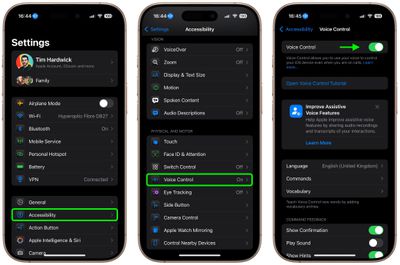
settings

Control Your iPhone's Camera With Apple Watch

  1. Launch the Camera Remote app on your wrist.
  2. Position your iPhone to frame the shot you want to take.
  3. Tap the Shutter button on your Apple Watch screen.
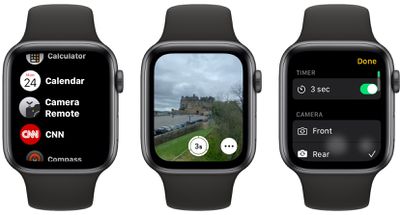
camera remote
By default, the shot is taken after three seconds to give you time to move into position, but you can disable the time and control other settings including flash, and Live Photo by tapping the ellipsis (three dots) button. The menu that this calls up also lets you switch between the front and rear iPhone camera.

Final tip: If you're familiar with the Shortcuts app, you can find a shortcut in the Gallery called "Say Cheese" that lets you use Siri to control your iPhone's camera remotely. Once you've added it to your active shortcuts and given it permission to access your camera and microphone, you'll be able to take photos remotely by saying "Hey Siri, say cheese."


Top Rated Comments

Veinticinco Avatar
19 months ago
[LIST=1]
* [I]When you're ready, say "Turn up the volume," to activate the camera's shutter and take the picture.[/I]


Well, isn't that just super-intuitive...
Score: 25 Votes (Like | Disagree)
MacUserFella Avatar
19 months ago
“No Apple Watch Needed”

*proceeds to list Apple Watch camera method*
Score: 17 Votes (Like | Disagree)
diego.c Avatar
19 months ago
Me: "Hey Siri, say cheese."

Siri: Cheddar, Mozzarella, Brie...
Score: 12 Votes (Like | Disagree)
19 months ago
It should be easy as “hey Siri take a photo” after launching camera app. “Turn the volume up” doesn’t seem very nice to do it.
Score: 8 Votes (Like | Disagree)
mrgraff Avatar
19 months ago

Can’t I use AirPods to take photos remotely?
Sure, and you can also use a bluetooth shutter remote. The tip in this post isn't the only way.
Score: 8 Votes (Like | Disagree)
19 months ago


[LIST=1]
* When you're ready, say "Turn up the volume," to activate the camera's shutter and take the picture.


Well, isn't that just super-intuitive...
It may not be "super-intuitive" but it is awesome. Instead of knee-jerk dissing on some feature, consider embracing it instead.

Many thanks to MR for providing this excellent tip. I capture many images where for safety or for good image capture reasons manual shutter release is challenging, even with the very helpful Camera Control button.

Hint:
Using voice control means one's hands need not be adding movement to the process of releasing the shutter, which [if one can manage to keep the iPhone really still] means the camera app will not need to apply as much computational photography to the image capture, which means less of the "over processing" unskilled users like to unfairly blame on the iPhone. The other technique to minimize how much computational photography is required is to always keep the camera set to RAW capture. And to realize that less available light always means compromises to image capture.
Score: 6 Votes (Like | Disagree)

Popular Stories

M5 MacBook Pro

RIP, MacBook Ultra

Monday October 19, 2026 9:37 am PDT by
Apple today sent out invites for an experience in Los Angeles on Wednesday, October 28, and the "Pro and tell" tagline on the invitation likely means that the rumored MacBook models with touch-enabled OLED displays will stick with MacBook Pro branding instead of the once-rumored "MacBook Ultra" name. The long-rumored "iPhone Ultra" ended up being named iPhone Duo, so speculation that Apple...
iPhone Duo Trio

Here's What Apple's Apps Look Like on the iPhone Duo

Tuesday October 20, 2026 11:12 am PDT by
With just three days to go until the iPhone Duo is released, Apple is getting ready for the launch. Behind the scenes, the App Store now has screenshots of Apple's built-in apps running on the Duo. We've seen some apps in marketing materials, but images of the ones we haven't seen give us an idea of what it will be like using the iPhone Duo day to day. Many apps are shown in landscape...
apple pro tell logo

Apple Announcing New Products Next Week: 'Pro and Tell'

Monday October 19, 2026 9:05 am PDT by
Apple's Greg Joswiak today hinted at new product announcements coming next week, sharing a social media post that says "Can't wait to pro and tell next week." Rumors suggest Apple is planning to debut the new MacBook Pro with an OLED touchscreen display, an M6 entry-level MacBook Pro, an M6 iMac, an iPad mini with an OLED display. Can't wait to pro and tell next week....

Latest Stories
Apple Reveals More Than 50 Apps That Will Be Updated for iPhone Duo
4 minutes ago
Apple Blocks Certificates That Could Help Attackers Fake Websites
1 hour ago
Giant iPhone Duo Installations Spotted at Apple Fifth Avenue
2 hours ago
iPhone Duo 2 Prototypes Include Under-Display Face ID
2 hours ago
Tesla App Gains iPad and iPhone Duo Support
6 hours ago
Apple Reportedly Boosts iPhone Duo Orders by 44%
7 hours ago
Fortnite Returning to Australian App Store After Court Ruling
7 hours ago
Apple Ordered to Open iPhone to Rival App Stores in Australia
7 hours ago
Apple Suppliers Face Hurdles Cutting Circuit Board Emissions
8 hours ago
Things Updated for iPhone Duo With Adaptive Layout
8 hours ago
Simplicity and Siri AI Are HomeView's Killer Features, Apple Says
9 hours ago
iPhone Duo Reviewers Really Miss Face ID
14 hours ago
Does the iPhone Duo Run Hot? Here's What Reviews Found
15 hours ago
Apple Music's New Look is Now Live on Apple's Website
16 hours ago
Anthropic Launches Claude Duet, a Proactive AI Agent
16 hours ago
What 32,000 Folds Did to the iPhone Duo's Hinge
17 hours ago
iPhone Duo's Hidden FaceTime Camera Takes 'Trash' Photos
19 hours ago
iPhone Duo Has 'Edge Light' Feature That Debuted on Macs Last Year
19 hours ago
Apple Support App Updated for iPhone Duo's Larger Display
19 hours ago
Amazon Sweetens the Deal on Entry-Level 16-Inch MacBook Pro With $570 Off
20 hours ago
iPhone Duo Tips Over on MagSafe Stands When Unfolded
20 hours ago
Apple Music's New Look Officially Announced
21 hours ago
iPhone Duo Supports Apple Pencil Starting With iOS 27.2
22 hours ago
iPhone Duo Accessories Roundup: Cases and Screen Protectors From OtterBox, ZAGG, and More
23 hours ago
Apple Stores Will Have 'Limited' Availability of iPhone Duo for Walk-In Customers
23 hours ago
iPhone Duo Reviews Explain Why Device is Both 'Fun' and 'Frustrating'
23 hours ago
Apple Says 'Reachability' Feature Coming to iPhone Duo Later This Year
1 day ago
Loop Capital Cuts Apple Rating Over iPhone Sales Outlook
1 day ago
Apple Stores in Bordeaux and Lille Looted During French Protests
1 day ago
Bluesound Adds Native Apple Music Support
1 day ago







































