

Downloading lots of songs or albums from the Apple Music catalog can use up a lot of local storage on your device.

Fortunately it's easy to remove downloaded Apple Music content and reclaim the storage space of your devices. Here's how.
- Launch the Music app on your iPhone or iPad, or open the Music app on your computer.
- Find the song or album in your library that you want to remove locally from your device.
- In the Music app, press and hold the item, select Delete From Library from the pop-up menu, and then tap Delete Album/Song when prompted. On Mac, right-click (or Ctrl-click) the item and select Remove Download.
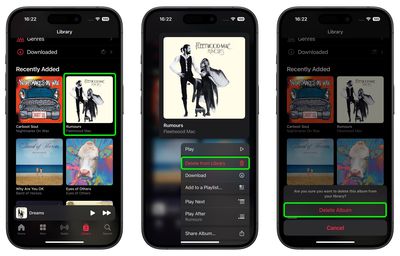
Note that if you see the cloud icon next to a song or album, then it's stored in the cloud, not on your device, so it doesn't use any local storage.
Tag: Apple Music Guide


























![Apple Pulls Keynote, Pages and Numbers From App Store [Update: Back]](https://images.macrumors.com/t/Okb7kitB_gNr6qe5Pex9nQIysD8=/112x112/article-new/2026/01/Apple-Creator-Studio-iWork-suite.jpg)


















