

If you recently switched from a Windows PC to a Mac, you may be wondering how to right-click in macOS. Apple mice and trackpads have never had a secondary button, but there are actually several ways you can right-click on Mac, giving you access to a plethora of contextual menus and options throughout Apple's desktop operating system.
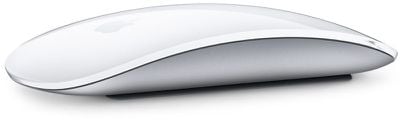
If you connect a third-party mouse with two buttons to your Mac, macOS should automatically recognize the secondary button and map it to the system's right-click functions without you having to do anything. On the other hand, if you're using an Apple Magic Mouse, Magic Trackpad, or a MacBook's built-in trackpad, you can perform one of the following actions to gain equivalent right-click functionality.
Right-Click on a MacBook Trackpad or Magic Trackpad
macOS has a built-in preference for enabling right-clicking on a MacBook Trackpad or a Magic Trackpad. Follow these steps to enable secondary click on either device.
- Click the Apple () menu in the upper left corner of your Mac's screen and select System Preferences....

- Click the Trackpad icon in the preferences panel.
- Click the Point & Click tab.
- Click the checkbox next to Secondary click.
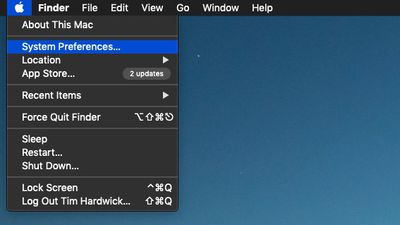
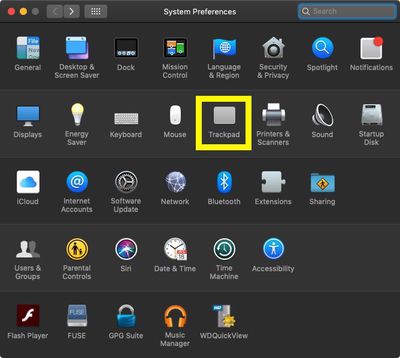
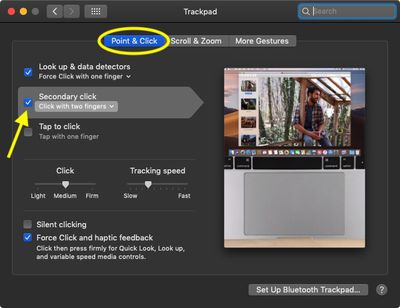
With Secondary click enabled, tapping the trackpad with two fingers at the same time performs a right-click action. If you click the chevron next to Click with two fingers you'll also see additional options for clicking in the bottom left or right corners of your trackpad.
Right-click on a Magic Mouse
macOS has a built-in preference for enabling right-clicking on a Magic Mouse. Follow these steps to enable secondary click on Apple's input device.
- Click the Apple () menu in the upper left corner of your Mac's screen and select System Preferences....
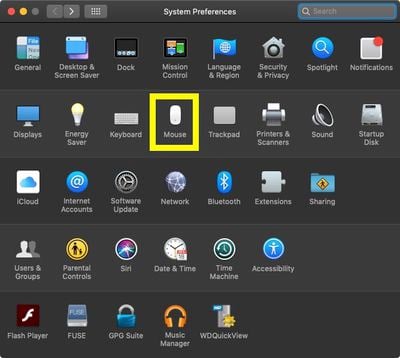
- Click the Mouse icon in the preferences panel.
- Click the Point & Click tab.
- Click the checkbox next to Secondary click. The default option here is Click on right side, but you can change it to Click on left side if you prefer.
The Control-Click
In addition to the two preference options outlined above, macOS provides an alternative method of secondary clicking. Holding down the Control (Ctrl) key on your keyboard when you click a mouse button is the equivalent of a right-click on a two-button mouse.

The Control key performs the same modifying function when you press down on a MacBook's built-in trackpad or an Apple Magic Trackpad while holding the key down.














































