

How to Scan Documents With Your iPhone in Three Quick Steps - MacRumors
Skip to Content

How to Scan Documents With Your iPhone in Three Quick Steps

by

notes icon ios 12The document scanning feature found in Apple's stock Notes app is a great way to digitize all sorts of print-based content, from letters and receipts to recipes and photos.

If you often make a digital record of paper in this way, you'll be familiar with the typical steps involved: unlock your device, launch the Notes app from the Home screen, create a new note, tap the "+" button, choose Scan Documents, then line up the document you want to shoot and save.

It's not immediately obvious, but there is a way to cut out several of these steps and make scanning a document a much quicker process, which is great news if you tend to scan things several times a day. First, you'll want to add Notes to the Control Center, like so:

  1. Launch the Settings app.
  2. Tap Control Center.
  3. In the More Controls list, tap the green "+" button next to the Notes entry.
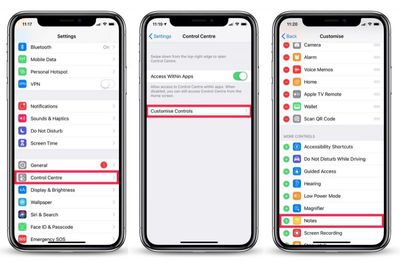
Add Notes to Control Center
Now that's set up, you can get to the document scanning screen in fewer steps, as described below.

How to Scan Documents in Three Quick Steps

  1. Launch Control Center from the Lock screen: On iPhone 8 or earlier, swipe up from the bottom of the screen; on iPhone X/XS/XR, swipe down from the upper right "ear".
  2. Hard press (or long press) the Notes icon.
  3. Tap Scan Document and allow Face ID to automatically authenticate you (If you're using an iPhone with Touch ID, place your finger on the Home screen to unlock.)
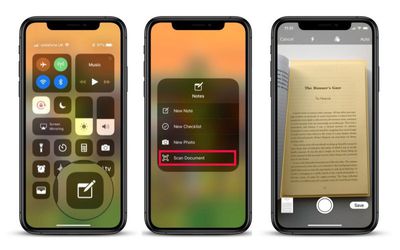
add document scanning to control center
You're now ready to scan your document and save it as a note.

Don't forget, if you want to generate a PDF of the scan as soon as it's been saved as a note, simply tap the Share Sheet icon (the box with an arrow pointing out) at the upper-right of the screen and select Create PDF from the third row of options.

Once it's generated you'll be offered the option to save it to the Files app, or you can share it elsewhere with another tap of the Share Sheet icon.


Related Forums: iOS 11, iOS 12

Top Rated Comments

97 months ago
Now where’s the built in OCR?
Score: 15 Votes (Like | Disagree)
TheScribe Avatar
97 months ago
Just FYI, you don’t NEED to add it to control center...you can just force touch or long press the regular notes app icon.
Score: 14 Votes (Like | Disagree)
97 months ago
I didn’t even know that scanning was an option in the notes app. I’ve been using ScannerPro by Readdle for years. It’s an excellent app. Highly recommend it.
Score: 13 Votes (Like | Disagree)
fredrik9 Avatar
97 months ago
Apple has got to remake this process. Two taps of the share sheet to save a PDF? And the worst part is you can't even name the .pdf file. For that, you have to open the Files app, then navigate to the folder where the PDF is saved, long press the file, tap change name, change name. Why can't we do this directly from the Files share sheet? Makes no sense.
Score: 9 Votes (Like | Disagree)
AngerDanger Avatar
97 months ago
That’s too many steps. I rather use my printers app. 3 taps and it’s done.
Three steps is too many? You'd rather do three other steps? o_O


Attachment Image
Score: 7 Votes (Like | Disagree)
AlliFlowers Avatar
97 months ago
Love it! I forget about Control Center. I should be using it more.
Score: 6 Votes (Like | Disagree)

Popular Stories

iOS 26

iOS 26.4 Adds Two New Features to CarPlay

Tuesday March 24, 2026 1:55 pm PDT by
iOS 26.4 was released today, and it includes a couple of new features for CarPlay: an Ambient Music widget and support for voice-based chatbot apps. To update your iPhone 11 or newer to iOS 26.4, open the Settings app and tap on General → Software Update. CarPlay will automatically offer the new features so long as the iPhone connected to your vehicle is running iOS 26.4 or later....
Apple Business hero

Apple Unveils 'Apple Business' All-in-One Platform

Tuesday March 24, 2026 8:53 am PDT by
Apple today announced Apple Business, a new all-in-one platform that unifies device management, productivity tools, and customer outreach features. The service is designed to be a consolidated replacement for several of Apple's existing business-focused offerings, including Apple Business Essentials, Apple Business Manager, and Apple Business Connect. It provides organizations with a single...
AirPods Pro Firmware Feature

Apple Releases New Firmware for AirPods Pro 3, AirPods Pro 2 and AirPods 4

Tuesday March 24, 2026 12:31 pm PDT by
Apple today released new firmware for the AirPods Pro 2, AirPods Pro 3, and the AirPods 4. The firmware has a version number of 8B39, up from 8B34 on the AirPods Pro 3, 8B28 on the AirPods Pro 2, and 8B21 on the AirPods 4. There is no word on what's included in the firmware, but Apple has a support document with limited notes. Most updates are limited to bug fixes and performance...















