iOS 16: How to Set a Dynamic Astronomy Lock Screen Wallpaper - MacRumors
Skip to Content

iOS 16: How to Set a Dynamic Astronomy Lock Screen Wallpaper

by

In iOS 16, Apple has added multiple options to customize the iPhone Lock Screen, including the ability to change the font and color, apply filters, and even add information-rich widgets to your wallpaper.
Lock Screen
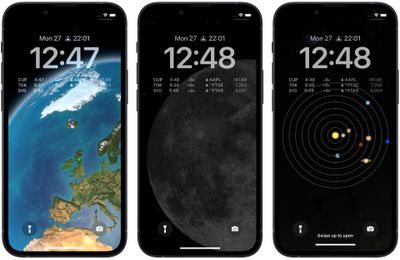
Apple has also included a handful of dynamic Lock Screen wallpapers that adapt to specific real-world variables, including an astronomy wallpaper that shows the current alignment of the Moon, Earth, and Solar System.

The astronomy wallpaper comes in several variations that let you view Earth from afar or close in on your current location, view the Moon from afar or in detail, or view the entire Solar System on your screen.

The following steps show you how to set up a dynamic astronomy wallpaper on an iPhone running iOS 16.

  1. Unlock your ‌‌iPhone‌‌ with Face ID or Touch ID, then press and hold the Lock Screen.
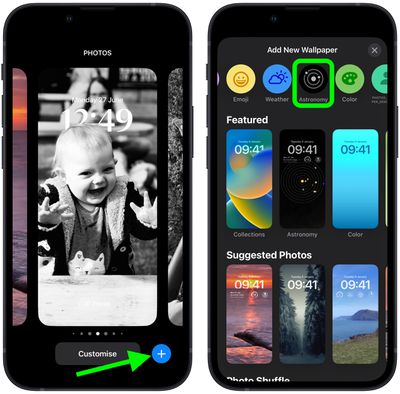
  2. Tap the blue + button, or swipe leftwards all the way to the end and then tap Add New.
  3. Tap the Astronomy button in the top row of options.
    Lock Screen

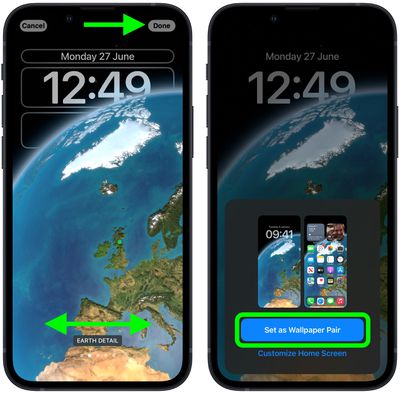
  4. Swipe left and right on the wallpaper to preview the different astronomical view options, including Earth, Earth Detail, Moon, Moon Detail, and Solar System.
  5. When you're happy with the look and have added any widgets, tap Done in the top-right corner of the screen.
  6. To make the dynamic wallpaper appear on both your Lock Screen and Home Screen, tap Set as Wallpaper Pair in the pop-up. Otherwise, tap Customize Home Screen to do so separately.
  7. Tap the Lock Screen you just created in the wallpaper gallery to activate it.
    Lock Screen

You can customize the current Lock Screen at any time by invoking the gallery view from the Lock Screen with a long press, or by going into Settings -> Wallpapers.


Popular Stories

Four iPhone 18 Pro Colors Mock Feature

iPhone 18 Pro Launching in September With These 10 New Features

Monday April 20, 2026 7:13 am PDT by
While the iPhone 18 Pro and iPhone 18 Pro Max are not launching until September, there are already plenty of rumors about the devices. It was initially reported that the iPhone 18 Pro models would have fully under-screen Face ID, with only a front camera visible in the top-left corner of the screen. However, the latest rumors indicate that only one Face ID component will be moved under the...


Tim Cook Rainbow

Apple CEO Tim Cook Stepping Down, John Ternus Taking Over

Monday April 20, 2026 1:33 pm PDT by
Apple CEO Tim Cook is stepping down as Apple's chief executive officer, and hardware engineering chief John Ternus is set to take over, Apple announced today. Cook will continue on as Apple CEO through the summer, with Ternus set to join Apple's Board of Directors and take over as CEO on September 1, 2026. Cook is going to transition to executive chairman, and he will "assist with certain...
iphone 17 ceramic shield

Leaker: Apple Downgrading iPhone 18 to Cut Costs

Monday April 20, 2026 9:12 am PDT by
Apple is downgrading the planned specifications of the standard iPhone 18 to cut costs, a leaker claims. In a new post on Weibo, the user known as "Fixed Focus Digital" said that the iPhone 18 features "certain manufacturing downgrades" that bring it more into line with the low-cost iPhone 18e model. The decision is said to be "a cost-cutting measure." Apple has apparently chosen to...