How to Set Up an Apple Watch Using Family Setup - MacRumors
Skip to Content

How to Set Up an Apple Watch Using Family Setup

by

Family Setup is an Apple Watch feature in watchOS 7 that's designed to allow parents to set up Apple Watches for their children without them needing to own an iPhone as well.
watchOS7 tips family setup
‌Family Setup‌ is mainly aimed at families with children, but it can also be used to set up an Apple Watch for an older adult or anyone else who doesn't have an iPhone but wants to take advantage of the health and fitness features of Apple Watch.

This article explains how to set up an Apple Watch to be used by someone else via ‌Family Setup‌. First though, there are some requirements to ‌Family Setup‌ that you should be aware of.

What You'll Need for Family Setup

‌Family Setup‌ is designed to work with a GPS and Cellular enabled Apple Watch Series 4 or later that's running ‌watchOS 7‌. It is not compatible with earlier Apple Watch models nor with those that do not have a cellular connection.

Cellular Apple Watch models require their own cellular plan, the price of which can vary between network operators, but you can get a plan for $10 month with most carriers in the United States. Note that while a cellular Apple Watch is required to set up a watch under ‌Family Setup‌, it can be activated without using a cellular plan.

The main person setting up ‌Family Setup‌ must have an ‌iPhone‌ 6s or later with iOS 14 installed, and all participants will need an Apple ID and will need to be part of a Family Sharing setup.

These last two requirements can be worked out during the setup process, but activating them beforehand will make the setup process a lot faster. Below are links to some how-tos that will help you with these pre-requisites, followed by a step-by-step walkthrough to set up an Apple Watch for ‌Family Setup‌.

How to Set Up an Apple Watch for Family Setup

  1. Turn on the Apple Watch.
  2. Launch the Watch app on your iPhone and go to the Apple Watch setup screen.
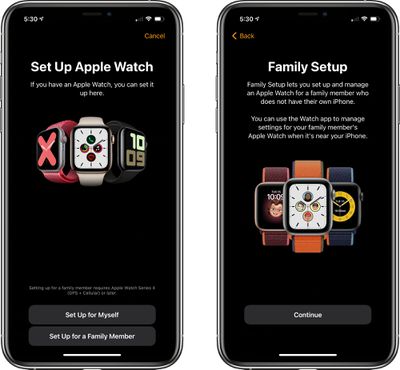
  3. Choose Set Up for a Family Member.
    familysetup1

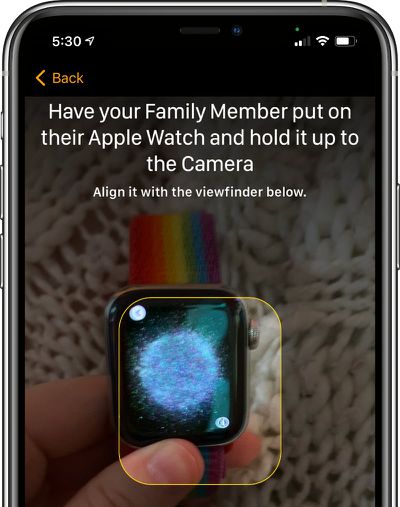
  4. Pair the Apple Watch with your ‌iPhone‌ by lining up the graphic on the watch's display with the ‌iPhone‌'s camera.
    applewatchfamilysetuppairing

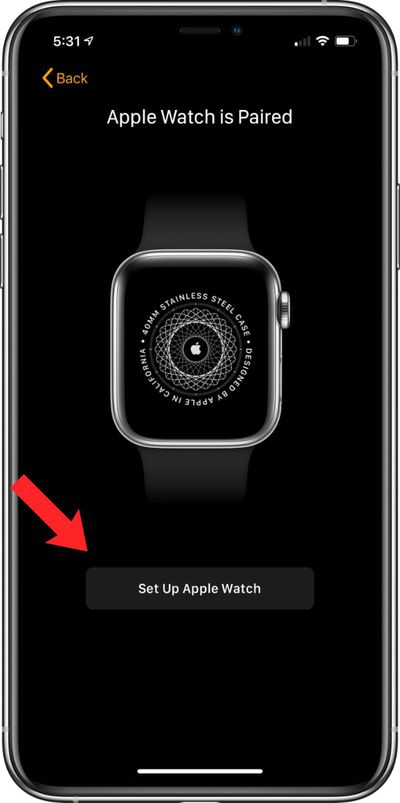
  5. Tap Set Up Apple Watch.
    setupapplewatchfamilysetup

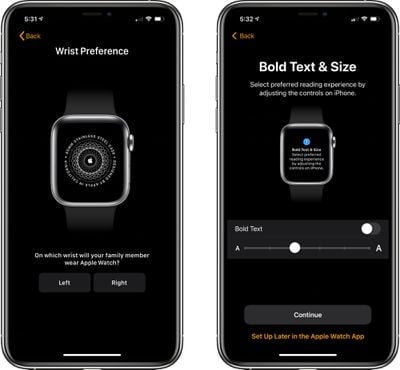
  6. Agree to the terms and conditions and select a wrist preference.
  7. Choose a text size for the Apple Watch, then select a passcode for unlocking it.
    familysetupapplewatchpreferences

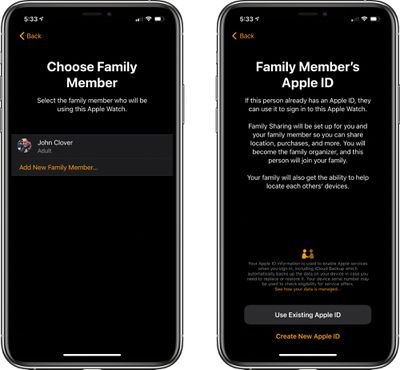
  8. Select the family member from your Family Sharing circle who will be using the Apple Watch. If the person is not a part of the Family Sharing group, you can choose to Add New Family Member and enter their ‌‌Apple ID‌‌.
    appleidfamilysetup

  9. If you chose the ‌‌Apple ID‌‌ route, you will need to go through some verification steps and enable two-factor authentication if it's not turned on. If you already had Family Sharing set up, enter the family member's ‌‌Apple ID‌‌ password to continue.
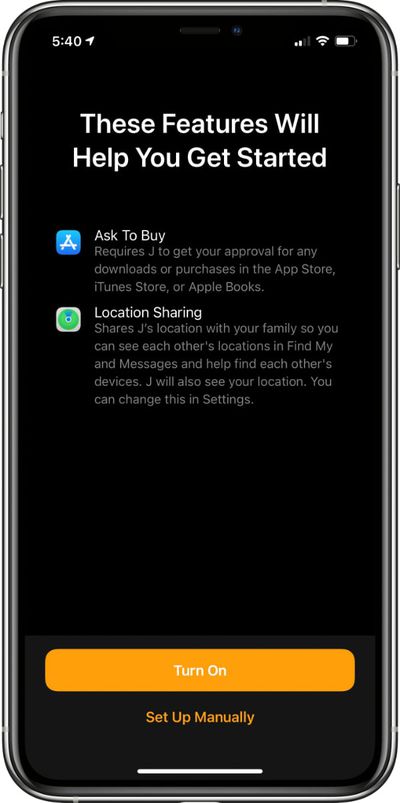
  10. Turn on Ask to Buy or Location Sharing if desired.
    familysetupgettingstarted

  11. Set up cellular and Wi-Fi access. Setting up cellular access will require going through your carrier/network operator, such as Verizon or Vodafone. This process can vary by carrier, but Apple and your carrier will walk you through the process on screen.
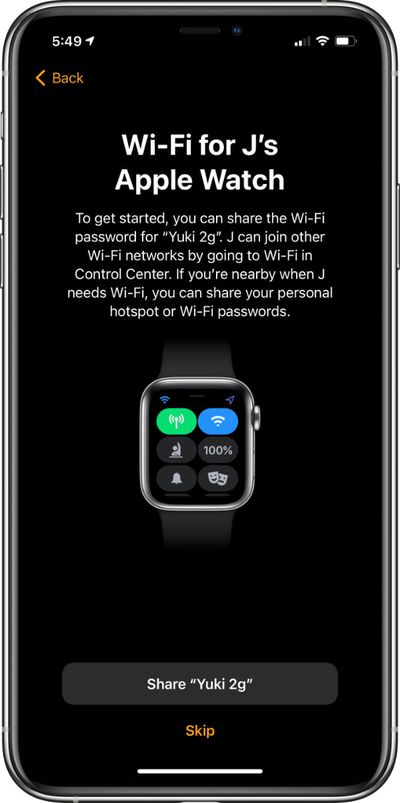
  12. You can also opt to set up cellular access at a later time and rely on Wi-Fi, but cellular is required for continual connectivity without an ‌iPhone‌. After setting up cellular or skipping it until later, tap the Share button to share your WiFi password with the Apple Watch.
    familysetupwifi

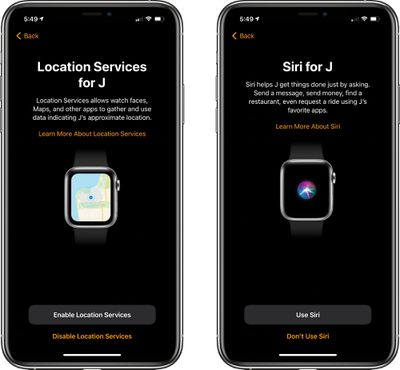
  13. Go through the additional setup screens for Location Sharing, Siri, analytics, and more.
    sirilocationservicesfamilysetup

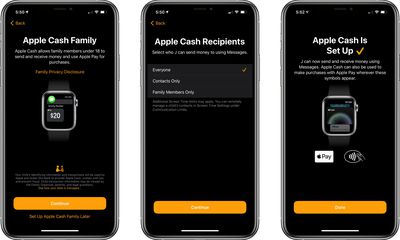
  14. Choose whether to set up Apple Cash Family, the feature that lets parents provide small amounts of cash to kids that can be used with Apple Pay for purchases. Parents can choose who their kids can send money to and receive money from. Agree to the Terms and Services, and confirm the legal name of your child.
    applecashfamilysetup

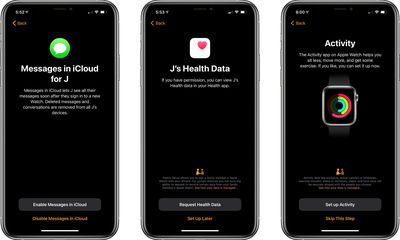
  15. Continue through the setup process, enabling or disabling additional services such as Messages in iCloud, Emergency SOS, Medical ID, Activity and route tracking options, Photos, trusted Contacts, Screen Time limits, Schooltime for limiting access during school hours, and a feature that lets parents view their children's health data, so daily activity can be monitored.
    evenmorefamilysetup

  16. After all of these settings are figured out, the Apple Watch will be ready to use and it will be listed under "Family Watches" in the Apple Watch app that belongs to the parent.
Apple offers parents quite a lot of control over what's enabled in ‌Family Setup‌ and how the Apple Watch functions. For an overview of what's available, be sure to check out our dedicated Family Setup guide.

Related Roundups: watchOS 26, watchOS 27
Related Forum: Apple Watch

Popular Stories

watchos 27

Apple Releases watchOS 27.0.1 for Additional Models

Monday September 28, 2026 2:08 pm PDT by
After releasing watchOS 27.0.1 for the Apple Watch Series 12 and Apple Watch Ultra 4 last week to address a bug that was causing devices to restart unexpectedly, Apple has now released the update for all eligible watches, which includes Series 9 and later. Apple's release notes say only that the update "provides bug fixes for your Apple Watch" and the company does not list any security fixes,...
watchos 27

Apple Releases watchOS 27.0.1 With Fix for Restart Bug

Wednesday September 23, 2026 12:44 pm PDT by
Apple today released watchOS 27.0.1, a minor update to the watchOS 27 operating system that came out last week. The update is limited to the Apple Watch Series 12 and Apple Watch Ultra 4. watchOS 27.0.1 can be downloaded through the Settings app on the watch or the Apple Watch app on a connected iPhone. Software can only be installed when the Apple Watch is on the charger and has over 50...


apple watch app switcher

App Switcher Returns in watchOS 27.2 Beta With New Launch Gesture

Tuesday September 22, 2026 1:41 am PDT by
Apple has apparently listened to user feedback and brought back the App Switcher screen in the latest watchOS 27.2 beta, but accessing it is a little different than before. In watchOS 26 and earlier versions, a double press of the Digital Crown would bring up the App Switcher, where you could easily switch to the last-used app and view and open other recently used apps. You could also swipe...
Latest Stories
Tesla App Gains iPad and iPhone Duo Support
14 minutes ago
Apple Reportedly Boosts iPhone Duo Orders by 44%
39 minutes ago
Fortnite Returning to Australian App Store After Court Ruling
1 hour ago
Apple Ordered to Open iPhone to Rival App Stores in Australia
1 hour ago
Apple Suppliers Face Hurdles Cutting Circuit Board Emissions
2 hours ago
Things Updated for iPhone Duo With Adaptive Layout
2 hours ago
Simplicity and Siri AI Are HomeView's Killer Features, Apple Says
3 hours ago
iPhone Duo Reviewers Really Miss Face ID
8 hours ago
Does the iPhone Duo Run Hot? Here's What Reviews Found
9 hours ago
Apple Music's New Look is Now Live on Apple's Website
10 hours ago
Anthropic Launches Claude Duet, a Proactive AI Agent
10 hours ago
What 32,000 Folds Did to the iPhone Duo's Hinge
11 hours ago
iPhone Duo's Hidden FaceTime Camera Takes 'Trash' Photos
12 hours ago
iPhone Duo Has 'Edge Light' Feature That Debuted on Macs Last Year
13 hours ago
Apple Support App Updated for iPhone Duo's Larger Display
13 hours ago
Amazon Sweetens the Deal on Entry-Level 16-Inch MacBook Pro With $570 Off
13 hours ago
iPhone Duo Tips Over on MagSafe Stands When Unfolded
14 hours ago
Apple Music's New Look Officially Announced
15 hours ago
iPhone Duo Supports Apple Pencil Starting With iOS 27.2
16 hours ago
iPhone Duo Accessories Roundup: Cases and Screen Protectors From OtterBox, ZAGG, and More
17 hours ago
Apple Stores Will Have 'Limited' Availability of iPhone Duo for Walk-In Customers
17 hours ago
iPhone Duo Reviews Explain Why Device is Both 'Fun' and 'Frustrating'
17 hours ago
Apple Says 'Reachability' Feature Coming to iPhone Duo Later This Year
18 hours ago
Loop Capital Cuts Apple Rating Over iPhone Sales Outlook
22 hours ago
Apple Stores in Bordeaux and Lille Looted During French Protests
22 hours ago
Bluesound Adds Native Apple Music Support
23 hours ago
Apple CEO John Ternus Explains What Makes Good Product Design
1 day ago
UK Proposes New Ways to Help Apple Pay Rivals
1 day ago
WhatsApp Developing In-App Browser for All Chat Links on iPhone
1 day ago
Apple's App Store Chief Explains Its Push for Premium Games
1 day ago