
iOS 15: How to Share Whatever's On Your Screen Using Siri - MacRumors
Skip to Content

iOS 15: How to Share Whatever's On Your Screen Using Siri

by

In iOS 15, Apple has significantly improved Siri by adding some much-anticipated features like on-device processing and support for offline requests, while also making the voice assistant more context-aware.

iOS 15 Siri Feature
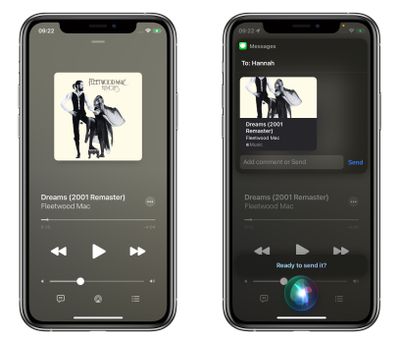
One result of ‌Siri‌'s increased contextual awareness is its ability to help you share whatever's on your iPhone screen with someone else via a Message, be it a website in Safari, a song in Apple Music, a photo, or just the local weather forecast.

To share something at any time, say "Hey ‌Siri‌," then "Share this with [person]." ‌Siri‌ will spring into action and confirm your request by asking "Are you ready to send it?" At that point, you can either say yes/no, or you can add a comment to the message using the input field and then hit Send.
siri
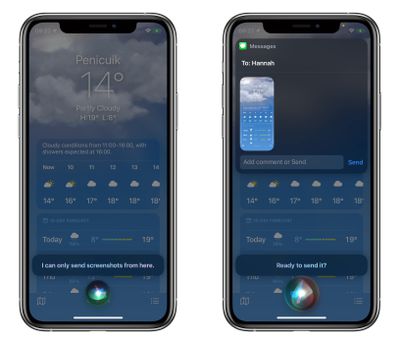
If it's something that can't be shared directly, like the weather forecast, ‌‌Siri‌‌ will take a screenshot and send that instead. All you have to do is say "Share this with [person]," and ‌‌Siri‌‌ will take the screenshot, then confirm the request with you in the same way.
siri
The feature works with ‌‌Apple Music‌‌, Apple Podcasts, Apple News, Maps, Safari web pages, photos, Messages, and more. When iOS 15 is released in September, expect third-party apps to gain support for sharing via ‌Siri‌, too.

Related Forum: iOS 15

Top Rated Comments

CarlJ Avatar
61 months ago

Sharing songs with Siri has been available for a long time. I use it a lot when I’m in the car, using CarPlay. I’ll say “hey Siri, send this song to Carl” and she’ll literally message them a link to the song
That’s odd, I haven’t gotten any of those links.
Score: 6 Votes (Like | Disagree)

Popular Stories

iOS 26

iOS 26.4 Adds Two New Features to CarPlay

Tuesday March 24, 2026 1:55 pm PDT by
iOS 26.4 was released today, and it includes a couple of new features for CarPlay: an Ambient Music widget and support for voice-based chatbot apps. To update your iPhone 11 or newer to iOS 26.4, open the Settings app and tap on General → Software Update. CarPlay will automatically offer the new features so long as the iPhone connected to your vehicle is running iOS 26.4 or later....
Apple Business hero

Apple Unveils 'Apple Business' All-in-One Platform

Tuesday March 24, 2026 8:53 am PDT by
Apple today announced Apple Business, a new all-in-one platform that unifies device management, productivity tools, and customer outreach features. The service is designed to be a consolidated replacement for several of Apple's existing business-focused offerings, including Apple Business Essentials, Apple Business Manager, and Apple Business Connect. It provides organizations with a single...
AirPods Pro Firmware Feature

Apple Releases New Firmware for AirPods Pro 3, AirPods Pro 2 and AirPods 4

Tuesday March 24, 2026 12:31 pm PDT by
Apple today released new firmware for the AirPods Pro 2, AirPods Pro 3, and the AirPods 4. The firmware has a version number of 8B39, up from 8B34 on the AirPods Pro 3, 8B28 on the AirPods Pro 2, and 8B21 on the AirPods 4. There is no word on what's included in the firmware, but Apple has a support document with limited notes. Most updates are limited to bug fixes and performance...

















