

One of the main uses for Siri on HomePod is to control your Apple Music collection. There are Siri voice commands for accessing content like playlists, genres, moods, liking or disliking songs, playing more music based on something you've heard, starting a new radio station, and much more.
Because the list of Siri commands is so extensive, this guide won't be covering every possible option and genre supported by available through Siri, but it should serve as a good starting point when getting to know what exactly your HomePod can do with your Apple Music library.
Playlists and Library
Your playlists may be the content you'll interact with most often in Apple Music, and Siri on HomePod can play any Apple Music playlist you've made in the past on an iOS device or Mac. Siri can also play Apple Music's personally curated mix playlists.
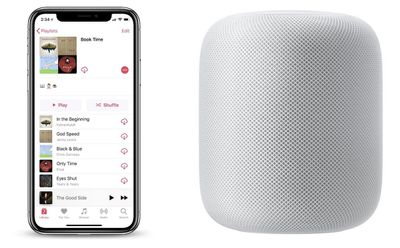
For items in your library, use the "play my" command and Siri will play albums and songs already added to your library. For everything else, Siri will play any songs available on Apple Music, even if they aren't in your library yet.
- "Hey Siri, play my Book Time playlist."
- "Hey Siri, shuffle my Book Time playlist."
- "Hey Siri, add this song to my Book Time playlist."
- "Hey Siri, add this to my library."
- "Hey Siri, play My New Music Mix."
- "Hey Siri, play the A-List Pop playlist."
- "Hey Siri, play my music from Sam Smith."
- "Hey Siri, play the newest music from Vance Joy."
Genres, Moods, and Radio
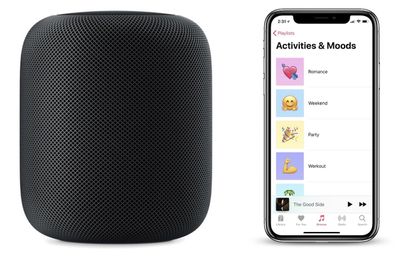
Siri can understand a wide range of commands requesting various musical genres and moods found in Apple Music. You can find some of these moods in Apple Music itself by navigating to the Browse tab, tapping Playlists, then looking through all of the Activities and Moods. You can also request songs based on decades, specific years, and exact dates. We've compiled a few examples below to get you started.
- "Hey Siri, play some recent pop music."
- "Hey Siri, play some chill music."
- "Hey Siri, play some romantic music."
- "Hey Siri, play some music to dance to."
- "Hey Siri, play the best songs from the '90s."
- "Hey Siri, play the top 10 songs from 1986."
- "Hey Siri, play the top song from April 17, 1992."
- "Hey Siri, create a radio station based on The Killers."
Here are some examples of more keywords that you could enter into the above commands:
- Sad
- Angry
- Lazy
- Somber
- Calm
- Fun
- Romance
- Weekend
- Cooking
- Party
- Workout
- Focus
- Motivation
- Bedtime
You'll also find the same results for essentially every genre, like Country, Alternative, Blues, and others.
General Controls
There are multiple commands you can relay to Siri to control music playback, with some examples below.
- "Hey Siri, play music."
- "Hey Siri, pause."
- "Hey Siri, skip this song."
- "Hey Siri, skip forward 30 seconds."
- "Hey Siri, jump back 10 seconds."
- "Hey Siri, previous track."
- "Hey Siri, raise/lower the volume."
- "Hey Siri, increase the volume to 50 percent."
- "Hey Siri, turn on repeat."
Other Commands
- "Hey Siri, play Party in the USA."
- "Hey Siri, I like/dislike this."
- "Hey Siri, what song is this?"
- "Hey Siri, what was the last song called?"
- "Hey Siri, who sings this?"
- "Hey Siri, who is the drummer in this?"
- "Hey Siri, what year is this song from?"
- "Hey Siri, how many songs are on this album?"
- "Hey Siri, play more like this."
- "Hey Siri, after this play Rolling in the Deep."
- "Hey Siri, play some Florence and the Machine."
- "Hey Siri, tell me more about this artist."
- "Hey Siri, I want to hear the live version of this song."
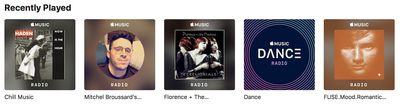
If you ever want to revisit the playlists and radio stations that Siri creates for you through voice commands on HomePod, head over to the For You tab in Apple Music. If you scroll down a bit, you should see "Recently Played" filled with the content that Siri played on HomePod.
If you have any other useful Siri commands we didn't mention, be sure to share them in the comments.





















Top Rated Comments
"Pick up key"
"Use key in lock"
:D
What happened to the promise of natural language recognition? Siri should understand us — we shouldn’t have to memorize phrases specifically to Siri’s liking.
https://forums.macrumors.com/threads/sorry-but-i-dont-know-the-historical-music-charts-for-your-country.2105322/
God forbid an Apple website talk about the new Apple product!