
How to Use Siri's New Translation Feature in iOS 11 - MacRumors
Skip to Content

How to Use Siri's New Translation Feature in iOS 11

by

iOS 11 brings new functionality to Siri, including a translation feature that allows Siri to translate words and phrases spoken in English to a handful of other languages. Translation is super simple to use, and while the translations aren't always perfect, they get the gist of what you're attempting to say across to someone who speaks another language.

Using Siri Translate

  1. Activate Siri, either by holding down the Home button or using a "Hey Siri" command.
  2. Tell Siri the phrase you want to translate and the language you want it in. For example: "Siri, how do I say where's the bathroom in Spanish?" siritranslationios11
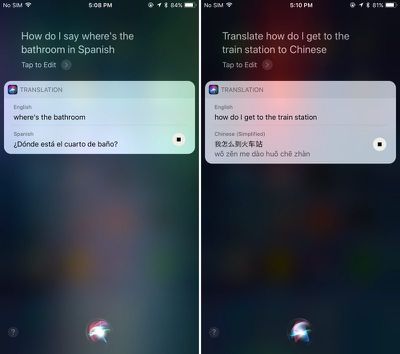
  3. Siri will respond with the appropriate translation, both in text form and vocally. The vocal component can be replayed by pressing the play button located at the bottom of the translation.
  4. There are multiple ways to phrase your translation requests. Siri will respond to "Translate X to X language" or "How do I say X in X language?"

Available Languages

Siri can translate English to Mandarin, French, German, Italian, and Spanish. There's no two-way translation available yet - it's only English to the above listed languages. Apple has said it plans to add additional languages to the Siri translation feature following the release of iOS 11.

Apple appears to be using an in-house translation engine for Siri, as the translations do not match up with translations provided by popular services like Google Translate or Bing Translate. Also of note, while Siri can translate from English to several other languages, the translation features do not work with British, Canadian, or Australian English settings.

Because Siri speaks translations aloud, the translation feature can come in handy when traveling and trying to get simple communications across. It's a simple addition, but one that may go a long way towards making Siri more useful.


Related Forum: iOS 11

Top Rated Comments

Haribokart Avatar
111 months ago
Does not translate from British English... what a joke!
Score: 7 Votes (Like | Disagree)
111 months ago
Does not translate from British English... what a joke!
So you mean you can't ask Siri to translate, "Put the torch in the boot?"
Score: 3 Votes (Like | Disagree)
palmerc2 Avatar
111 months ago
No thanks. I'll continue to use Google Translate.

Similar to Maps, they'll continue to be far behind the features.

Should've struck a deal with Google to implement Google Translate into iOS, as I've never come across a language I couldn't translate - and I've been to a lot of places.
Score: 2 Votes (Like | Disagree)
tbayrgs Avatar
111 months ago
So you can have what you want to say translated but will have no idea what the response is since there’s no two way translation. Yeah, that’s brilliant. :rolleyes:
Score: 2 Votes (Like | Disagree)
111 months ago
https://www.deepl.com/translator

More powerful than all other machine translators. Still not always perfect, but incredibly close.
Score: 1 Votes (Like | Disagree)
111 months ago
Does not translate from British English... what a joke!
Indeed. There is only one English. It is British English as spoken in England. I know this as I checked with the Queen.
Score: 1 Votes (Like | Disagree)

Popular Stories

iOS 26

iOS 26.4 Adds Two New Features to CarPlay

Tuesday March 24, 2026 1:55 pm PDT by
iOS 26.4 was released today, and it includes a couple of new features for CarPlay: an Ambient Music widget and support for voice-based chatbot apps. To update your iPhone 11 or newer to iOS 26.4, open the Settings app and tap on General → Software Update. CarPlay will automatically offer the new features so long as the iPhone connected to your vehicle is running iOS 26.4 or later....
Apple Business hero

Apple Unveils 'Apple Business' All-in-One Platform

Tuesday March 24, 2026 8:53 am PDT by
Apple today announced Apple Business, a new all-in-one platform that unifies device management, productivity tools, and customer outreach features. The service is designed to be a consolidated replacement for several of Apple's existing business-focused offerings, including Apple Business Essentials, Apple Business Manager, and Apple Business Connect. It provides organizations with a single...
AirPods Pro Firmware Feature

Apple Releases New Firmware for AirPods Pro 3, AirPods Pro 2 and AirPods 4

Tuesday March 24, 2026 12:31 pm PDT by
Apple today released new firmware for the AirPods Pro 2, AirPods Pro 3, and the AirPods 4. The firmware has a version number of 8B39, up from 8B34 on the AirPods Pro 3, 8B28 on the AirPods Pro 2, and 8B21 on the AirPods 4. There is no word on what's included in the firmware, but Apple has a support document with limited notes. Most updates are limited to bug fixes and performance...















