How to Take Burst Photos on iPhone and iPad - MacRumors
Skip to Content

How to Take Burst Photos on iPhone and iPad

by

photos iconBurst Mode refers to when the camera on your iOS device captures a series of photos in rapid succession, at a rate of ten frames per second. It's a great way to shoot an action scene or an unexpected event, since you're always more likely to end up with the picture you were aiming for.

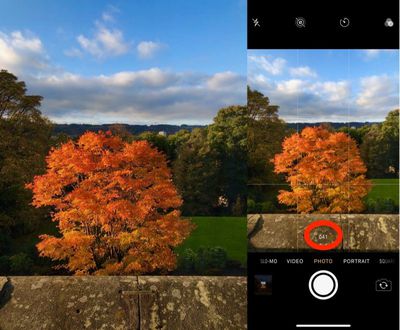
For instance, the picture below was taken when the sun came out momentarily from behind the clouds to throw light on the beautiful yellow ocher leaves of a tree. Burst Mode made it possible to shoot the whole event and then save out the one shot that captured the tree at its most vivid during its brief illumination.

To take a photo in Burst Mode, launch the Camera app from the Lock Screen – if your device is unlocked, select the Camera app from the Home screen or slide the Control Center into view and launch it from there. Once you have a shot in frame, tap and hold the shutter button at the bottom of the Camera interface for the duration of the scene that you're trying to capture.
IMG 2349
Notice the counter increase at the bottom of the frame for as long as you hold down the shutter. This indicates how many shots are being captured in the current burst. Simply take your finger off the shutter when you want to end the burst of shots.

When you take a series of burst photos, they automatically appear in the Photo app under the Album name Bursts. You'll also find them in your main Photo Library as well as the Moments section found in the Photos tab. Here's how to view your burst photos and pick out the best images from them for safe keeping.

How to View Burst Photos

  1. Launch the Photos app.
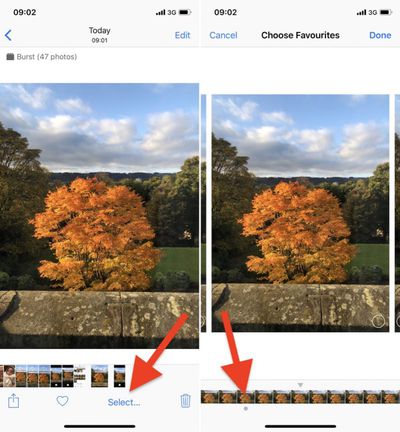
  2. Tap a collection of burst photos – they appear in the Photos Library as a single picture, but if you look closely, you'll see more images stacked underneath the top thumbnail image.
    taking burst photos 1

  3. Tap Select at the bottom of the screen.
  4. Swipe the film strip-like ribbon of images below the photo to view the other shots in the burst.

taking burst photos 2
Any dots you see below images in a burst indicate that Apple's algorithms think they have the best focus and detail in the set, but of course you may think differently.

How to Save Individual Images in Burst Photos

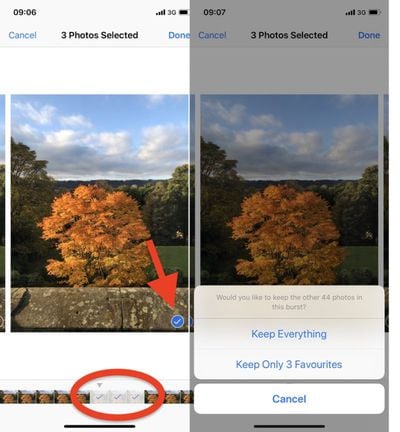
  1. Tap a stack of burst photos in your Photo Library.
  2. Tap Select in the top-right corner of the screen.
  3. Tap each image in the series that you want to keep.
  4. Tap Done in the top-right corner of the screen.
  5. To keep only the images that you ticked in the burst series, tap Keep Only Favorites. Otherwise, tap Keep everything.

taking burst photos 3

Related Forum: iOS 12

Top Rated Comments

ColdShadow Avatar
105 months ago
How to turn off this annoying feature permanently??
alot of my photos are saved as burst all the time.I hate it!
Score: 3 Votes (Like | Disagree)
Mac Fly (film) Avatar
105 months ago
Anyone know how to combine several burst photos into one on iOS? The easiest way; preferably an automatic method.

Example photo:

Score: 3 Votes (Like | Disagree)
iapplelove Avatar
105 months ago
Burst photo and Live Photo...two things I shut off immediately.
Score: 2 Votes (Like | Disagree)
RightMACatU Avatar
105 months ago
How to turn off this annoying feature permanently??
alot of my photos are saved as burst all the time.I hate it!
Ahhh this!!! I would double thumb-you-up if I could.
Score: 2 Votes (Like | Disagree)
Mac Fly (film) Avatar
105 months ago
How to turn off this annoying feature permanently??
alot of my photos are saved as burst all the time.I hate it!
Use volume button as shutter and press with a click.
Score: 2 Votes (Like | Disagree)
yaxomoxay Avatar
105 months ago
Burst photo and Live Photo...two things I shut off immediately.
Live Photos is actually pretty cool. It’s one of the things I radically changed my mind upon. I captured quite a few nice moments with it, and thanks to the possibility to change the main picture I was gladly happy to find out multiple times that a picture taken on a very slightly different moment was much better than the one I actually took.
Score: 1 Votes (Like | Disagree)

Popular Stories

M5 MacBook Pro

RIP, MacBook Ultra

Monday October 19, 2026 9:37 am PDT by
Apple today sent out invites for an experience in Los Angeles on Wednesday, October 28, and the "Pro and tell" tagline on the invitation likely means that the rumored MacBook models with touch-enabled OLED displays will stick with MacBook Pro branding instead of the once-rumored "MacBook Ultra" name. The long-rumored "iPhone Ultra" ended up being named iPhone Duo, so speculation that Apple...
iPhone Duo Trio

Here's What Apple's Apps Look Like on the iPhone Duo

Tuesday October 20, 2026 11:12 am PDT by
With just three days to go until the iPhone Duo is released, Apple is getting ready for the launch. Behind the scenes, the App Store now has screenshots of Apple's built-in apps running on the Duo. We've seen some apps in marketing materials, but images of the ones we haven't seen give us an idea of what it will be like using the iPhone Duo day to day. Many apps are shown in landscape...
apple pro tell logo

Apple Announcing New Products Next Week: 'Pro and Tell'

Monday October 19, 2026 9:05 am PDT by
Apple's Greg Joswiak today hinted at new product announcements coming next week, sharing a social media post that says "Can't wait to pro and tell next week." Rumors suggest Apple is planning to debut the new MacBook Pro with an OLED touchscreen display, an M6 entry-level MacBook Pro, an M6 iMac, an iPad mini with an OLED display. Can't wait to pro and tell next week....
Latest Stories
Giant iPhone Duo Installations Spotted at Apple Fifth Avenue
20 minutes ago
iPhone Duo 2 Prototypes Include Under-Display Face ID
37 minutes ago
Tesla App Gains iPad and iPhone Duo Support
5 hours ago
Apple Reportedly Boosts iPhone Duo Orders by 44%
5 hours ago
Fortnite Returning to Australian App Store After Court Ruling
5 hours ago
Apple Ordered to Open iPhone to Rival App Stores in Australia
6 hours ago
Apple Suppliers Face Hurdles Cutting Circuit Board Emissions
6 hours ago
Things Updated for iPhone Duo With Adaptive Layout
7 hours ago
Simplicity and Siri AI Are HomeView's Killer Features, Apple Says
7 hours ago
iPhone Duo Reviewers Really Miss Face ID
12 hours ago
Does the iPhone Duo Run Hot? Here's What Reviews Found
13 hours ago
Apple Music's New Look is Now Live on Apple's Website
14 hours ago
Anthropic Launches Claude Duet, a Proactive AI Agent
15 hours ago
What 32,000 Folds Did to the iPhone Duo's Hinge
15 hours ago
iPhone Duo's Hidden FaceTime Camera Takes 'Trash' Photos
17 hours ago
iPhone Duo Has 'Edge Light' Feature That Debuted on Macs Last Year
17 hours ago
Apple Support App Updated for iPhone Duo's Larger Display
17 hours ago
Amazon Sweetens the Deal on Entry-Level 16-Inch MacBook Pro With $570 Off
18 hours ago
iPhone Duo Tips Over on MagSafe Stands When Unfolded
18 hours ago
Apple Music's New Look Officially Announced
19 hours ago
iPhone Duo Supports Apple Pencil Starting With iOS 27.2
20 hours ago
iPhone Duo Accessories Roundup: Cases and Screen Protectors From OtterBox, ZAGG, and More
21 hours ago
Apple Stores Will Have 'Limited' Availability of iPhone Duo for Walk-In Customers
21 hours ago
iPhone Duo Reviews Explain Why Device is Both 'Fun' and 'Frustrating'
22 hours ago
Apple Says 'Reachability' Feature Coming to iPhone Duo Later This Year
23 hours ago
Loop Capital Cuts Apple Rating Over iPhone Sales Outlook
1 day ago
Apple Stores in Bordeaux and Lille Looted During French Protests
1 day ago
Bluesound Adds Native Apple Music Support
1 day ago
Apple CEO John Ternus Explains What Makes Good Product Design
1 day ago
UK Proposes New Ways to Help Apple Pay Rivals
1 day ago