
How to Turn Off FaceTime on iPhone, iPad, and Mac - MacRumors
Skip to Content

How to Turn Off FaceTime on iPhone, iPad, and Mac

by

There's a serious bug affecting FaceTime right now, which lets someone who calls you hear the audio on your iPhone, iPad, or Mac even if you don't answer the call.

There does not appear to be any way to avoid getting these unwanted calls, short of turning off FaceTime. Luckily, it's easy to do.
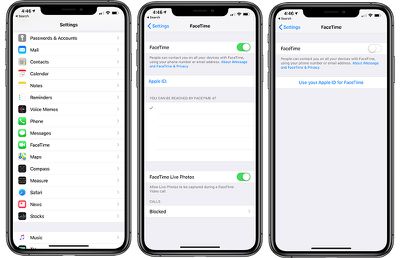
facetimehowtodisable

How to Turn Off FaceTime on Your iPhone and iPad

  1. Open the Settings app.
  2. Scroll down to ‌FaceTime‌.
  3. Click on the toggle next to "‌FaceTime‌."

This will turn off ‌FaceTime‌ on your specific device, but you will need to deactivate ‌FaceTime‌ on all of your iPhones and iPads to avoid unwanted spy calls if you use ‌FaceTime‌ connection methods other than a phone number.

How to Turn Off FaceTime on macOS

  1. Open up the ‌FaceTime‌ app.
  2. Click on "‌FaceTime‌" in the menu bar.
  3. Select "Turn ‌FaceTime‌ Off."

You can also choose "Preferences" and deselect "Enable this account to deactivate ‌FaceTime‌.

With ‌FaceTime‌ disabled, no one will be able to secretly ‌FaceTime‌ call you to listen to your audio. With ‌FaceTime‌ enabled, anyone can exploit a Group FaceTime bug to place a call to you that will allow them to listen to your audio even if you don't accept the ‌FaceTime‌ call.

Top Rated Comments

93 months ago
I'm still on iOS 10. Looks like I'm still enjoying the best iOS version.
Some would stay that would be iOS 6. ;)
Score: 2 Votes (Like | Disagree)
zorinlynx Avatar
93 months ago
The big downside to this is most people will probably turn off FaceTime and never turn it back on, even after the bug is fixed.

I like being able to call people with FaceTime audio, because the sound quality is far better than a cellular call. This may prove less reliable in the future.
Score: 2 Votes (Like | Disagree)
arn Avatar
93 months ago
This doesn’t work between my wife’s iPhone 8 (11.4.1) and my ip7+ (12.1.3) both devices must have to be on iOS 12.
I think that's b/c Group FaceTime was an iOS 12 feature.
Score: 2 Votes (Like | Disagree)
-BigMac- Avatar
93 months ago
How to turn off Facetime.

Click “Turn off Facetime”.

The more you know;)
Score: 2 Votes (Like | Disagree)
AZMecha Avatar
93 months ago
I'm still on iOS 10. Looks like I'm still enjoying the best iOS version.
Not :p:p:p
Score: 1 Votes (Like | Disagree)
93 months ago
[doublepost=1548735503][/doublepost]Of if you get a call from anyone you dont trust, just power off your phone immediately.
Seems like overkill. If someone was actually worried about a FaceTime attack of this kind, easy enough to decline the call and that ends the whole thing right there.
Score: 1 Votes (Like | Disagree)

Popular Stories

iOS 26

iOS 26.4 Adds Two New Features to CarPlay

Tuesday March 24, 2026 1:55 pm PDT by
iOS 26.4 was released today, and it includes a couple of new features for CarPlay: an Ambient Music widget and support for voice-based chatbot apps. To update your iPhone 11 or newer to iOS 26.4, open the Settings app and tap on General → Software Update. CarPlay will automatically offer the new features so long as the iPhone connected to your vehicle is running iOS 26.4 or later....
Apple Business hero

Apple Unveils 'Apple Business' All-in-One Platform

Tuesday March 24, 2026 8:53 am PDT by
Apple today announced Apple Business, a new all-in-one platform that unifies device management, productivity tools, and customer outreach features. The service is designed to be a consolidated replacement for several of Apple's existing business-focused offerings, including Apple Business Essentials, Apple Business Manager, and Apple Business Connect. It provides organizations with a single...
AirPods Pro Firmware Feature

Apple Releases New Firmware for AirPods Pro 3, AirPods Pro 2 and AirPods 4

Tuesday March 24, 2026 12:31 pm PDT by
Apple today released new firmware for the AirPods Pro 2, AirPods Pro 3, and the AirPods 4. The firmware has a version number of 8B39, up from 8B34 on the AirPods Pro 3, 8B28 on the AirPods Pro 2, and 8B21 on the AirPods 4. There is no word on what's included in the firmware, but Apple has a support document with limited notes. Most updates are limited to bug fixes and performance...

















