How to Turn Siri Off in iOS and macOS - MacRumors
Skip to Content

How to Turn Siri Off in iOS and macOS

by

Siri is by no means universally loved by iPhone and iPad users, so it's a good thing that Apple provides a simple way to turn off the virtual assistant completely. Here's how it's done.
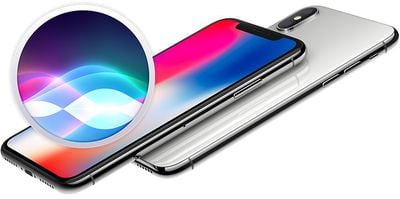
siri iphone x

How to Disable Siri in iOS

  1. Launch the Settings app on your iPhone or ‌iPad‌.
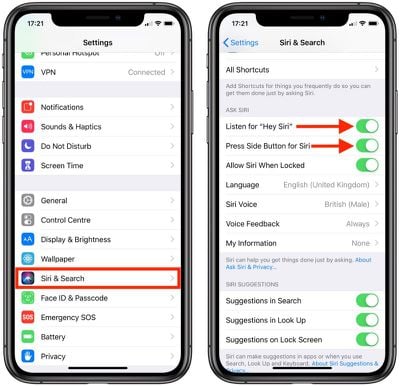
  2. Scroll down and tap Siri & Search.
    how to turn off siri

  3. Under the Ask Siri section, tap the switches next to Listen for "Hey Siri" and Press Side Button for Siri so that both are toggled to the white OFF position.
  4. Confirm by tapping Turn Off Siri in the pop-up.
Note that when you turn off ‌Siri‌ on your device, the information ‌Siri‌ uses to respond to your requests is removed from Apple's servers. As such, if you choose to enable ‌Siri‌ later, it may take some time to resend this information.

How to Disable Siri in macOS

Mac users also have the ability to turn off ‌Siri‌ if they don't find the virtual assistant useful.

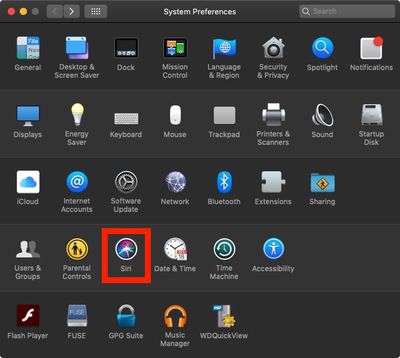
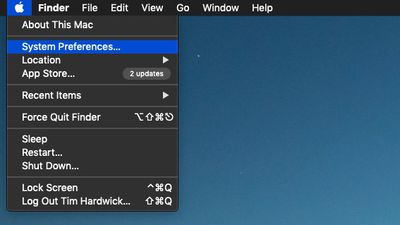
  1. Click the Apple () symbol in the menu bar at the top-left corner of the screen and select System Preferences....
    apple menu system preferences

  2. Click the Siri icon in the preferences panel.
    siri system preferences

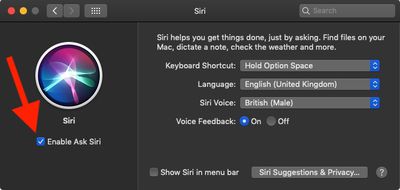
  3. Click to untick the checkbox next to Enable Ask Siri.
    turn off siri mac

Like iOS, when you turn off ‌Siri‌ in macOS, the information the virtual assistant uses to respond to your requests is removed from Apple's servers. As a result, if you choose to enable ‌Siri‌ later on your Mac, it may take some time to resend this information.

Popular Stories

iOS 26

iOS 26.4 Adds Two New Features to CarPlay

Tuesday March 24, 2026 1:55 pm PDT by
iOS 26.4 was released today, and it includes a couple of new features for CarPlay: an Ambient Music widget and support for voice-based chatbot apps. To update your iPhone 11 or newer to iOS 26.4, open the Settings app and tap on General → Software Update. CarPlay will automatically offer the new features so long as the iPhone connected to your vehicle is running iOS 26.4 or later....
Apple Business hero

Apple Unveils 'Apple Business' All-in-One Platform

Tuesday March 24, 2026 8:53 am PDT by
Apple today announced Apple Business, a new all-in-one platform that unifies device management, productivity tools, and customer outreach features. The service is designed to be a consolidated replacement for several of Apple's existing business-focused offerings, including Apple Business Essentials, Apple Business Manager, and Apple Business Connect. It provides organizations with a single...
AirPods Pro Firmware Feature

Apple Releases New Firmware for AirPods Pro 3, AirPods Pro 2 and AirPods 4

Tuesday March 24, 2026 12:31 pm PDT by
Apple today released new firmware for the AirPods Pro 2, AirPods Pro 3, and the AirPods 4. The firmware has a version number of 8B39, up from 8B34 on the AirPods Pro 3, 8B28 on the AirPods Pro 2, and 8B21 on the AirPods 4. There is no word on what's included in the firmware, but Apple has a support document with limited notes. Most updates are limited to bug fixes and performance...