How to Uninstall iPhone and iPad Apps on an M1 Mac - MacRumors
Skip to Content

How to Uninstall iPhone and iPad Apps on an M1 Mac

by

If you own a Mac powered by Apple silicon, you can download and install iOS and iPadOS apps from the Mac App Store in macOS Big Sur. But how do you uninstall them? Keep reading to learn how.
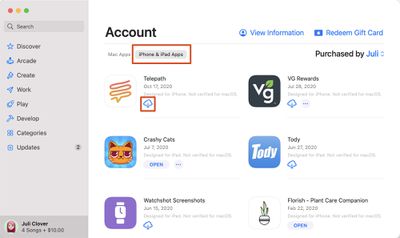
mac app store iphone ipad apps
Apple's M1 Macs, which are the first to be powered by an Apple-designed Arm-based chip, are able to run iOS and iPadOS apps because of the common architecture between the different operating systems.

That means ‌M1‌ Mac owners can download and install iOS apps from the ‌Mac App Store‌ just as if they were Mac apps, and Apple even includes preferences for Touch Alternatives that allow users to set keyboard commands for iPhone/iPad touch input alternatives.

However, many users have found themselves wondering how iOS apps are properly uninstalled on an Apple silicon-based Mac.

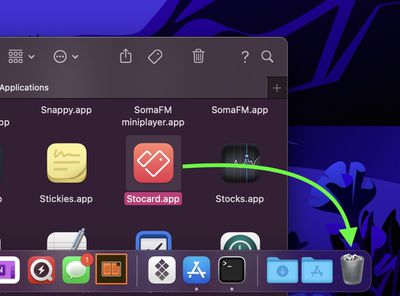
The question comes up because many users have tried dragging the app icon to the Trash in the usual way, only to find that the app binary gets deleted yet much of the app's related content remains on the disk, usually in the ~/Library/Containers folder, needlessly taking up storage.

Fortunately, there is a surefire way to ensure that all of the data associated with an iOS app is removed when you uninstall it, but it does require the use of a couple of Terminal commands, so make sure you're comfortable working in a command prompt window before you attempt the following.

How to Uninstall iOS Apps on an M1 Mac

  1. Open the Applications folder and drag the app you want to uninstall into the Trash.
    trash

  2. Now, launch Terminal (Applications/Utilities/Terminal.app).
    terminal

  3. At the Terminal window prompt, input the command cd ~/Library/Containers and hit Enter.
  4. Next, input the command find . -iname "*appname*" , and replace "appname" (but keeping the asterisks) with the name of the app you just dragged to the Trash. This command should output any matches found, typically in the form of obscured directory names (eg. 0D3DA1EC-21FB-4836-B6A7-8C6053EF9567).
    terminal

  5. Next, input the command rm -Rf XXXXX-XXXX-XXXX-XXXXXXX but replace the XXXX with the obscured directory name shown in the previous output, then hit Enter.
  6. If several directories are shown in the output, repeat the previous step for each directory.
The iOS app and all data associated with it should now be removed from your Mac.

Related Forum: macOS Big Sur

Popular Stories

skyrim

Skyrim Comes to Apple Silicon Macs With New Unofficial Installer

Tuesday October 20, 2026 7:56 pm PDT by
Bethesda's beloved role-playing game "The Elder Scrolls V: Skyrim" has reached multiple generations of consoles since its 2011 debut, but it never officially came to the Mac. A new unofficial project called SkyrimMT now aims to make playing and modding it on Apple silicon Macs easier than ever. Mac owners have found ways to play Skyrim over the years, including installing Windows through...


M5 MacBook Pro

RIP, MacBook Ultra

Monday October 19, 2026 9:37 am PDT by
Apple today sent out invites for an experience in Los Angeles on Wednesday, October 28, and the "Pro and tell" tagline on the invitation likely means that the rumored MacBook models with touch-enabled OLED displays will stick with MacBook Pro branding instead of the once-rumored "MacBook Ultra" name. The long-rumored "iPhone Ultra" ended up being named iPhone Duo, so speculation that Apple...
iPhone Duo Trio

Here's What Apple's Apps Look Like on the iPhone Duo

Tuesday October 20, 2026 11:12 am PDT by
With just three days to go until the iPhone Duo is released, Apple is getting ready for the launch. Behind the scenes, the App Store now has screenshots of Apple's built-in apps running on the Duo. We've seen some apps in marketing materials, but images of the ones we haven't seen give us an idea of what it will be like using the iPhone Duo day to day. Many apps are shown in landscape...
Latest Stories
Apple Blocks Certificates That Could Help Attackers Fake Websites
1 hour ago
Giant iPhone Duo Installations Spotted at Apple Fifth Avenue
2 hours ago
iPhone Duo 2 Prototypes Include Under-Display Face ID
2 hours ago
Tesla App Gains iPad and iPhone Duo Support
6 hours ago
Apple Reportedly Boosts iPhone Duo Orders by 44%
7 hours ago
Fortnite Returning to Australian App Store After Court Ruling
7 hours ago
Apple Ordered to Open iPhone to Rival App Stores in Australia
7 hours ago
Apple Suppliers Face Hurdles Cutting Circuit Board Emissions
8 hours ago
Things Updated for iPhone Duo With Adaptive Layout
8 hours ago
Simplicity and Siri AI Are HomeView's Killer Features, Apple Says
9 hours ago
iPhone Duo Reviewers Really Miss Face ID
14 hours ago
Does the iPhone Duo Run Hot? Here's What Reviews Found
15 hours ago
Apple Music's New Look is Now Live on Apple's Website
16 hours ago
Anthropic Launches Claude Duet, a Proactive AI Agent
16 hours ago
What 32,000 Folds Did to the iPhone Duo's Hinge
17 hours ago
iPhone Duo's Hidden FaceTime Camera Takes 'Trash' Photos
18 hours ago
iPhone Duo Has 'Edge Light' Feature That Debuted on Macs Last Year
19 hours ago
Apple Support App Updated for iPhone Duo's Larger Display
19 hours ago
Amazon Sweetens the Deal on Entry-Level 16-Inch MacBook Pro With $570 Off
19 hours ago
iPhone Duo Tips Over on MagSafe Stands When Unfolded
20 hours ago
Apple Music's New Look Officially Announced
21 hours ago
iPhone Duo Supports Apple Pencil Starting With iOS 27.2
22 hours ago
iPhone Duo Accessories Roundup: Cases and Screen Protectors From OtterBox, ZAGG, and More
23 hours ago
Apple Stores Will Have 'Limited' Availability of iPhone Duo for Walk-In Customers
23 hours ago
iPhone Duo Reviews Explain Why Device is Both 'Fun' and 'Frustrating'
23 hours ago
Apple Says 'Reachability' Feature Coming to iPhone Duo Later This Year
1 day ago
Loop Capital Cuts Apple Rating Over iPhone Sales Outlook
1 day ago
Apple Stores in Bordeaux and Lille Looted During French Protests
1 day ago
Bluesound Adds Native Apple Music Support
1 day ago
Apple CEO John Ternus Explains What Makes Good Product Design
1 day ago