
How to Use Apple Diagnostics to Test Your Mac - MacRumors
Skip to Content

How to Use Apple Diagnostics to Test Your Mac

by

Formerly known as Apple Hardware Test, Apple Diagnostics is a system-integrated feature on newer Macs running macOS Big Sur and macOS Monterey that can check your Mac for hardware issues. This article explains how to use it on Apple silicon Macs and Intel Macs.
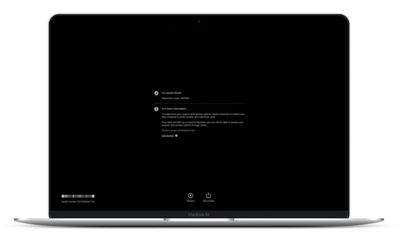
apple diagnostics
If you think your Mac has a hardware problem, you can use Apple Diagnostics to help you determine which hardware component might be at fault. Apple Diagnostics can also suggest solutions and get you in touch with Apple Support for additional help.

Before you use Apple Diagnostics, make sure your Mac is shut down (choose Apple menu -> Shut Down from the menu bar) then disconnect all external devices except for the keyboard, mouse, display, and any Ethernet connection if you have one. Make sure your Mac is connected to a power outlet, then follow the steps below for your type of Mac.

How to Use Apple Diagnostics on an Apple silicon Mac

  1. Turn on your Mac and continue to press and hold the power button as your Mac starts up.
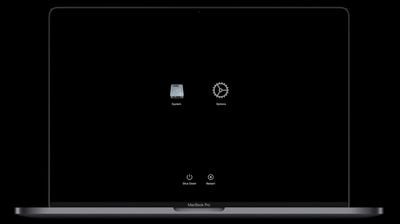
  2. Release the power button when you see the startup options window (you'll see the internal disk icon and a gear icon labeled Options).
    apple silicon mac startup recovery screen

  3. Press the Command-D key combination on your keyboard.
How to Use Apple Diagnostics on an Intel Mac

  1. Press the power button to turn on your Mac, then immediately press and hold the D key on your keyboard as your Mac starts up.
  2. Release the D key when you see a progress bar or you're asked to choose a language.
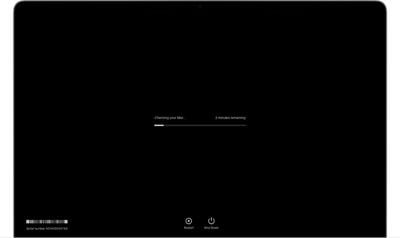
macos big sur apple diagnostics
After you've followed the above steps, Apple Diagnostics will begin to run on your Mac. When it's finished testing your machine, the results will be shown, including one or more reference codes to help you identify any potential issues (refer to Apple's support page to learn more about reference codes). To repeat the test, click Run the test again or press Command-R. Alternately, click Restart or Shut Down.
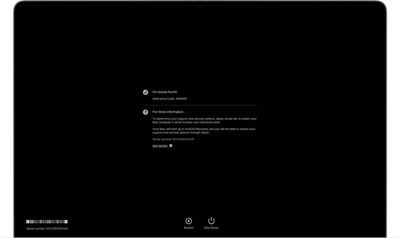
macos big sur apple diagnostics results no issues
To get more information about your service and support options, make sure that your Mac is connected to the internet. Then click Get started or press Command-G. Your Mac will restart and open a webpage with more information. When you're done, choose Restart or Shut Down from the Apple menu.


Popular Stories

M5 MacBook Pro

RIP, MacBook Ultra

Monday October 19, 2026 9:37 am PDT by
Apple today sent out invites for an experience in Los Angeles on Wednesday, October 28, and the "Pro and tell" tagline on the invitation likely means that the rumored MacBook models with touch-enabled OLED displays will stick with MacBook Pro branding instead of the once-rumored "MacBook Ultra" name. The long-rumored "iPhone Ultra" ended up being named iPhone Duo, so speculation that Apple...

iPhone Duo Trio

Here's What Apple's Apps Look Like on the iPhone Duo

Tuesday October 20, 2026 11:12 am PDT by
With just three days to go until the iPhone Duo is released, Apple is getting ready for the launch. Behind the scenes, the App Store now has screenshots of Apple's built-in apps running on the Duo. We've seen some apps in marketing materials, but images of the ones we haven't seen give us an idea of what it will be like using the iPhone Duo day to day. Many apps are shown in landscape...
apple pro tell logo

Apple Announcing New Products Next Week: 'Pro and Tell'

Monday October 19, 2026 9:05 am PDT by
Apple's Greg Joswiak today hinted at new product announcements coming next week, sharing a social media post that says "Can't wait to pro and tell next week." Rumors suggest Apple is planning to debut the new MacBook Pro with an OLED touchscreen display, an M6 entry-level MacBook Pro, an M6 iMac, an iPad mini with an OLED display. Can't wait to pro and tell next week....
Latest Stories
Apple Reveals More Than 50 Apps That Will Be Updated for iPhone Duo
19 minutes ago
Apple Blocks Certificates That Could Help Attackers Fake Websites
2 hours ago
Giant iPhone Duo Installations Spotted at Apple Fifth Avenue
2 hours ago
iPhone Duo 2 Prototypes Include Under-Display Face ID
3 hours ago
Tesla App Gains iPad and iPhone Duo Support
7 hours ago
Apple Reportedly Boosts iPhone Duo Orders by 44%
7 hours ago
Fortnite Returning to Australian App Store After Court Ruling
7 hours ago
Apple Ordered to Open iPhone to Rival App Stores in Australia
8 hours ago
Apple Suppliers Face Hurdles Cutting Circuit Board Emissions
8 hours ago
Things Updated for iPhone Duo With Adaptive Layout
9 hours ago
Simplicity and Siri AI Are HomeView's Killer Features, Apple Says
9 hours ago
iPhone Duo Reviewers Really Miss Face ID
14 hours ago
Does the iPhone Duo Run Hot? Here's What Reviews Found
15 hours ago
Apple Music's New Look is Now Live on Apple's Website
16 hours ago
Anthropic Launches Claude Duet, a Proactive AI Agent
17 hours ago
What 32,000 Folds Did to the iPhone Duo's Hinge
17 hours ago
iPhone Duo's Hidden FaceTime Camera Takes 'Trash' Photos
19 hours ago
iPhone Duo Has 'Edge Light' Feature That Debuted on Macs Last Year
19 hours ago
Apple Support App Updated for iPhone Duo's Larger Display
19 hours ago
Amazon Sweetens the Deal on Entry-Level 16-Inch MacBook Pro With $570 Off
20 hours ago
iPhone Duo Tips Over on MagSafe Stands When Unfolded
20 hours ago
Apple Music's New Look Officially Announced
21 hours ago
iPhone Duo Supports Apple Pencil Starting With iOS 27.2
22 hours ago
iPhone Duo Accessories Roundup: Cases and Screen Protectors From OtterBox, ZAGG, and More
23 hours ago
Apple Stores Will Have 'Limited' Availability of iPhone Duo for Walk-In Customers
23 hours ago
iPhone Duo Reviews Explain Why Device is Both 'Fun' and 'Frustrating'
1 day ago
Apple Says 'Reachability' Feature Coming to iPhone Duo Later This Year
1 day ago
Loop Capital Cuts Apple Rating Over iPhone Sales Outlook
1 day ago
Apple Stores in Bordeaux and Lille Looted During French Protests
1 day ago
Bluesound Adds Native Apple Music Support
1 day ago








































