

 If you use your iPhone as your alarm clock, chances are it's one of Apple's default alarm sounds that gets you out of bed in the morning. But did you know that you can set any song in your iPhone's music library as an alarm to wake you from your slumber?
What's more, if you're an Apple Music subscriber, you can choose almost any song you can think of to be your alarm, so long as it's included in Apple Music's 50-million strong music catalog. Here's how it works.
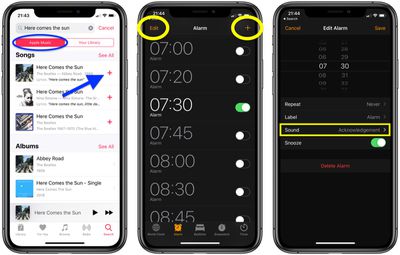
- Launch the Music app on your iPhone.
- Tab the Search tab.
- Type the name of the song you want to use as your alarm (or type some lyrics if you can't recall the song name).
- Tap the Apple Music button just below the search field so that it's highlighted red.
- Fingers crossed you'll see the song in the returned results – tap the plus (+) button alongside it to add it to your music library, then tap the cloud icon that replaces it to download the song to your device.

- Next, launch the native Clock app on your iPhone and then tap the Alarm tab at the bottom of the screen.
- Tap the plus (+) button in the upper right of the screen to create a new alarm, or tap Edit in the upper left and then tap an existing alarm from the list that you want to add the song to.
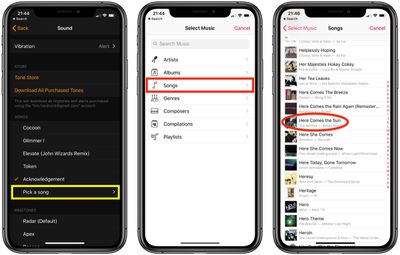
- Tap Sound.
- Tap Pick a Song.
- Under Select Music, tap Songs.
- Locate and then tap the song that you downloaded to your music library.
- Tap Back in the upper left of the screen.
- Tap Save, and your done.
That's it! Once you've set a song as your alarm, it'll be played whenever the alarm is set to go off in the morning. You can follow the same steps to change the song whenever you like, and you can set different songs for each alarm you have set up if you'd like to listen to something different each day.






















![Apple Pulls Keynote, Pages and Numbers From App Store [Update: Back]](https://images.macrumors.com/t/Okb7kitB_gNr6qe5Pex9nQIysD8=/112x112/article-new/2026/01/Apple-Creator-Studio-iWork-suite.jpg)





















