Apple Reference Image on iPhone 18 Pro: What It Does and How to Use It - MacRumors
Skip to Content

Apple Reference Image on iPhone 18 Pro: What It Does and How to Use It

by

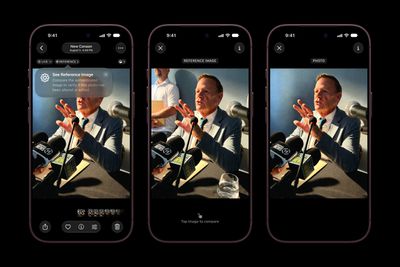
Apple's latest iPhone 18 Pro models support something called Apple Reference Image – a way to verify that a photo was taken with an iPhone and hasn't been edited. The method can be used to prove that something actually happened and wasn't AI-generated. Apple likens the feature to a digital film negative.
Apple iPhone 18 Pro Photos app Apple Reference Image 260909 scaled
You can use Apple Reference Image to save and share additional data to verify the authenticity of a photo, or to take a photo and also capture the original data from the sensor in the Main camera.

How it Works

Apple Reference Image boots the camera sensor into a specialized reference mode, and the mode instructs the sensor to cryptographically sign pixel data immediately after capture. The sensor firmware is prevented from modifying the data. Other authentication systems don't sign images until the end of the software processing pipeline, which Apple says leaves images vulnerable to tampering attacks.

The resulting "secure digital negative" is protected from software compromise alongside a standard editable photo. The negative is stored on-device and includes pixel data, sensor metadata, and cryptographic timestamps with lower and upper bounds. When a user decides to "develop" the negative for verification, it is sent unprocessed to Private Cloud Compute. Private Cloud Compute runs the steps needed to render the image in a secure, private, and verifiable environment.

Enabling Apple Reference Image on iPhone 18 Pro

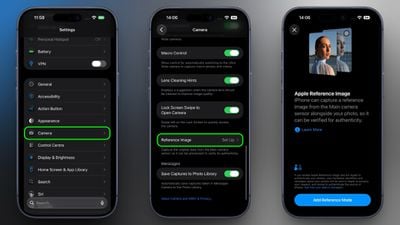
You can enable Apple Reference in the Settings app, and you only have to do it once.

  1. Open the Settings app on your iPhone 18 Pro.
  2. Tap Camera.
  3. Tap Reference Image.
  4. Tap Add Reference Mode, then follow the on-screen instructions.
set up reference image iphone 18 pro

After you have added Reference Mode, the Reference Image settings screen will reveal two new options. When sharing photos, toggling on Share Reference Image ensures that the reference image data is always included. Toggling on Transfer Reference Image automatically includes the reference image data when you transfer photos to a Mac or PC.

How to Take a Photo With a Reference Image

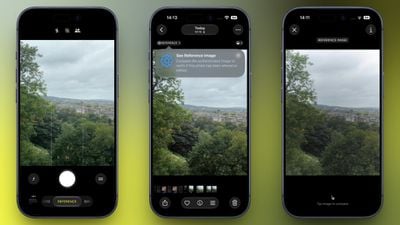
  1. Open the Camera app on your iPhone.
  2. Swipe along the carousel at the bottom of the screen and select Reference.
  3. Tap the shutter button to take a photo.

Note that a reference image contains the full image frame regardless of the zoom level. Apple says it uses around 10MB to 35MB of storage, depending on the capture settings.

View a Reference Image in Photos

When you capture a reference image, your iPhone will also capture the original, signed data from the sensor in the Main camera, allowing you to develop and view a reference image in Photos.

  1. Open the Photos app on your iPhone.
  2. Tap Reference in the upper left corner of the screen.
  3. View the reference image, and tap to compare it and verify if the photo has been edited or altered.
view reference image iphone 18 pro

Apple says the feature resists data injection attacks, compromised operating systems, hardware attacks, and cryptographic attacks.

Apple believes Apple Reference Image is the only image provenance system with quantum-secure defenses. In case the system is breached, there is also a revocation option. Private Cloud Compute calculates a confidence score for each image, and Apple can revoke individual photos or an entire sensor if fraud is detected.

To safeguard photographers, Apple Reference Image avoids using an explicit, public credential for photographers, and it prevents public association between different photos taken by the same sensor. The confidentiality of the image is protected, including from Apple.

More information on Apple Reference Image can be found in Apple's blog post.
Related Roundup: iPhone 18 Pro
Related Forum: iPhone

Popular Stories

iPhone 18 Pro Max Glacier Camera

Apple Says iPhone 18 Pro Max Users With AT&T Cellular Issue Need to Have Device Replaced

Friday October 2, 2026 8:21 pm PDT by
Apple today confirmed that a "small number" of iPhone 18 Pro Max users on the AT&T network have experienced an issue that causes the device to lose cellular service, thereby preventing phone calls, text messages, and data from working. Thousands of users complained about the issue across the Apple Support Community and other platforms. Apple said it released iOS 27.0.1 earlier this week and...

iPhone 18 Pro Max ATT

AT&T Acknowledges iPhone 18 Pro Max Issues: Update 'Immediately'

Thursday October 1, 2026 8:42 pm PDT by
In a text message sent to customers today, AT&T acknowledged that some iPhone 18 Pro Max devices on its network are experiencing cellular issues. AT&T said that customers should immediately update to iOS 27.0.1, despite the fact that many affected users have said that the update does not resolve the issues. There are now at least thousands of users that have experienced this problem,...
Face ID iPhone 18 Pro

Apple Confirms iPhone 18 Pro Bug Fix Update is Coming Next Week

Thursday September 24, 2026 6:10 am PDT by
Apple has confirmed to 9to5Mac's Benjamin Mayo that it plans to release a software update early next week with a fix for a Face ID issue affecting some iPhone 18 Pro users. Yesterday, we reported that Apple is testing iOS 27.0.1, which is likely to be the update with the...
Latest Stories
Apple Will Label Apps 'Made for iPhone Duo' in App Store
2 hours ago
Amazon Takes $49 Off iPad With Prices Starting at $399.99
2 hours ago
F1 on Apple TV Now Available in Dolby Atmos
3 hours ago
Apple Reveals More Than 50 Apps That Will Be Updated for iPhone Duo
3 hours ago
Apple Blocks Certificates That Could Help Attackers Fake Websites
4 hours ago
Giant iPhone Duo Installations Spotted at Apple Fifth Avenue
5 hours ago
iPhone Duo 2 Prototypes Include Under-Display Face ID
5 hours ago
Tesla App Gains iPad and iPhone Duo Support
9 hours ago
Apple Reportedly Boosts iPhone Duo Orders by 44%
10 hours ago
Fortnite Returning to Australian App Store After Court Ruling
10 hours ago
Apple Ordered to Open iPhone to Rival App Stores in Australia
11 hours ago
Apple Suppliers Face Hurdles Cutting Circuit Board Emissions
11 hours ago
Things Updated for iPhone Duo With Adaptive Layout
11 hours ago
Simplicity and Siri AI Are HomeView's Killer Features, Apple Says
12 hours ago
iPhone Duo Reviewers Really Miss Face ID
17 hours ago
Does the iPhone Duo Run Hot? Here's What Reviews Found
18 hours ago
Apple Music's New Look is Now Live on Apple's Website
19 hours ago
Anthropic Launches Claude Duet, a Proactive AI Agent
19 hours ago
What 32,000 Folds Did to the iPhone Duo's Hinge
20 hours ago
iPhone Duo's Hidden FaceTime Camera Takes 'Trash' Photos
22 hours ago
iPhone Duo Has 'Edge Light' Feature That Debuted on Macs Last Year
22 hours ago
Apple Support App Updated for iPhone Duo's Larger Display
22 hours ago
Amazon Sweetens the Deal on Entry-Level 16-Inch MacBook Pro With $570 Off
23 hours ago
iPhone Duo Tips Over on MagSafe Stands When Unfolded
23 hours ago
Apple Music's New Look Officially Announced
1 day ago
iPhone Duo Supports Apple Pencil Starting With iOS 27.2
1 day ago
iPhone Duo Accessories Roundup: Cases and Screen Protectors From OtterBox, ZAGG, and More
1 day ago
Apple Stores Will Have 'Limited' Availability of iPhone Duo for Walk-In Customers
1 day ago
iPhone Duo Reviews Explain Why Device is Both 'Fun' and 'Frustrating'
1 day ago
Apple Says 'Reachability' Feature Coming to iPhone Duo Later This Year
1 day ago