
How to Speak With ChatGPT in the Background on iPhone - MacRumors
Skip to Content

How to Speak With ChatGPT in the Background on iPhone

by

Apple has partnered with OpenAI to integrate its ChatGPT technology into iOS 18, which will go on general release in the fall. Until then, here's a way to interact with ChatGPT on your iPhone – whatever you're doing on it.
chatgpt iphone dynamic island
Last year, OpenAI launched its free-to-use ChatGPT app for iPhone and iPad. Using the app, you can interact with the AI chatbot via text input and voice, allowing you to make the most of its generative artificial intelligence to get answers to questions and receive advice on all manner of subjects. OpenAI says that ChatGPT can help with all of the following:

  • Instant answers: Get precise information without sifting through ads or multiple results.
  • Tailored advice: Seek guidance on cooking, travel plans, or crafting thoughtful messages.
  • Creative inspiration: Generate gift ideas, outline presentations, or write the perfect poem.
  • Professional input: Boost productivity with idea feedback, note summarization, and technical topic assistance.
  • Learning opportunities: Explore new languages, modern history, and more at your own pace.

History is synced across devices, so you can see your ChatGPT interactions both on the web and on iOS devices, and it integrates the Whisper speech recognition system.

One of the lesser known features in the app is its Background Conversations feature. Basically, it allows ChatGPT to continue processing and responding to your queries even when the app is not actively open on the screen. This means you can switch to other apps or perform other tasks on your iPhone without interrupting the conversation. Here's how to fire it up.

Talk With ChatGPT in the Background on iPhone

  1. Download the ChatGPT app for iPhone.
  2. Launch the app, then log in to your OpenAI account or create a new one.
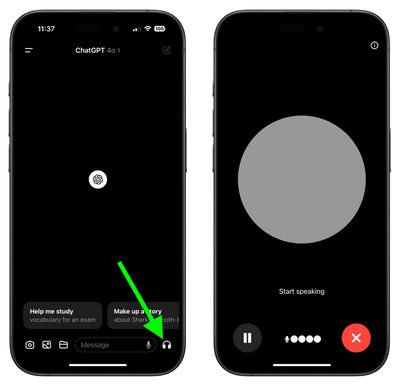
  3. When the main screen appears, tap the headphones icon in the bottom-right corner to enter Voice Mode.
  4. Allow ChatGPT to connect to Voice. After that, you can start interacting right away. There are manual controls which allow you to pause, resume, and exit the voice conversation. When you want to do something else on your iPhone, simply swipe out of the app to enable Background Conversations mode.
chatgpt ios voice

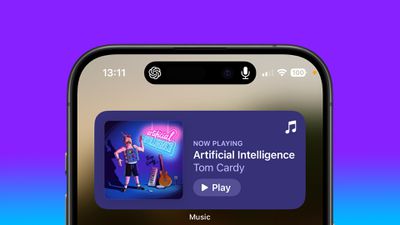
ChatGPT is now actively listening in the background, and all you need to do is start speaking to pick up where you left off. If you have an iPhone with Dynamic Island, you'll see the ChatGPT symbol and a microphone icon, indicating that it's listening and ready to chat.

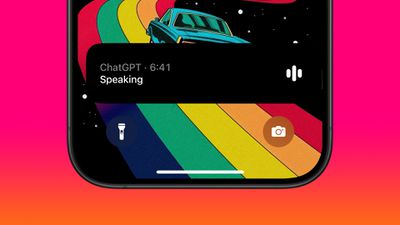
If you lock your iPhone, Background Conversations mode will remain active, and it will appear as a Live Activity card on your Lock Screen. This means that you can continue to talk with ChatGPT while you're busy doing something else, as long as your iPhone is nearby. OpenAI says the Background Conversations feature is designed to be battery-efficient, and minimizes the impact on battery life by optimizing background processes and reducing unnecessary usage.
Lock Screen

Change the Voice

Voice chat was created with a range of voice actors (perhaps you heard about the recent ScarJo controversy) and there are a handful to choose from if the current voice doesn't jibe with you.

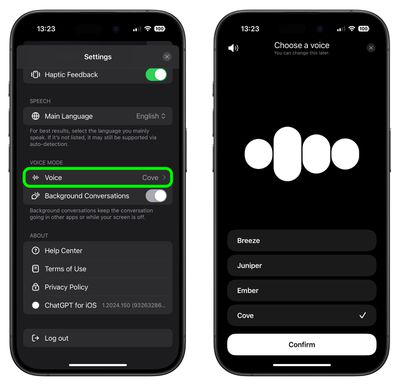
  1. Tap the sidebar icon in the top-left corner of the main ChatGPT window.
  2. Tap your account profile to open Settings.
  3. Under the "Voice Mode" section, tap Voice.
  4. Choose from Breeze, Juniper, Ember, and Cove. You'll get a sample of the voice when you tap it.
  5. Hit Confirm to confirm your voice choice.
chatgpt

Assign Voice Mode to iPhone Action Button

If you have an iPhone with an Action Button (iPhone 15 Pro models, for example) you can easily assign ChatGPT's Voice Mode to it for quick access.

  1. Open the Settings app.
  2. Tap Action Button.
  3. Swipe to the Shortcut option, then tap the action selector.
  4. Search for "ChatGPT," then select the Start voice conversation shortcut.
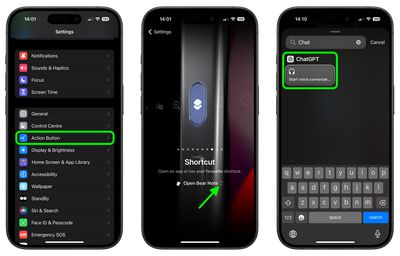
settings

That's all there is to it. Now you can simply long press the Action button on your iPhone to begin a voice conversation, whether you're in another app or if your device is locked.

If you have privacy concerns about the feature, but still want to use the ChatGPT app, there's good news: This week, OpenAI quietly deployed a new option to turn off Background Conversations. You can find the toggle in Settings under the "Voice Mode" section. You'll know that it's disabled because the orange dot indicating mic activity won't be visible in the top-right corner of your iPhone's screen.

Voice Mode Is About to Get Better

Some exciting features in GPT-4's voice mode are on the horizon but haven't gone live yet. These include advanced controls for changing the emotion and tone of responses, making interactions feel even more natural. While you can already customize voices to some extent, the full integration of voice and visual inputs, which promises richer and more interactive experiences, is still in the works.

OpenAI also says developers will soon get access to a wider range of APIs to better tailor voice interactions for their needs, enhancing applications like customer service. Enhanced support for different accents and dialects is also coming, making the system more accessible globally. Finally, more detailed privacy controls for managing and reviewing voice data are being rolled out gradually. All in all, these updates will make GPT-4's voice mode even more versatile and user-friendly.

Tag: ChatGPT

Top Rated Comments

31 months ago
“ChatGPT is now actively listening in the background…”.

Thank you, no.
Score: 20 Votes (Like | Disagree)
SteveJUAE Avatar
31 months ago
The wife does not even listen to me can't see this being any better :)
Score: 10 Votes (Like | Disagree)
31 months ago
Close the pod bay doors ChatGPT.

Sorry I have no access to pod bay doors.

That was a joke.

Oh I see hahahaha so funny! That was a film reference to 2001 A Space Odyssey which was directed by Stanley Kubrick in 196…

S T F U
Score: 9 Votes (Like | Disagree)
shpankey Avatar
31 months ago

It’s probably pretty good at note summary, though who’s to say that it manages to capture the core piece of information you need the summary to contain?
Can confirm. We use copilot pro at work and it does an amazing job summarizing our teams meetings summary, notes, to-do, etc, with simplified and verbose options. It's pretty impressive.
Score: 7 Votes (Like | Disagree)
31 months ago

Or the Macrumors forums, the only place on the internet where Apple fans and haters unite on one common ground: To **** on Apple.
That would be funny if Apple did not deserve it because of their poor decision making.
Score: 4 Votes (Like | Disagree)
31 months ago

Summarizes a summary that you had to read to make sure the summary is correct!!😛😛😛
I work for a supermarket, and they are going to use AI for forecasting the amount fo stock we need, so if the weather is going to sunny say, they will send in a load of stuff for sunny weather, like ice cream and Pop (soda for the U.S. peeps).
I live in a place where the weather seems to be different from the rest of the UK. so I so we will wait and see. Also, it will check what is on the selves and then send a message to somone if the shelf is empty, we will see how long it will be before it gets confused when somone puts something back in the wrong place.
I don't think iut will happen in our shop for a while, but it is about cutting jobs again.
Score: 3 Votes (Like | Disagree)

Popular Stories

gpt 6 intelligent ui

ChatGPT Gets GPT-6 and New Intelligent UI With Visual Answers

Wednesday October 7, 2026 3:26 pm PDT by
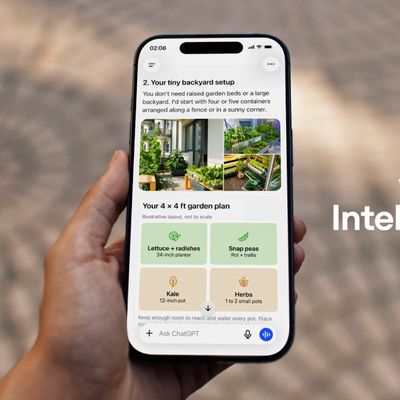
OpenAI today introduced Intelligent UI, a new feature that will let ChatGPT answer questions with "fully interactive user interfaces." OpenAI says everyday answers will be more visual, and the feature will make it easier for users to understand complicated topics. ChatGPT responses will include graphics, tappable buttons, forms, charts, diagrams, and other interactive experiences. Sample...
chatgpt logo

ChatGPT in Siri 'Persistently Underperforming,' Says OpenAI

Wednesday September 23, 2026 5:15 pm PDT by
OpenAI saw disappointing results working with Apple to integrate ChatGPT in Siri, according to court documents filed [PDF] in its ongoing legal fight with Elon Musk's company SpaceXAI (xAI at the time the lawsuit was filed). Apple added ChatGPT to Siri in December 2024, but users had to go through a multistep opt-in process, which added a layer of friction. By January 2025, OpenAI said the...
M5 MacBook Pro

RIP, MacBook Ultra

Monday October 19, 2026 9:37 am PDT by
Apple today sent out invites for an experience in Los Angeles on Wednesday, October 28, and the "Pro and tell" tagline on the invitation likely means that the rumored MacBook models with touch-enabled OLED displays will stick with MacBook Pro branding instead of the once-rumored "MacBook Ultra" name. The long-rumored "iPhone Ultra" ended up being named iPhone Duo, so speculation that Apple...
Latest Stories
Apple Will Label Apps 'Made for iPhone Duo' in App Store
1 hour ago
Amazon Takes $49 Off iPad With Prices Starting at $399.99
2 hours ago
F1 on Apple TV Now Available in Dolby Atmos
2 hours ago
Apple Reveals More Than 50 Apps That Will Be Updated for iPhone Duo
3 hours ago
Apple Blocks Certificates That Could Help Attackers Fake Websites
4 hours ago
Giant iPhone Duo Installations Spotted at Apple Fifth Avenue
5 hours ago
iPhone Duo 2 Prototypes Include Under-Display Face ID
5 hours ago
Tesla App Gains iPad and iPhone Duo Support
9 hours ago
Apple Reportedly Boosts iPhone Duo Orders by 44%
9 hours ago
Fortnite Returning to Australian App Store After Court Ruling
10 hours ago
Apple Ordered to Open iPhone to Rival App Stores in Australia
10 hours ago
Apple Suppliers Face Hurdles Cutting Circuit Board Emissions
11 hours ago
Things Updated for iPhone Duo With Adaptive Layout
11 hours ago
Simplicity and Siri AI Are HomeView's Killer Features, Apple Says
11 hours ago
iPhone Duo Reviewers Really Miss Face ID
16 hours ago
Does the iPhone Duo Run Hot? Here's What Reviews Found
18 hours ago
Apple Music's New Look is Now Live on Apple's Website
18 hours ago
Anthropic Launches Claude Duet, a Proactive AI Agent
19 hours ago
What 32,000 Folds Did to the iPhone Duo's Hinge
20 hours ago
iPhone Duo's Hidden FaceTime Camera Takes 'Trash' Photos
21 hours ago
iPhone Duo Has 'Edge Light' Feature That Debuted on Macs Last Year
22 hours ago
Apple Support App Updated for iPhone Duo's Larger Display
22 hours ago
Amazon Sweetens the Deal on Entry-Level 16-Inch MacBook Pro With $570 Off
22 hours ago
iPhone Duo Tips Over on MagSafe Stands When Unfolded
22 hours ago
Apple Music's New Look Officially Announced
1 day ago
iPhone Duo Supports Apple Pencil Starting With iOS 27.2
1 day ago
iPhone Duo Accessories Roundup: Cases and Screen Protectors From OtterBox, ZAGG, and More
1 day ago
Apple Stores Will Have 'Limited' Availability of iPhone Duo for Walk-In Customers
1 day ago
iPhone Duo Reviews Explain Why Device is Both 'Fun' and 'Frustrating'
1 day ago
Apple Says 'Reachability' Feature Coming to iPhone Duo Later This Year
1 day ago









































