
How to Use Quick Look in macOS Mojave - MacRumors
Skip to Content

How to Use Quick Look in macOS Mojave

by

In previous versions of macOS, the Quick Look feature lets you view photos and files without having to open them in an app. In macOS Mojave, Apple has also introduced some convenient new editing tools to Quick Look, allowing you to perform actions specific to the kind of file you're viewing. Let's take a look at how it all fits together.
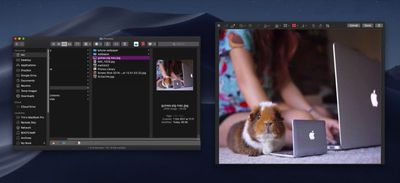
mojave quick look file edits

How Quick Look Works

For those unfamiliar with Quick Look, the feature can be used for items on the Desktop, in Finder windows, in emails, in messages, and other places. It supports numerous file types, including HTML, PDF, Plain text, RTF, iWork, MS Office, RAW, JPEGs, and QuickTime formats. To activate it, simply select one or more items, then press the Spacebar or force-click using your Mac's trackpad.

In the top left of the Quick Look window you'll find the Maximize button next to the Close button. (You can also manually enlarge the window by dragging the corners.) Open with [App] and Share buttons are located in the top-right corner of the Quick Look window, along with a Rotate Left button if you're working with images or video.
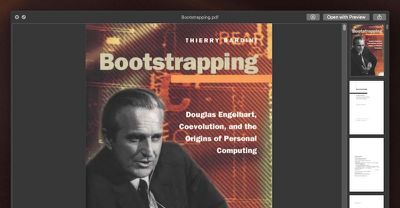
mojave quick look 1
As before, if you select multiple items, you'll see arrow buttons to navigate through them, as well as a Sheet View button to see the items in an index sheet view. If you opened a document such as a PDF, you'll see a column of thumbnails along the side of the window for quickly navigating through the pages.

What's New in Quick Look

New to Quick Look in Mojave is the ability to access Markup tools. Simply click the Markup button to reveal the toolset.

mojave quick look markup button e1531128163973
Quick Look lets you draw on and annotate images or PDF documents using arrows, shapes, and text. You can also use Markup to quickly sign a document with your digital signature. Click Done, and your changes are automatically saved.
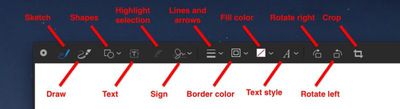
mojave quick look file edits1
If you're viewing a video file in Quick Look, you'll see a new Trim button that allows you to trim the clip without having to open QuickTime.

mojave quick look trim clip button e1531128093109
Clicking the Trim button reveals the scrubbing and edit ribbon along the bottom of the clip. You can click anywhere in the ribbon to jump to another point in the video, and drag the edges of the yellow frame to trim the clip to the desired length.

mojave quick look file edits6
Again, simply click Done when you're finished and your changes are automatically saved.

Related Forum: macOS Mojave

Top Rated Comments

Detektiv-Pinky Avatar
108 months ago
What about directly copying text from a document via Quicklook?
This was one of my favourite hidden feature in previous versions, until Apple took it away.
Score: 6 Votes (Like | Disagree)
jonnysods Avatar
108 months ago
Mojave is looking tight!
Score: 2 Votes (Like | Disagree)
ppdix Avatar
108 months ago
I use quicklook all the time. It's great but still can't look at contents of a folder. Back in 2009 there was quick look x-ray that showed some of the documents in a folder. U had to manually enable it in terminal but it was useful.
The new stacks are cool and u can scrub thru documents but not folders. I wish the scrubbing function would work for folders or at least show you an icon view of the folder's contents.
Score: 2 Votes (Like | Disagree)
JosephAW Avatar
108 months ago
Does quick look in Mojave now clear it's thumbnail cache on a schedule? Especially from an encrypted volume?

https://www.geekwebguides.com/2018/06/18/macos-quick-look-encrypted-data-bug/
Score: 2 Votes (Like | Disagree)
jimthing Avatar
105 months ago
This is exactly the case. And it sucks.
Wonder if there's any other solution here?

I guess what we need is a third-party QL replacement that can playback any file type desired without Apple's needless gimping of filetype support.

However as a non-dev, I'd be surprised if it was even possible to do, given the lack of those APIs spoken about above.

Although if apps like Dropbox et al. can use special permissions to operate in Finder, maybe it's possible via a different route or something? Who knows. :-/

It's just such a shame that yet again Apple highly limit such a potentially powerful tool to semi-useless by their own actions. We see things like this all the time with Apple OS's.

The recent one I've been dealing with (yet again!), is how Finder doesn't always correctly give the total for folder sizes with "cmd-i" keystroke (or when selecting multiple files, and using "cmd-ctl-i" keystroke), making comparisons a complete pain.
Then you check through each file individually with "cmd-i", only to find that they actually ARE identical to the ones you were trying to compare after all. So when grouped together, Finder must have been giving a wrong figure! (doing "cmd-shift-." to see hidden files like .ds crap or similar, showed none there, so that wasn't what caused it, either.)
Score: 1 Votes (Like | Disagree)
kriebe Avatar
105 months ago
Quicklook does works seamlessly for most filetypes as Apple delivers QL plugins for the most common filetypes. However, that doesn't mean that if Apple didn't deliver a QL plugin for a filetype that you're stuck -- because Apple also made it easy to add your own QL plugins.

The following web site gives pointers to QL plugins for a number of filetypes that Apple doesn't deliver -- In particular Quicklook Video which adds support for .asf, .avi, .flv, .mkv, .rm, .webm & .wmf
http://www.quicklookplugins.com/
[doublepost=1537910576][/doublepost]
What gives? Instead of complaining that Apple hasn't covered your corner case, why not spend a few seconds looking for "quick look plugins"? Naaaah, too much effort...
So yeah, I did find this site, like 3 years ago, and nothing exists that would help with the issues I've mentioned. It would be nice if you would actually read the site before accusing people here of not knowing what we're talking about. Jimthing already pointed out what exactly is wrong with the one single QL plugin for video files that does work. And that's just that it only shows the preview screenshot and icon of the video. Nothing more. It will not play any of those video files the same way it will a standard .mov or mp4. I actually have this plugin installed and have for years. It does exactly what it says it does, but still does not do what I and many other would like it to do.


[doublepost=1538375156][/doublepost]
Looks like a complete fail. Hence why I originally moaned about the lack of format support, as I likely checked it out previously, and gave up.

The video one, titled "Quicklook Video", is actually useless, and is from ages ago, "Oct 2014":
https://www.quicklookplugins.com/2014/10/27/quicklook-video / https://github.com/Marginal/QLVideo

Says "allows macOS Finder to display thumbnails, static QuickLook previews, cover art and metadata for most types of video files."
So basically it doesn't PLAY any video, but instead shows still image shot(s) of a video. Thus making it pretty useless as a so-called video playback QT plugin! Read the comments underneath, with people thinking it would, only to find out it doesn't.

My limited understanding here, is that in the latest few versions of macOS, make it not possible to get most things to function in QT, as there are not the API hooks available anymore in order to do so, &/or things like Perian are not able to work either. Making the idea of most of these apparent QT plugins largely legacy only.

Please correct me if I'm wrong.
This is exactly the case. And it sucks.
Score: 1 Votes (Like | Disagree)

Popular Stories

M5 MacBook Pro

RIP, MacBook Ultra

Monday October 19, 2026 9:37 am PDT by
Apple today sent out invites for an experience in Los Angeles on Wednesday, October 28, and the "Pro and tell" tagline on the invitation likely means that the rumored MacBook models with touch-enabled OLED displays will stick with MacBook Pro branding instead of the once-rumored "MacBook Ultra" name. The long-rumored "iPhone Ultra" ended up being named iPhone Duo, so speculation that Apple...
iPhone Duo Trio

Here's What Apple's Apps Look Like on the iPhone Duo

Tuesday October 20, 2026 11:12 am PDT by
With just three days to go until the iPhone Duo is released, Apple is getting ready for the launch. Behind the scenes, the App Store now has screenshots of Apple's built-in apps running on the Duo. We've seen some apps in marketing materials, but images of the ones we haven't seen give us an idea of what it will be like using the iPhone Duo day to day. Many apps are shown in landscape...
apple pro tell logo

Apple Announcing New Products Next Week: 'Pro and Tell'

Monday October 19, 2026 9:05 am PDT by
Apple's Greg Joswiak today hinted at new product announcements coming next week, sharing a social media post that says "Can't wait to pro and tell next week." Rumors suggest Apple is planning to debut the new MacBook Pro with an OLED touchscreen display, an M6 entry-level MacBook Pro, an M6 iMac, an iPad mini with an OLED display. Can't wait to pro and tell next week....
Latest Stories
iPhone Duo 2 Prototypes Include Under-Display Face ID
1 minute ago
Tesla App Gains iPad and iPhone Duo Support
4 hours ago
Apple Reportedly Boosts iPhone Duo Orders by 44%
4 hours ago
Fortnite Returning to Australian App Store After Court Ruling
5 hours ago
Apple Ordered to Open iPhone to Rival App Stores in Australia
5 hours ago
Apple Suppliers Face Hurdles Cutting Circuit Board Emissions
6 hours ago
Things Updated for iPhone Duo With Adaptive Layout
6 hours ago
Simplicity and Siri AI Are HomeView's Killer Features, Apple Says
6 hours ago
iPhone Duo Reviewers Really Miss Face ID
11 hours ago
Does the iPhone Duo Run Hot? Here's What Reviews Found
13 hours ago
Apple Music's New Look is Now Live on Apple's Website
13 hours ago
Anthropic Launches Claude Duet, a Proactive AI Agent
14 hours ago
What 32,000 Folds Did to the iPhone Duo's Hinge
15 hours ago
iPhone Duo's Hidden FaceTime Camera Takes 'Trash' Photos
16 hours ago
iPhone Duo Has 'Edge Light' Feature That Debuted on Macs Last Year
17 hours ago
Apple Support App Updated for iPhone Duo's Larger Display
17 hours ago
Amazon Sweetens the Deal on Entry-Level 16-Inch MacBook Pro With $570 Off
17 hours ago
iPhone Duo Tips Over on MagSafe Stands When Unfolded
17 hours ago
Apple Music's New Look Officially Announced
19 hours ago
iPhone Duo Supports Apple Pencil Starting With iOS 27.2
19 hours ago
iPhone Duo Accessories Roundup: Cases and Screen Protectors From OtterBox, ZAGG, and More
20 hours ago
Apple Stores Will Have 'Limited' Availability of iPhone Duo for Walk-In Customers
21 hours ago
iPhone Duo Reviews Explain Why Device is Both 'Fun' and 'Frustrating'
21 hours ago
Apple Says 'Reachability' Feature Coming to iPhone Duo Later This Year
22 hours ago
Loop Capital Cuts Apple Rating Over iPhone Sales Outlook
1 day ago
Apple Stores in Bordeaux and Lille Looted During French Protests
1 day ago
Bluesound Adds Native Apple Music Support
1 day ago
Apple CEO John Ternus Explains What Makes Good Product Design
1 day ago
UK Proposes New Ways to Help Apple Pay Rivals
1 day ago
WhatsApp Developing In-App Browser for All Chat Links on iPhone
1 day ago








































