How to Use Two HomePods With a Mac for Stereo Audio Output - MacRumors
Skip to Content

How to Use Two HomePods With a Mac for Stereo Audio Output

by

If your Mac is running macOS Big Sur 11.3 or later, you can use a HomePod stereo pair as your Mac's system audio output. This article explains how to set up two ‌HomePod‌ speakers as a stereo pair and then connect them to your Mac.
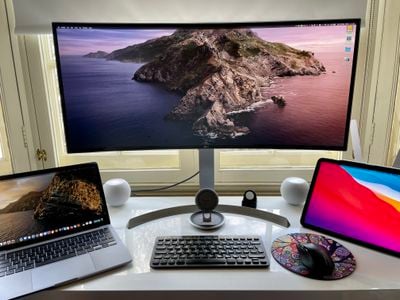
homepod mini stereo pair mac
Dedicated stereo speakers are always going to provide a better listening experience than relying on your Mac's built-in speakers for audio, so it makes sense that some people will be interested in using two HomePods as a stereo pair to create a wider soundstage for richer, more enveloping sound.

In previous versions of macOS, such a setup had a glaring limitation: HomePods set up as a stereo pair could only be used in the Music app and other apps that support AirPlay. In other words, it was only possible to select separate ‌HomePod‌ speakers from the menu bar on a Mac, which meant using stereo-paired ‌‌HomePod‌‌ speakers as your Mac's audio output device was a non-starter.
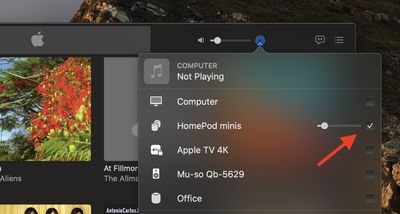
homepod stereo pair music mac
Fortunately, Apple fixed this omission in macOS Big Sur 11.3, and it's now possible to use a ‌HomePod‌ stereo pair as you default audio output on a Mac. Note that system sounds will remain playing only on your Mac's built-in speakers.

Stereo-paired HomePods can already be set as an audio output option on iPhone, iPad, and Apple TV, so the update brings the same functionality to the Mac. Note that stereo pairing is available with two HomePods or two ‌‌HomePod‌‌ minis, but the ‌‌HomePod‌‌ and ‌HomePod‌ mini can't be paired together.

You can join two ‌‌HomePod‌‌ speakers as a stereo pair when you initially set up ‌‌HomePod‌‌, or you can later join two speakers that you’ve already set up using the Home app. Keep reading to learn how it's done.

How to Create a HomePod or HomePod Mini Stereo Pair

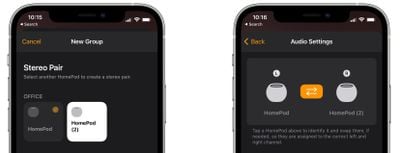
  1. Launch the Home app on your iPhone or ‌iPad‌.
  2. Make sure both HomePod speakers are in the same room.
  3. Touch and hold one of the HomePods.
  4. Swipe up and tap the cog icon in the bottom-right corner of the screen.
  5. Tap Create Stereo Pair....
    home

  6. Select the other ‌HomePod‌ that you want to use.
  7. In the last screen, tap a ‌HomePod‌ to identify it via a tone, and swap the and right channels if needed.
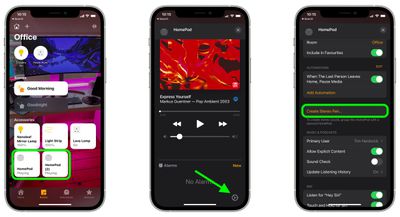
    home

Once you've paired the two ‌HomePod‌ speakers, you'll see a single pane in the Home app representing the stereo pair.

How to Select a HomePod Stereo Pair As Your Mac's Audio Output

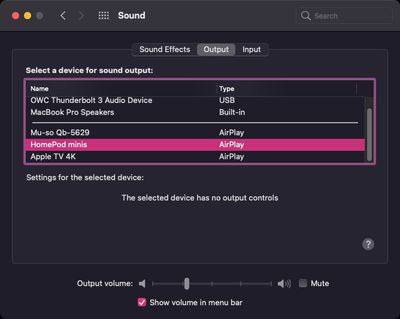
This is the easy part. Once you've set up your stereo pair in the Home app, you should be able to select them as your Mac's default audio output, just like any other speaker.

There are two ways to do this. You can click the sound icon in the menu bar and select your paired HomePods from there.
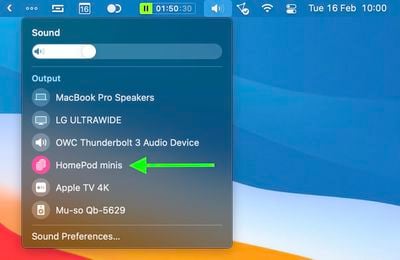
homepod stereo pair big sur menu bar
Alternatively, launch System Preferences, click the Sound pane, and select your HomePods in the ‌AirPlay‌ section of the devices list.

sys prefs
It's worth bearing in mind that when two ‌‌HomePod‌‌ speakers are joined, only one responds to Siri requests, plays alarms, and acts as a speakerphone.

Tip: If you own an ‌Apple TV‌ 4K and two ‌HomePod‌ speakers, you can create a theater experience with Dolby Atmos or surround sound right in your home.


Related Roundups: HomePod, HomePod mini 2

Top Rated Comments

72 months ago
And what about a 2-3 second lag between the video and audio on FaceTime or Zoom calls? Why is there no mention of this “feature,” which renders a stereo pair of HomePods useless as computer speakers? Yes, this is still happening with macOS 11.3 and the HomePod Minis running 14.5.
Score: 29 Votes (Like | Disagree)
72 months ago
What a hassle!
If you enjoy Music then get yourself some good Bookshelf Speakers and an AMP to drive it! (Additionally you don't have to deal with compressed Audio via AirPlay)
Even with you watch Youtube and skip the timeline, you will always have the 2-3 seconds sync delay!

Cable is Cable!
Score: 12 Votes (Like | Disagree)
72 months ago
Once I tested a pair of HomePod Minis running 14.5 with macOS 11.3 and confirmed that the 2-3 second lag with audio is still present, I ordered a pair of Pebble V3 speakers by Creative for $40. The speakers have Bluetooth 5.0, USB-C, and analog Aux inputs. The reviews are great. I will test them with Bluetooth to see if there’s a lag in audio. If there is, I will use USB-C or Aux cable.

I’m returning my HomePod Minis and I’m done with HomePods. From now on, it’s wired or Bluetooth speakers for me to be used as computer speakers, and it’s Sonos for high-quality music. Apple has screwed up another one of their promising product lines. It’s no wonder Sonos was completely unphased by Apple when the HomePod was first released. They knew that Apple would screw up the HomePod and were not threatened by the HomePod at all.

Score: 7 Votes (Like | Disagree)
72 months ago
While I am enthusiastic about the sound quality of my Homepod mini (I really did not expect this out of a $100, smallish speaker), there are many small issues that makes them almost impractical.
First, there is the 2 or 3 seconds lag that makes them useless for any real-time task (video conferencing, video, and probably gaming). As a consequence, I move back and forth between computer output (for meetings) to Homepod mini (for music while working).
Second, the connection also takes about 5 to 10 seconds and often just does not work so I have to try again. And recently, while playing the connection just stopped and would not come back until I reboot the laptop.

This is a very promising device when considering sound quality, form factor, and price point. But a lot of work remains to be done to make it really practical.
Score: 7 Votes (Like | Disagree)
72 months ago
It mustn’t be much of a view out of that window…
Score: 7 Votes (Like | Disagree)
getheo Avatar
72 months ago
From the iphone (youtube or safari), the stereo homepods work without lag. From the macbook, there is lag. Maybe it is not hardware limitation and they can fix it.
Score: 4 Votes (Like | Disagree)

Popular Stories

Apple TV 4K HomeView HomePod Mini tweaked

New Apple TV 4K, HomeView, and HomePod Mini: 16 Details Just Leaked

Sunday October 11, 2026 12:56 pm PDT by
Just two days before Apple's "Welcome home" experience in New York, Bloomberg's Mark Gurman has leaked several details about the new products set to be unveiled, including an all-new smart home hub, a HomePod mini 2, and a new Apple TV 4K. Here is an all-in-one summary of the details shared by Gurman:Apple's home hub with a touch-enabled display will be named HomeView, seemingly confirming a ...
HomePod minis Apple TV and iPad mini Leak Feature

iPad Mini With A20 Pro, New HomePod Mini Colors, and New Apple TV 4K All Just Leaked

Friday September 25, 2026 8:18 am PDT by
The next iPad mini, HomePod mini, and Apple TV 4K models have all leaked, just a few weeks before the devices are expected to be announced. Specifically, MacRumors contributor Aaron Perris discovered a few of Apple's official images of the devices, confirming their existence and some new features that are planned. The most notable iPad mini details revealed in today's leak include an A20 Pro ...
HomePod minis on gradient feature 1 1

Exclusive: First Look at HomePod Mini 2 in Three New Colors

Friday September 25, 2026 8:17 am PDT by
Apple's new HomePod mini will share the same design as the original model and come in five colors, MacRumors has found. The information originates from Apple's own code (spotted by MacRumors contributor Aaron Perris) and shows clear product images of the new models in all of their colors. The above image contains Apple's own icons, which specifically refer to a "HomePod mini 2." The new...
Latest Stories
Tesla App Gains iPad and iPhone Duo Support
4 hours ago
Apple Reportedly Boosts iPhone Duo Orders by 44%
4 hours ago
Fortnite Returning to Australian App Store After Court Ruling
5 hours ago
Apple Ordered to Open iPhone to Rival App Stores in Australia
5 hours ago
Apple Suppliers Face Hurdles Cutting Circuit Board Emissions
6 hours ago
Things Updated for iPhone Duo With Adaptive Layout
6 hours ago
Simplicity and Siri AI Are HomeView's Killer Features, Apple Says
6 hours ago
iPhone Duo Reviewers Really Miss Face ID
11 hours ago
Does the iPhone Duo Run Hot? Here's What Reviews Found
13 hours ago
Apple Music's New Look is Now Live on Apple's Website
13 hours ago
Anthropic Launches Claude Duet, a Proactive AI Agent
14 hours ago
What 32,000 Folds Did to the iPhone Duo's Hinge
15 hours ago
iPhone Duo's Hidden FaceTime Camera Takes 'Trash' Photos
16 hours ago
iPhone Duo Has 'Edge Light' Feature That Debuted on Macs Last Year
17 hours ago
Apple Support App Updated for iPhone Duo's Larger Display
17 hours ago
Amazon Sweetens the Deal on Entry-Level 16-Inch MacBook Pro With $570 Off
17 hours ago
iPhone Duo Tips Over on MagSafe Stands When Unfolded
17 hours ago
Apple Music's New Look Officially Announced
19 hours ago
iPhone Duo Supports Apple Pencil Starting With iOS 27.2
19 hours ago
iPhone Duo Accessories Roundup: Cases and Screen Protectors From OtterBox, ZAGG, and More
20 hours ago
Apple Stores Will Have 'Limited' Availability of iPhone Duo for Walk-In Customers
21 hours ago
iPhone Duo Reviews Explain Why Device is Both 'Fun' and 'Frustrating'
21 hours ago
Apple Says 'Reachability' Feature Coming to iPhone Duo Later This Year
22 hours ago
Loop Capital Cuts Apple Rating Over iPhone Sales Outlook
1 day ago
Apple Stores in Bordeaux and Lille Looted During French Protests
1 day ago
Bluesound Adds Native Apple Music Support
1 day ago
Apple CEO John Ternus Explains What Makes Good Product Design
1 day ago
UK Proposes New Ways to Help Apple Pay Rivals
1 day ago
WhatsApp Developing In-App Browser for All Chat Links on iPhone
1 day ago
Apple's App Store Chief Explains Its Push for Premium Games
1 day ago